Hide Check Control messages. Display. Fuel gauge. Tachometer
This chapter covers speed control in the BMW 5 VII Gen, from cruise control to Active Cruise Control. It explains how desired speeds are stored, changed or deactivated. The adaptive function is particularly noteworthy: the BMW automatically adjusts its speed to the traffic ahead and maintains a safe distance. Restrictions under certain weather conditions or system limits are also covered.
Hide Check Control messages
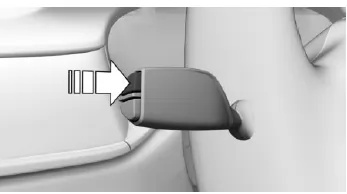
Press the button on the turn signal lever.
Permanent display
Some Check Control messages are displayed permanently and remain until the malfunction is corrected. If several malfunctions occur at the same time, the messages are displayed one after another.
These messages can be hidden for approx. 8 seconds. After that, they are displayed again automatically.
Temporary display
Other Check Control messages are hidden automatically after approx. 20 seconds.
They remain stored and can be displayed again.
Display stored Check Control messages
Via iDrive:
- "My Vehicle"
- "Vehicle status"
 "Check Control"
- Select text message.
Display
Check-Control
 At least one Check Control message is displayed or stored.
Text messages
Text messages in combination with a symbol in the instrument cluster explain a Check Control message and the meaning of the indicator and warning lamps.
Supplementary text messages
Further information can be retrieved via Check Control, e.g. on the cause of a malfunction and the required action.
For urgent messages, the supplementary text is shown automatically on the Control Display.
Further assistance
Depending on the Check Control message, further assistance can be selected.
Via iDrive:
- "My Vehicle"
- "Vehicle status"
 "Check Control"
- Select the desired text message.
- Select the desired setting.
- "Owner's Manual" Display additional information on the Check Control message in the Integrated Owner's Manual.
- "Service request" Contact a manufacturer's Service Partner or another qualified Service Partner or specialist workshop.
- “BMW Roadside Assistance” Contact roadside assistance.
Messages after end of trip
Certain messages that were displayed while driving will be displayed again after ready-to-drive mode is switched off.
Fuel gauge
Instrument cluster without extended scope
 The inclination of the vehicle can cause fluctuations in the display.
An arrow next to the fuel pump symbol indicates on which side of the vehicle the fuel filler flap is located.
Refueling notes.
Instrument cluster with extended scope
The inclination of the vehicle can cause fluctuations in the display.
The current range is shown as a numerical value.
An arrow next to the fuel pump symbol indicates on which side of the vehicle the fuel filler flap is located.
Refueling notes.
Tachometer
General
Always avoid engine speeds in the red warning zone.
In this range, fuel supply is limited to protect the engine.
Shift Lights
Principle
With the corresponding equipment, Shift Lights indicate the upshift point at which the best possible acceleration values are achieved.
Requirements
Shift Lights are displayed when the SPORT or SPORT PLUS driving mode is activated.
Activate Shift Lights
Steptronic Sport transmission:
- Select SPORT or SPORT PLUS using the Driving Experience control.
- Activate manual mode M of the transmission.
Display
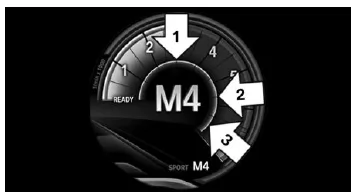
- The current engine speed is shown in the tachometer.
- Arrow 1: Fields lighting up yellow one after another indicate increasing engine speed.
- Arrow 2: Fields lighting up orange one after another indicate that the upshift point is approaching.
- Arrow 3: Field lights up red. Shift up no later than this point.
When the maximum permitted engine speed is reached, the entire display flashes. When the maximum engine speed is exceeded, fuel supply is limited to protect the engine.
The displays of the BMW 5 G30/G31 offer a well-considered combination of clarity and functionality. All important information, from the fuel gauge to the tachometer, is shown clearly and helps the driver keep an overview.
Shift Lights in particular support sporty driving by signaling the optimal upshift point. This makes the cockpit of the BMW 5 G30/G31 a control center for safe and dynamic driving.
FAQQuestion 1: When do the Shift Lights appear?
Answer: When SPORT or SPORT PLUS mode is activated and manual mode is used.
Question 2: Can I call up Check Control messages later?
Answer: Yes, via the iDrive menu under “Vehicle status” → “Check Control”.
Test yourself
A quick BMW 5 quiz: every answer comes with an explanation and a link to the manual page.