On-board computer in the instrument cluster
The on-board computer in the BMW 5 VII generation provides a wide range of information directly in the instrument cluster, from fuel consumption and average speed to remaining range. Data can be called up using a button on the turn signal lever and reset if required. Drivers can thus analyze and optimize their driving behavior efficiently.
Principle
The on-board computer shows various vehicle data in the instrument cluster, such as average values.
Calling up information
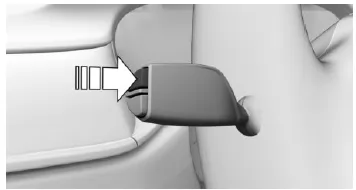
Press the button on the turn signal lever.
Press repeatedly to display further information.
Overview of information
The following information can be displayed via the on-board computer:
- Odometer and trip odometer.
- Fuel consumption display.
- Average consumption and average speed.
- Estimated arrival time and distance to destination.
Setting on-board computer information
For some on-board computer information, it can be set whether it can be called up in the instrument cluster.
Via iDrive:
- "My Vehicle"
- "iDrive settings"
- "Displays"
- "Instrument cluster"
- "On-board computer"
- Select the desired setting.
The setting is saved for the currently used driver profile.
Information in detail
Odometer and trip odometer
Show/reset odometer
 Press button.
- When Ready mode is switched off, the odometer and trip odometer are displayed.
- When Ready mode is switched on, the trip odometer is reset.
Display
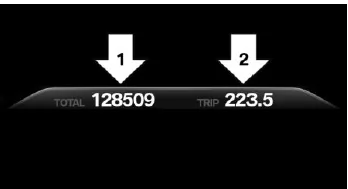
- Odometer, arrow 1.
- Trip odometer, arrow 2.
Fuel consumption display
Principle
During energy recovery, the kinetic energy of the vehicle is converted into electrical energy during overrun. The vehicle battery is partially charged and fuel consumption can be reduced.
The instantaneous consumption shows the current fuel consumption. It can be monitored how economically and environmentally friendly the vehicle is being driven.
General
Energy recovery and instantaneous consumption can be shown in the on-board computer as a bar display.
Display
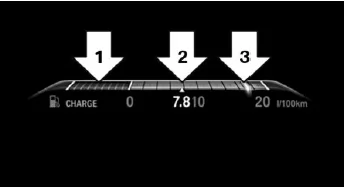
- Energy recovery, arrow 1.
- Average consumption, arrow 2.
- Instantaneous consumption, arrow 3.
Average speed and average consumption
General
The average speed and average consumption are calculated over the distance driven since the last reset in the on-board computer.
When calculating the average speed, standstill with the engine manually switched off is not taken into account.
Resetting average values
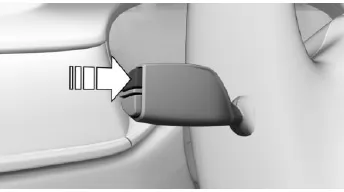
Press and hold the button on the turn signal lever.
Display
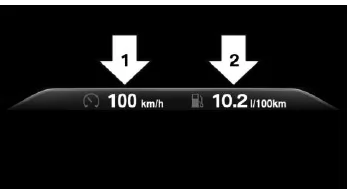
- Average speed, arrow 1.
- Average consumption, arrow 2.
Estimated arrival time and distance to destination
General
The estimated arrival time and remaining distance to the destination are displayed if a destination was entered in the navigation system before starting the trip.
Display
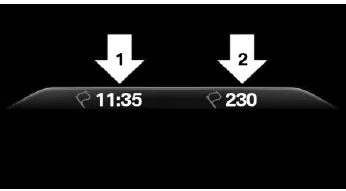
- Estimated arrival time, arrow 1.
- Distance to destination, arrow 2.
The on-board computer of the BMW 5 G30/G31 provides the driver with all relevant trip information at a glance. From consumption data and average speed to navigation details, the system is a practical aid for efficient and comfortable journey planning.
Thanks to clear operation via the turn signal lever and adjustable settings via iDrive, the displayed data can be configured individually. This allows optimal adaptation to personal needs and ensures maximum overview while driving.
FAQQuestion 1: Can the on-board computer average values be reset manually?
Answer: Yes, press and hold the button on the turn signal lever or use iDrive to reset the values.
Question 2: Does the on-board computer also show the estimated arrival time?
Answer: Yes, if a destination is activated in the navigation system, the estimated arrival time and distance are displayed.
Test yourself
A quick BMW 5 quiz: every answer comes with an explanation and a link to the manual page.