Automatic two-zone air conditioning
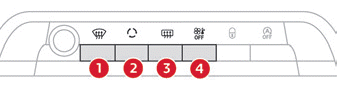
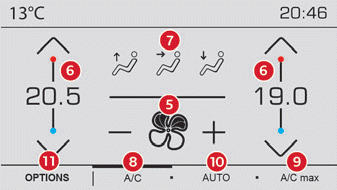
 Press the Air conditioning menu button below the touchscreen to display the system control page.
- Automatic Visibility programme.
- Recirculation mode.
- Rear window demisting / defrosting.
- System off.
- Air flow adjustment.
- Temperature adjustment.
- Air distribution adjustment.
- Air conditioning on / off.
- Maximum air conditioning.
- Activating the Comfort automatic program.
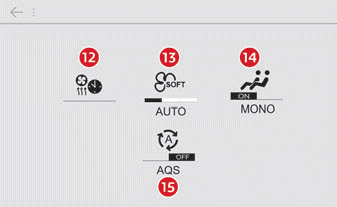
- Access to the secondary page.
- Cabin pre-conditioning (depending on version).
- Selecting the Comfort automatic program setting (Soft/Normal/Fast).
- Single-zone / Dual-zone.
- "AQS (Air Quality System)" function (depending on version).
This air conditioning system operates with the engine running, but you have access to the ventilation and its controls with the ignition on.
When the air conditioning is activated, the temperature, air flow and air distribution in the cabin are controlled automatically.
Adjusting the temperature
The driver and the front passenger can each set the temperature independently.
► Press one of the buttons 6 to decrease (blue) or increase (red) the value.
The displayed value corresponds to a comfort level, not to a specific temperature.
It is recommended to avoid a difference of more than 3 between the left and right settings.
To cool or heat the cabin to the maximum, press the temperature control button down or up until LO or HI is displayed.
Comfort automatic program
► Press button 10 "AUTO" to activate the automatic mode of the air conditioning system.
When the button indicator light is on, the air conditioning system operates automatically: depending on the selected comfort level, the system optimally manages the temperature, air flow and air distribution in the cabin.
The intensity of the Comfort automatic program can be adjusted by choosing one of the settings offered on the secondary page, accessed via button 11 "OPTIONS".
To change the current setting, indicated by the lit indicator light, press button 13 repeatedly until the desired mode is displayed:
"Soft": prioritises optimum gentleness and quiet operation by limiting air flow.
"Normal": offers the best compromise between thermal comfort and quiet operation (default setting).
"Fast": prioritises dynamic and efficient air delivery.
Prefer the "Normal" and "Fast" modes to ensure the comfort of rear-seat passengers.
This setting is associated with automatic mode only. However, when AUTO mode is switched off, the indicator light of the last setting remains on.
Changing the setting does not reactivate AUTO mode if it is switched off.
In cold weather and with a cold engine, to limit the release of cold air into the cabin, the air flow increases gradually until the comfort value is reached.
When entering the vehicle, if the cabin temperature is much colder or warmer than the requested comfort value, there is no need to change the displayed value to reach the desired comfort more quickly. The system automatically compensates for the temperature difference as quickly as possible.
Automatic Visibility programme
For more information on button 1 "Automatic Visibility programme", refer to the section "Front demisting / defrosting".
"Air Quality System" (AQS) function
Using a pollution sensor, this function automatically activates cabin air recirculation as soon as a certain threshold of polluting substances is detected in the outside air.
When the air quality is satisfactory again, cabin air recirculation is automatically switched off.
This function is not designed to detect bad odours.
Recirculation is automatically activated when the front washer is used or reverse gear is engaged.
The function is inactive when the outside temperature is below 5 ºC, to guard against the risk of fogging on the windscreen and side windows.
To activate / deactivate the function, access the secondary page using button 11 "OPTIONS", then press button 15.
Manual overrides
You can manually adjust one or more of these functions while the others remain managed by the system:
- air flow, button 5, - air distribution, button 7.
As soon as you change a setting, the indicator light of button 10 "AUTO" goes off.
► Press button 10 again to reactivate the Comfort automatic program.
Adjusting the air volume
► Press one of the buttons 5 to increase (+) or decrease (-) the fan speed.
The air flow symbol (fan) fills up progressively according to the amount of air requested.
Reducing the air flow to the minimum switches off ventilation.
"OFF" is displayed next to the fan icon.
Avoid driving for too long with the ventilation off. Risk of condensation build-up and deterioration of air quality!
Adjusting the air distribution
You can adjust the air distribution in the cabin using the three buttons 7.
 Windscreen and side windows.
 Central and side vents.
 Occupants' feet.
Each press on a button activates or deactivates the function. The indicator light is on when the button is activated. For even distribution in the cabin, all three buttons can be activated at the same time.
In AUTO mode, the indicator lights of the three buttons 7 are off.
Air conditioning on / off.
The air conditioning is designed to work efficiently in all seasons, with the windows closed:
- In summer, it lowers the temperature.
- In winter, above 3ºC, it improves the efficiency of demisting.
► Press button 8 to switch the air conditioning on / off.
When the function is switched on, the indicator light comes on.
The air conditioning does not operate when the air flow is switched off.
To get cool air more quickly, use cabin air recirculation for a few moments. Then return to outside air intake.
Switching off the air conditioning may cause discomfort (humidity, fogging).
Single-zone / Dual-zone
The passenger-side comfort level can be linked to the driver-side comfort level (single-zone function).
It is available on the secondary page, accessed via button 11 "OPTIONS".
► Press button 14 to activate the "MONO" function; its status is displayed as "ON".
The function switches off automatically as soon as the passenger uses their temperature adjustment buttons (dual-zone function).
Ventilation with ignition on
When the ignition is switched on, you can use the ventilation system and adjust the air flow 5 and air distribution 7 in the cabin, for a duration that depends on the battery charge level.
This function does not allow the air conditioning system to operate.
Test yourself
A quick Citroen C5 Aircross quiz: every answer comes with an explanation and a link to the manual page.