Front fittings
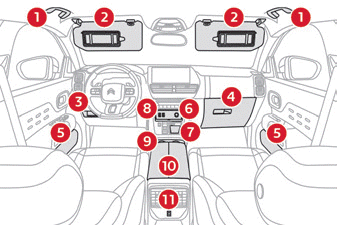
- Grab handle
- Sun visor
- Storage under steering wheel
Card holder - Illuminated glove box
- Door bins
- USB sockets
12 V accessory socket (120 W). - Storage tray
- Storage tray or Wireless charger
- Cup holder
- Front armrest with storage
- USB charger socket
Make sure no objects are left in the cabin that could act as a magnifying glass under sunlight - Risk of damage to interior trim or fire!
Sun visor
► Ignition on, lower the vanity flap; depending on version, the mirror lights up automatically.
This sun visor also includes a ticket holder.
Glove box
► To open the glovebox, lift the handle.
Ignition on, the glovebox light comes on when it is opened.
It provides access to the front passenger airbag deactivation control.
Never drive with the glove box open when a passenger is seated in the front. Risk of injury in the event of sudden deceleration!
12 V accessory socket(s)
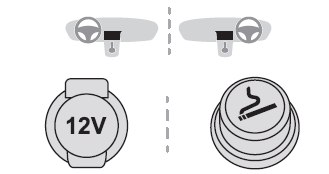
► This socket can be used to connect a phone charger, a bottle warmer...
Connecting electrical equipment not approved by CITROËN, such as a charger with a USB socket, may cause malfunctions of the vehicle's electrical components, such as poor radio reception or display disturbances on the screens.
USB sockets
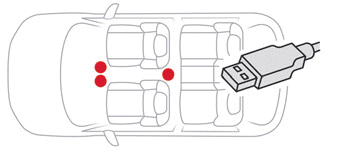
The USB sockets are used to connect portable equipment.
 The USB socket on the left side (chrome) can also be used to connect a smartphone with Android Auto or CarPlay, to use certain smartphone applications on the touch screen.
For optimal operation, the use of a cable original to or certified by the Manufacturer is required.
These applications can be controlled using the steering wheel controls or the audio system controls.
While in use via USB, the portable device may charge automatically.
During charging, a message is displayed if the portable device's consumption exceeds the current supplied by the vehicle.
For more information on using this equipment, refer to the sections describing the audio and telematics systems.
Wireless smartphone charging
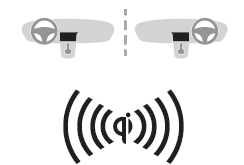
This system wirelessly charges portable devices such as smartphones, using magnetic induction, in accordance with the Qi 1.1 standard.
The device to be charged must be Qi-compatible, either by design or with a compatible case or cover.
A mat may also be used, provided it is approved by the Manufacturer.
The charging zone is marked with the Qi symbol.
Charging works with the engine running and in STOP mode of Stop & Start.
Charging is managed by the smartphone.
With the Hands-Free Access and Start system, charging may be temporarily interrupted when a door is opened or when the ignition is switched off.
Charging
► Keep the charging zone clear, place the device in its centre.

When the device is detected, the charger indicator light turns green. It stays on for the entire duration of battery charging.
The system is not designed to charge several devices simultaneously.
Do not leave any metal object (e.g. coins, keys, vehicle remote control) in the charging zone during charging. Risk of overheating or charging interruption!
When running applications for an extended period in combination with wireless charging, some smartphones may switch to thermal safety mode, causing certain functions to stop.
Operation check
The indicator light status shows the operation of the charger.
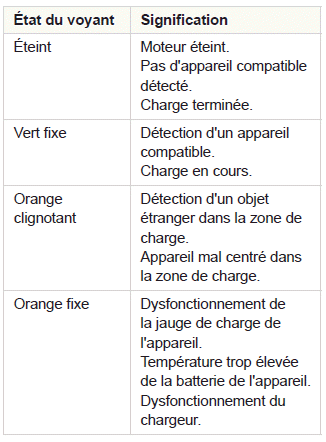

If the indicator light is steady orange:
- Remove the device, then place it back in the centre of the charging zone.
or - Remove the device and try again a quarter of an hour later.
If the problem persists, have the system checked by the CITROËN network or by a qualified workshop.
Front armrest
It has a refrigerated storage compartment (depending on version) and lights up when the lid is opened.
Opening
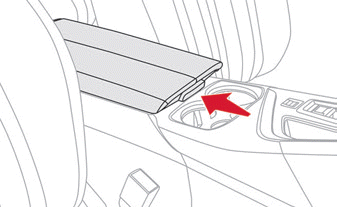
► Press the tab located under the lid.
The lid opens in two parts.
Storage
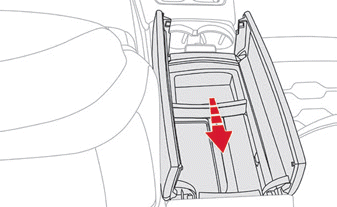
The small removable tray can be installed at the front or rear of the storage compartment.
A ventilation nozzle delivers cooled air.
Closing
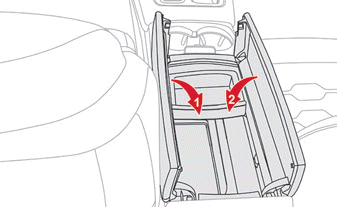
► Fold down both parts of the lid.
Overmat
Fitting
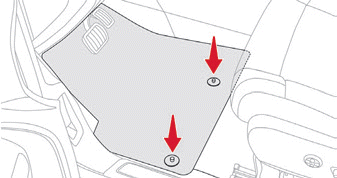
When fitting it on the driver's side, use only the fixings present on the mat (a "click" confirms correct locking).
The other overmats are simply placed on the carpet.
Removal / Refitting
► To remove it on the driver's side, move the seat back and unclip the fixings.
► To refit it, position the floor mat and fix it by pressing down.
► Check that the floor mat is securely held.
To avoid any risk of the pedals jamming:
- Use only floor mats suited to the fixings already present in the vehicle; their use is mandatory.
- Never stack several floor mats.
Using floor mats not approved by CITROËN may hinder access to the pedals and interfere with the operation of the cruise control / speed limiter.
Approved floor mats are fitted with two fixings located under the seat.
Test yourself
A quick Citroen C5 Aircross quiz: every answer comes with an explanation and a link to the manual page.