Getting started
 With the engine running, press once to mute the sound.
With the ignition off, press once to switch on the system.
Increase or decrease the volume using the wheel or the "+" or "-" buttons (depending on equipment).
Use the menu keys located on each side of or below the touchscreen to access the menus, then press the on-screen buttons on the touchscreen.
Depending on the model, use the "Source" or "Menu" keys to access the menu carousels, then press the on-screen buttons on the touchscreen.
Display the menu carousel at any time by briefly tapping the screen with three fingers.
All touch-sensitive areas of the screen are white.
Press the back arrow to go up one level.
Press "OK" to confirm.
The screen is of the "capacitive" type.
To clean the screen, use a soft, non-abrasive cloth (spectacle cloth) without any additional product.
Do not use pointed objects on the screen.
Do not touch the screen with wet hands.
Some information is displayed permanently in the side bands or in the upper band of the touchscreen (depending on equipment):
- Reminder of climate control information (depending on version), with direct access to the corresponding menu.
- Access the choice of audio source and the station list (or track list depending on the source) directly.
- Access "Notifications" for messages and emails, map updates, and navigation notifications depending on services.
- Access the touchscreen and digital instrument cluster settings.
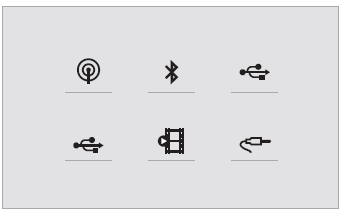
Selecting the audio source (depending on equipment):
- FM / DAB / AM radio (depending on equipment).
- Phone connected via Bluetooth and Bluetooth media streaming.
- USB key.
- Media player connected via the auxiliary socket (depending on equipment).
- Video (depending on equipment).
Using the "Settings" menu, you can create a profile for a single person or for a group of people with common characteristics, with the option of configuring many settings (radio presets, audio settings, navigation history, favourite contacts, etc.).
The settings are applied automatically.
In very high temperatures, the sound volume may be limited to protect the system. The system may go into standby (screen and sound completely off) for a minimum of 5 minutes.
The system returns to its normal state once the cabin temperature has dropped.
Test yourself
A quick Citroen C5 Aircross quiz: every answer comes with an explanation and a link to the manual page.