Cruise Control — If Equipped
When activated, cruise control takes over accelerator control at speeds above 25 mph (40 km/h) or 20 mph (32 km/h), depending on engine size and axle ratio.
The cruise control buttons are located on the right side of the steering wheel.
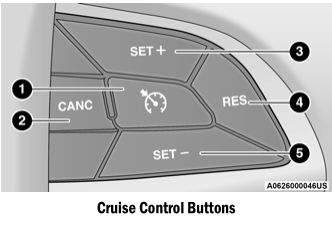
- ON OFF
- CANC/Cancel
- SET (+)/Accel
- RES/Resume
- SET (-)/Coast
NOTE:
- Do not move the shift selector to NEUTRAL while cruise control is on. This will disengage the system.
- For proper operation, the cruise control system is designed to disengage if more than one speed control function is operated at the same time. In this case, the cruise control system can be reactivated by pressing the cruise control ON/OFF button and resetting the desired vehicle speed.
Activate
Press the ON/OFF button to activate cruise control. "CRUISE CONTROL READY" will appear in the instrument cluster display, indicating that cruise control is on. To turn the system off, press the ON/OFF button again. "CRUISE CONTROL OFF" will appear in the instrument cluster display, indicating that cruise control is off. The system should be turned off when not in use.
Setting a Desired Speed
Turn cruise control on. When the vehicle reaches the desired speed, press and release the SET (+) or SET (-) button. Release the accelerator and the vehicle will maintain the selected speed. After the speed is set, the message "CRUISE CONTROL SET TO MPH (km/h)" appears, indicating the set speed. The cruise indicator lamp, together with the set speed, will also appear and remain illuminated in the instrument cluster while the speed is set.
Changing the Set Speed
Increasing or Decreasing the Set Speed
When cruise control is set, you can increase the speed by pressing the SET (+) button, or decrease the speed by pressing the SET (-) button.
US Speed (mph)
A single press of the SET (+) or SET (-) button will change the set speed by 1 mph. Each subsequent press of the button adjusts the speed by 1 mph.
If the button is held continuously, the set speed will continue to change until the button is released, and the new set speed will be established.
Metric Speed (km/h)
- A single press of the SET (+) or SET (-) button will adjust the speed by 1 km/h. Each subsequent press of the button adjusts the speed by 1 km/h.
- If the button is held continuously, the set speed will keep adjusting. A new set speed will be established when the button is released.
Accelerating to Pass
Press the accelerator pedal as usual. When the pedal is released, the vehicle will return to the set speed.
Using Cruise Control on Hills
The transmission may downshift on hills to maintain the set speed of the vehicle.
The cruise control system maintains speed on uphill and downhill grades. A slight change in speed on moderate grades is normal. On steep grades, a large loss or gain of speed may occur, so it may be preferable to drive without cruise control.
To Resume Speed
To return to a previously set speed, press and release the RES button. Resume can be used at any speed above 32 km/h.
Deactivating
Pressing the brake pedal, pressing the CANC button, or applying normal braking pressure deactivates the cruise control system without erasing the set speed from memory.
The following conditions also deactivate cruise control without erasing the set speed from memory:
- The vehicle parking brake is applied
- A stability event occurs
- The transmission selector is moved out of the DRIVE position
- Engine overspeed occurs
Pressing the on/off button or turning the ignition to the OFF position erases the set speed from memory.
Test yourself
A quick Dodge Charger quiz: every answer comes with an explanation and a link to the manual page.