SYNC™ 3 (if equipped)

Route Guidance

In this manual: SYNC™ 3 (if equipped)
Introduction — 1Symbol Glossary — 1Data Privacy — 7At a Glance — 1Child Safety — 11Seat Belts — 9Personal Safety System™ — 1Airbags — 8Pedestrian Warning System. 911 Assist — 1Keys and Remote Controls — 8MyKey™ — 5Doors & Locks — 5Keyless Entry — 6Easy Entry and Exit — 1Liftgate - Vehicles With: Manual Liftgate — 3Liftgate - Vehicles With: Power Liftgate — 6Safety — 4Steering Wheel — 1Wipers and Washers — 7Exterior Lighting — 8Interior Lighting — 4Windows — 3Interior Mirror — 1Exterior Mirrors — 1Sunroof (if equipped) — 4Instrument Cluster — 16Instrument Cluster Display — 14Trip Computer — 3Head-Up Display (If Equipped) — 1Remote Start — 5Climate Control — 7Cabin Air Quality — 1Front Seats — 5Rear Seats — 1Rear Seat Reminder — 1Memory Function — 1Garage Door Opener — 7USB Ports — 3Power Point - Vehicles With: 12V Outlet — 1Wireless Accessory Charger — 1Storage — 1Starting and Stopping the Engine — 9Hybrid Electric Vehicle Information — 6Auto Start-Stop — 1Fuel and Refueling — 10Catalytic Converter — 1High-Voltage Battery — 1Charging Your Vehicle – Plug-in Hybrid Electric Vehicle (PHEV) — 7Automatic Transmission — 8All-Wheel Drive — 1Brakes — 4Electric parking brake — 1Hill Start Assist — 1Auto Hold — 1Traction Control — 1Stability Control — 1Steering — 1Park Aid — 7Rearview Camera — 1Active Park Assist — 5Cruise Control — 1Adaptive Cruise Control — 10Drive Mode Control — 5Lane Keeping System — 6Blind Spot Information System — 5Cross-Traffic Alert — 5Pre-Collision Assist — 9Driver Alert — 4Traffic Sign Recognition — 4Loading — 6Cargo Area — 1Trailer Hitch Connection — 3Towing a Trailer — 4Trailer Sway Control — 1Driving Tips — 4Breakdown and Emergency Information — 7Towing Your Vehicle — 4Fuses — 4Maintenance — 14Vehicle Care — 5Body Styling Kits — 1Storing Your Vehicle — 1Wheels and Tires Information — 6Tire Care — 4Tire Sealant and Inflator Kit — 8Tire Pressure Monitoring System — 4Road Wheel Replacement — 1Capacities and Specifications — 16Vehicle Identification — 1Connected Vehicle — 4Vehicle Wi-Fi Hotspot — 3Audio System — 8SYNC™ (if equipped) — 9SYNC™ 3 (if equipped) — 41Accessories — 1Ford Protect — 1Scheduled Maintenance — 4Customer Information — 23Appendices — 3
4steps
~24min
2/5difficulty
Done 0 of 4
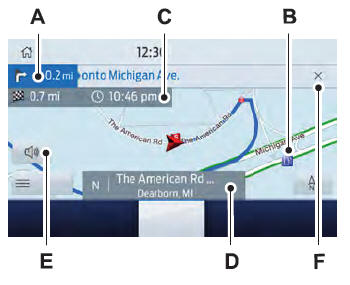
Ford Escape. Route Guidance
  1. Turn indicator. Select to hear the last voice prompt.
  2. Point of interest.
  3. Estimated time of arrival, distance to the destination or time to the destination.
  4. Current road.
  5. Turn off prompts.
  6. Cancel route guidance.

Route Guidance Navigation Menu
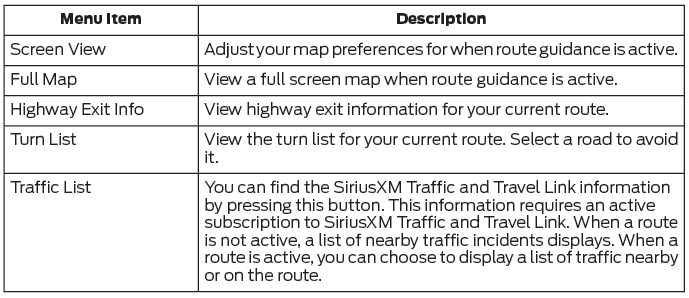
Ford Escape. Route Guidance

Adjusting Navigation Prompt Volume

Turn the volume knob while a guidance prompt is playing to adjust the volume.

Turning Off Prompts

Ford Escape. Route GuidanceSelect the mute option on the screen to turn off guidance prompts.

Adding Waypoints

You can add a waypoint to the navigation route as a destination on your route. You can add up to five waypoints.

  1. Select a search option on the map.
  2. Set a destination.
  3. Select Add Waypoint.
  4. Select Go.

Canceling Route Guidance

Ford Escape. Route GuidanceSelect the route guidance menu option on the active guidance screen.

Select Cancel Route.
Ford Escape. Route Guidance

Test yourself

A quick Ford Escape quiz: every answer comes with an explanation and a link to the manual page.