Front fog lamps and rear fog lamp (for certain vehicle versions)
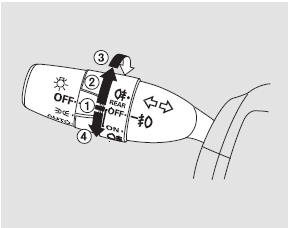
1. Off
2. Front fog lights
3. Front fog lights and rear fog light
4. Rear fog light
The front fog light and rear fog light switch is located next to the light switch.
Front fog lights – turn the switch from the OFF position to the ON position. At the same time, the indicator on the instrument panel will illuminate. .
The front fog lights can only be turned on when the exterior lights are on, with the light switch in the or

To turn off the front fog lights, turn the fog light switch to the OFF position.
Turning on the fog lights and rear fog light – Turn the fog light switch one position up from the fog light on position.
Except indicator the indicator will illuminate on the instrument panel
 confirming that the rear fog light is on.
You can turn on the rear fog light when the fog lights are on.
To turn off the rear fog light while leaving the fog lights on, turn the fog light switch up again.
When the exterior lights are turned off, the fog lights and rear fog light also turn off. When the lights are turned on again, the fog lights will also come on.
If the light switch is in the AUTO position, you can turn on the fog lights when the headlights are on automatically. The fog lights will turn off when the headlights turn off automatically.
Turning on the rear fog light – Turn the fog light switch down from the OFF position. At the same time, the indicator on the instrument panel will illuminate
The rear fog light will only turn on when the light switch is in the position.
To turn off the rear fog light while leaving the fog lights on, turn the fog light switch up again.
When the headlights are turned off, the rear fog light will turn off. To turn the rear fog light on again, use the fog light switch once more.
Test yourself
A quick Honda CR-V quiz: every answer comes with an explanation and a link to the manual page.