Storing the Cargo Area Cover

To increase the cargo space, you can store the cover in the designated location in the floor.
1. Retract the front and rear cover sections into the housing by allowing them to wind back.
2. Detach the cargo area cover housing by pressing its left edge toward the right edge of the housing and lifting it up.

3. Lower the right edge and insert it into the holder on the right side panel.
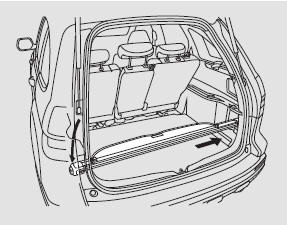
4. After inserting the right side of the housing into the right side panel holder, lower the left side into the opening in the left side panel.
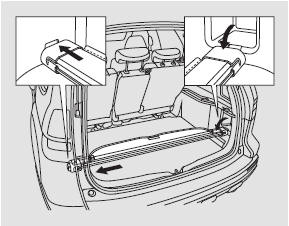
5. Pressing on the lower part of the housing, insert its right side into the holder on the lower right side panel.
Make sure the cargo area cover is securely installed and will not come out of the holders while the vehicle is in motion.
To install the cargo cover in place, repeat this procedure in reverse order.
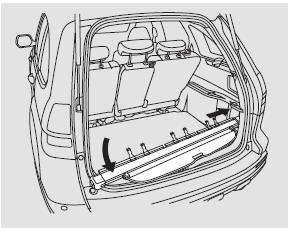
To completely remove the cargo area cover, perform step 3, then remove the cover by pulling its right side out of the holder. Do not attempt to remove the cover by applying physical force.
Do not place heavy objects on the cargo area cover. This may cause it to fail.
Test yourself
A quick Honda CR-V quiz: every answer comes with an explanation and a link to the manual page.