Head Unit
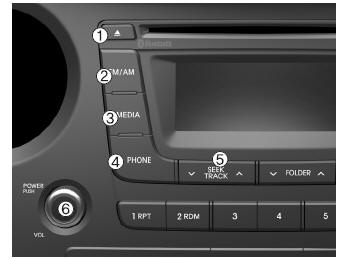
1.  (EJECT)
- Eject the disc.
2.
- Changes the FM / AM mode.
- Each time the button is pressed, the mode changes in this order: FM1 FM2AM.
3.
- Changes the CD, USB (iPod), AUX, My Music and BT Audio modes.
- Each time the button is pressed, the mode changes in this order: CD, USB (iPod), AUX, My Music and BT audio.
4.  (if equipped)
- Phone screen operation.
When a phone is connected, the connection screen appears.
5.
- Radio mode: Starts automatic search for station frequencies.
- CD, USB, iPod, My Music modes
- Press briefly (less than 0.8 seconds): Skip to the next or previous track (file).
- Press and hold (more than 0.8 seconds): Rewinds or fast-forwards the current track.
6. PWR/VOL knob
-  POWER knob: Press the knob to turn the power on/off.
- Volume knob: Turn the knob right/left to adjust the volume.
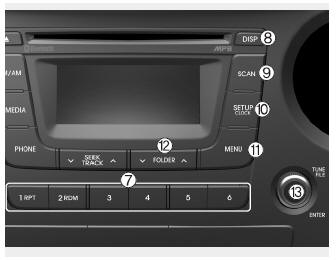
7.  (Preset)
- Radio mode: Stores frequencies (channels) or recalls stored frequencies (channels).
CD, USB, iPod, My Music modes.
-  : Repeat
-  : Shuffle
- On the Radio, Media, Setup and Menu pop-up screens, select the numeric menu.
8.
- Each short press of the button (less than 0.8 seconds) switches the screen to Off.Screen OnScreen Off.
Audio operation is maintained and only the screen is turned off.
When the screen is off, press any button to turn it back on.
9.
- Radio Mode
- Press (less than 0.8 seconds) the button: Preview each station for 5 seconds.
- CD, USB, My Music modes
- Press (less than 0.8 seconds) the button: Preview each track (file) for 10 seconds.
Press the button again to continue playing the current track (file).
10.
- Briefly press (less than 0.8 seconds) the button: Move to the Display, Sound, Clock, Phone and System setting modes.
- Press and hold (more than 0.8 seconds) the button: Move to the clock setting screen.
11.
Displays the menus for the current mode.
iPod List: Return to the main category.
12.
- CD MP3, USB modes: Search folders.
13.  Radio Mode:
- Radio Mode: Change the frequency by turning the TUNE knob left/right.
- CD, USB, iPod, My Music modes: Search the songs (files) by turning the TUNE knob left/right.
When the desired track is displayed, press the TUNE knob to start playback.
- Move to the menu selection screen and select menus.
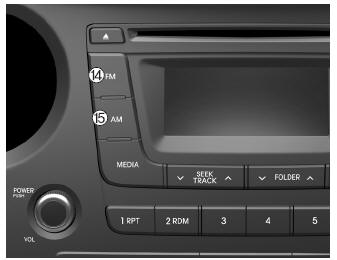
14.
- Changing FM mode.
- Each time the button is pressed, the mode changes in this order: FM1FM2.
15.
- Changing AM mode.
Test yourself
A quick Hyundai i10 quiz: every answer comes with an explanation and a link to the manual page.