Cruise Control
Cruise Control Operation
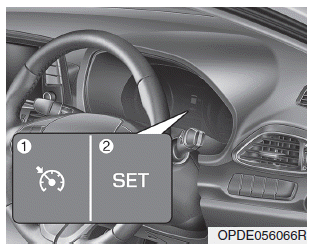
1. CRUISE indicator
2. SET indicator
The cruise control system allows you to drive at speeds above 20 mph (30 km/h) without depressing the accelerator pedal.
WARNING
Observe the following precautions:
- Always set the vehicle speed below the speed limit in your country.
- If cruise control is left on (the
 indicator light in the instrument cluster is illuminated), cruise control may be activated unintentionally. Keep the cruise control system off (CRUISE OFF indicator) when cruise control is not being used to avoid accidentally setting a speed.
- Use the cruise control system only on open highways in good weather.
- Do not use cruise control when it may be unsafe to maintain a constant speed:
- When driving in heavy traffic or when road conditions make it difficult to drive at a constant speed
- When driving on wet, icy or snow-covered roads
- When driving on hilly or winding roads
- When driving in windy areas - Do not use cruise control when towing a trailer.
NOTICE
When driving at cruising speed in a vehicle with a manual transmission, do not shift to neutral without depressing the clutch pedal, as this will overload the engine. If this happens, depress the clutch pedal or press the Cruise Control ON/OFF button.
Information
- During normal cruise control operation, when the SET switch is activated or reactivated after applying the brake, cruise control engages after approximately 3 seconds. This delay is normal.
- Before cruise control can be activated, the system checks that the brake switch is operating normally. Depress the brake pedal at least once after turning the ignition on or starting the vehicle.
Cruise control switch
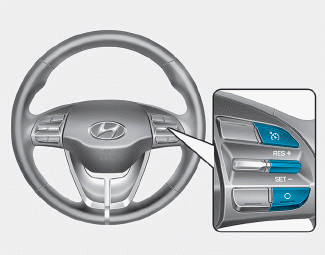
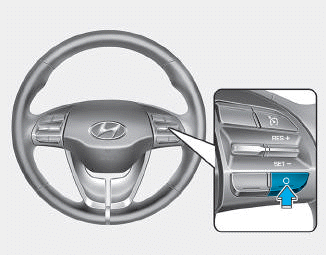
O: Cancels cruise control operation.
 : Turns the cruise control system on or off.
RES+: Resumes or increases the cruise control speed.
SET-: Sets or decreases the cruise control speed.
Information
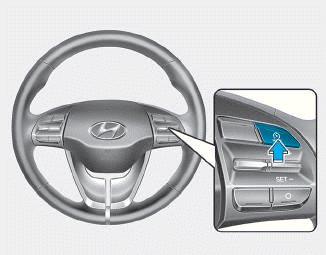
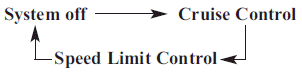
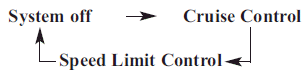
First, switch the mode to Cruise Control by pressing the button, if equipped with the Speed Limiter Control system.
The mode changes as shown below each time the button is pressed.
Setting the Cruise Control Speed
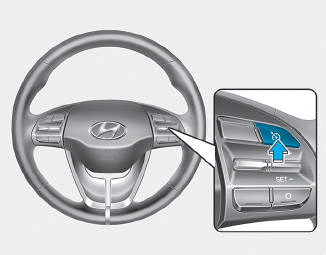
1. Press the  button on the steering wheel to turn the system on. The
 indicator will illuminate.
2. Accelerate to the desired speed, which must be above 20 mph (30 km/h).
Information - Manual Transmission
For vehicles with a manual transmission, you must depress the brake pedal at least once to set cruise control after starting the engine.
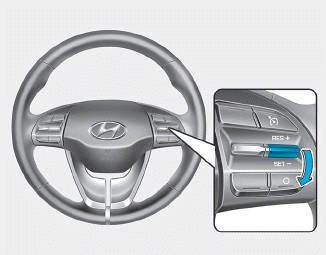
3. Push the switch down (SET-) and release it. The SET indicator will illuminate.
4. Release the accelerator pedal.
Information
On steep slopes, the vehicle may slightly decelerate or accelerate when driving uphill or downhill.
To increase the cruise control speed
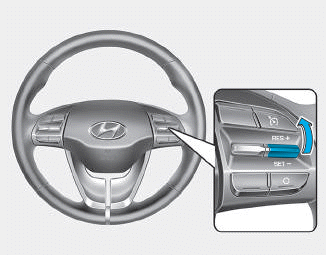
• Push the switch up (RES+) and hold it, while monitoring the SET speed in the instrument cluster.
Release the switch when the desired speed is displayed, and the vehicle will accelerate to that speed.
• Push the switch up (RES+) and release it immediately. The set speed will increase by 2 km/h each time the switch is operated in this way.
• Depress the accelerator pedal. When the vehicle reaches the desired speed, push the switch down (SET-).
To decrease the cruise control speed
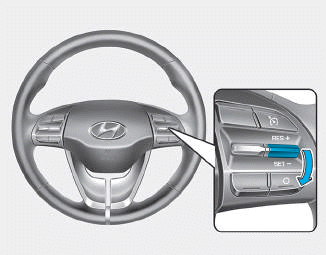
- Push the switch down (SET-) and hold it. The vehicle will gradually decelerate. Release the switch at the speed you want to maintain.
- Push the switch down (SET-) and release it immediately. The set speed will decrease by 2 km/h each time the switch is operated in this way.
- Lightly depress the brake pedal. When the vehicle reaches the desired speed, push the switch down (SET-).
To temporarily accelerate with cruise control on
Press the accelerator pedal. When you release the accelerator pedal, the vehicle will return to the previously set speed.
If you push the switch down (SET-) at a higher speed, cruise control will maintain the increased speed.
Cruise control will be canceled when
- The brake pedal is pressed.
- The clutch pedal is depressed. (For vehicles with a manual transmission)
- Pressing the O button located on the steering wheel.
- Press the
 button. Both the
 indicator and the SET indicator will illuminate. Turn off.
- Press
 button. Both the
 indicator and the SET indicator will turn off. (if equipped with Speed Limiter Control)
- Move the shift lever to the N (Neutral) position. (for automatic transmission/dual clutch transmission)
- The vehicle speed decreases to less than approximately 20 mph (30 km/h).
- ESC (Electronic Stability Control) operates.
- Shift to 2nd gear in manual shift mode. (for automatic transmission/dual clutch transmission vehicles)
Information
Each of the above actions cancels cruise control operation (the SET indicator in the instrument cluster will turn off), but only pressing the  button will turn the system off. To resume cruise control operation, push the switch up (RES+) located on the steering wheel. You will return to your previously set speed if the system was turned off using the
 button.
To resume the previously set cruise speed
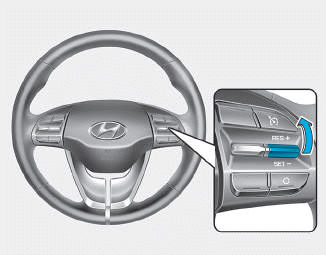
Push the switch up (RES+). If the vehicle speed is above 20 mph (30 km/h), the vehicle will resume the set speed.
To Turn Off Cruise Control
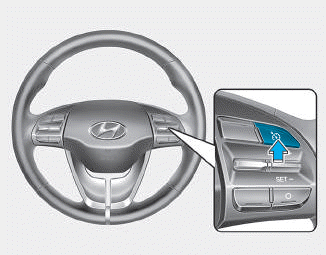
• Press the  button (the
 indicator light will turn off).
• Press the button (the CRUISE indicator will turn off). (if equipped with Speed Limiter Control system)
- When cruise control is on, pressing the button once will turn off cruise control and switch to speed limiter control.
- When cruise control is off and speed limiter control is on, pressing the button will turn off both systems.
Information
The mode changes as shown below each time the  button is pressed.
Test yourself
A quick Hyundai i30 quiz: every answer comes with an explanation and a link to the manual page.