To Activate the ISG System
Activation Conditions
The ISG system operates under the following conditions.
- Driver's seat belt is fastened.
- Driver's door and hood are closed.
- Brake system vacuum pressure is adequate.
- Battery is sufficiently charged.
- Outside temperature is between 14 °F and 95 °F (-10 °C and 35 °C).
- Engine coolant temperature is not too low.
- System is not in diagnostic mode.
- Grade is gradual.
- Steering wheel is turned less than 180 degrees.
- Shift lever is in the DRIVE or NEUTRAL position.
Information

- The ISG system will not activate when the conditions for activating the ISG system are not met. In this case, the ISG OFF button indicator will illuminate and the auto stop indicator (
 ) will illuminate yellow on the instrument cluster.
- If the above indicator remains illuminated on the instrument cluster, we recommend having the IGS system inspected by an authorized HYUNDAI dealer.
Auto Stop
To Stop the Engine at Idle
1. Reduce the vehicle speed to 0 mph.
2. Press the brake pedal and shift the shift lever to D (Drive) or N (Neutral).
The auto stop indicator ( ) illuminates green on the instrument cluster when the engine stops.
Information
Vehicle speed must be at least 3 mph (5 km/h) after stopping at idle before the engine stops idling again.
In auto stop mode, when the driver opens the hood, the ISG system will be deactivated.
When the system is deactivated:
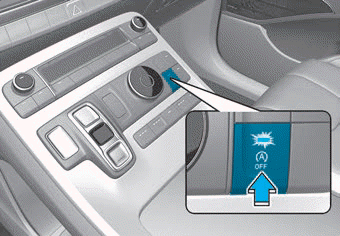
The ISG OFF button indicator illuminates.

If the message "Auto Stop disabled. Shift to P or N and start the engine manually" appears on the LCD display with an audible signal, restart the vehicle manually by depressing the brake pedal with the vehicle in P (Park) or N (Neutral). For your safety, restart the vehicle in P (Park).
"Start the vehicle manually" appears on the LCD display with a warning sound. Restart the vehicle manually by pressing the brake pedal with the vehicle in P (Park) or N (Neutral). For safety, restart the vehicle in P (Park).
Auto Start
Restarting the Engine in Auto Stop Mode
Release the brake pedal.
- When Auto Hold is activated, if you release the brake pedal, the engine will be in auto stop state. However, if you press the accelerator pedal, the engine will restart.
The auto stop indicator (  ) turns off on the instrument cluster when the engine restarts.
The engine restarts automatically in the following situations.
- The manual climate control system blower fan speed is set above the 3rd position with the A/C ON.
- The automatic climate control system blower fan speed is set above the 6th position with the A/C ON.
- A certain period of time has passed with the A/C on.
- Defrost is activated.
- Brake system pressure is low.
- Battery is weak.
- The vehicle is shifted to P (Park) or R (Reverse) while the brake pedal is pressed or Auto Hold is activated.
- The door is open or the seat belt is unfastened while the brake pedal is pressed or Auto Hold is activated.
- EPB is applied while Auto Hold is activated.
The auto stop indicator (  ) flashes green for 5 seconds on the instrument cluster.
Auto start is temporarily disabled in the following situations.

When shifting from N (Neutral) to R (Reverse), D (Drive), or manual shift mode without the brake pedal pressed, the message "Press brake pedal for auto start" will appear on the LCD display. To activate auto start, press the brake pedal.
Deactivating the ISG System
- Press the ISG OFF button to deactivate the ISG system. The ISG OFF button indicator will then illuminate.
- Press the ISG OFF button again to reactivate the ISG system. The ISG OFF button indicator turns OFF.
Test yourself
A quick Hyundai Palisade quiz: every answer comes with an explanation and a link to the manual page.