Electrochromic Mirror with HomeLink
Your vehicle may be equipped with a Gentex auto-dimming mirror with a built-in HomeLink® wireless control system.
During night driving, this function automatically detects and reduces glare from the rearview mirror. The HomeLink® Universal Transceiver allows you to activate garage door(s), electric gates, home lighting, etc.
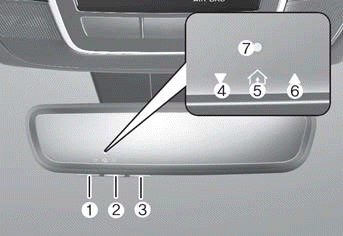
1 HomeLink Button 1
2 HomeLink Button 2
3 HomeLink Button 3
4 Garage Door Opener Status Indicator: Closing or Closed
5 HomeLink Activity Indicator
6 Garage Door Opener Status Indicator: Opening or Open
7 HomeLink User Interface Indicator
Built-in HomeLink® Wireless Control System
The HomeLink® Wireless Control System provides a convenient way to replace up to three hand-held radio frequency transmitters used to activate compatible devices such as gate operators, garage door openers, door locks, security systems and home lighting.
NOTICE
HomeLink® operates only when the ignition switch is in the ACC or ON position to prevent unintentional security problems when the vehicle is parked outside the garage.
WARNING
Before programming HomeLink® to a garage door opener or gate operator, make sure that people and objects are not in the path of the door to prevent potential injury or damage. Do not use HomeLink® with any garage door opener that lacks safety stop and reverse features required by federal safety standards (including any garage door opener manufactured before April 1, 1982). A garage door that cannot detect an object and signal the door to stop and reverse does not meet current U.S. federal safety standards. Using a garage door opener without these features increases the risk of serious injury or death.
For more information, contact HomeLink® at www.homelink.com or call the HomeLink customer support line at 1-800-355-3515.
1. HomeLink® Programming
The following steps show how to program HomeLink. If you have questions or difficulty programming the HomeLink buttons, visit the HomeLink website or call the toll-free HomeLink customer support number.
- Visit the HomeLink website at www.homelink.com or scan the QR code. Then select your vehicle make at the top of the page. Then watch the videos on YouTube and/or access additional information on the site.

- Or call HomeLink support at 1-800-355-3515 (when the vehicle make/model and the garage door opener make/model are readily available).
1) Preparation for Programming
1. When programming a garage door opener, park the vehicle outside the garage.
2. Insert a new battery into the remote transmitter to be programmed to HomeLink for faster learning and accurate transmission of the radio frequency signal.
3. Turn the ignition switch to the ACC position to program HomeLink.
2) Programming a New HomeLink®
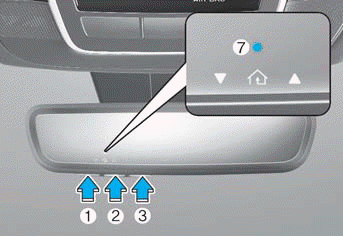
1. Press and release HomeLink button 1, 2, or 3 to program. HomeLink Indicator 7 will blink slowly orange (if not, perform the "Erasing HomeLink Buttons" steps and start over).
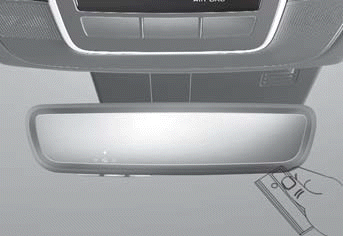
2. Position the garage door opener remote 1–3 in (2–8 cm) from the HomeLink button.
3. While the HomeLink indicator is on
Test yourself
A quick Hyundai Tucson LM quiz: every answer comes with an explanation and a link to the manual page.