Convenience
Steering Wheel Heater
In this manual: Convenience
~1min read
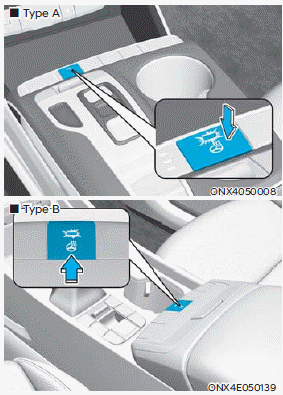
When the ignition switch is in the ON position or the engine is running, press the steering wheel heater button to heat the steering wheel.
The indicator on the button illuminates.
To turn off the steering wheel heater, press the button again. The indicator turns off.
Driver Automatic Comfort Control
The automatic comfort control function can operate the steering wheel heater depending on the outside temperature and the set temperature while the engine is running.
- To use this function, it can be enabled from the settings menu in the infotainment system.
Select: Settings > Vehicle > Seat (or Climate) > Heated/Ventilated Seats > Link to Climate Settings for Automatic Control > Steering Wheel Heater - If the steering wheel heater button is pressed while the automatic comfort control function is operating, the steering wheel heater is controlled manually.
- The steering wheel heater defaults to OFF whenever the ignition switch is turned on. However, if the automatic comfort control function is ON, the steering wheel heater turns on and off depending on the outside temperature and the set temperature.
Information
- The steering wheel heater turns off automatically after approximately 30 minutes.
- The infotainment system may change after a software update. For more information, refer to the infotainment system user's manual and quick reference guide.
NOTICE
- Do not install covers or accessories on the steering wheel to prevent damage to the steering wheel heater system.
- Do not strike the steering wheel surface with a pointed object. This may damage the heating element in the steering wheel.
Test yourself
A quick Hyundai Tucson LM quiz: every answer comes with an explanation and a link to the manual page.
Was this page helpful?