Wireless Smartphone Charging System
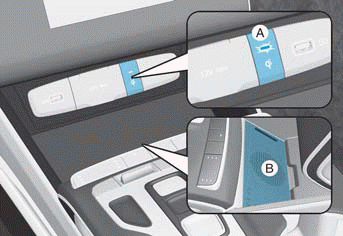
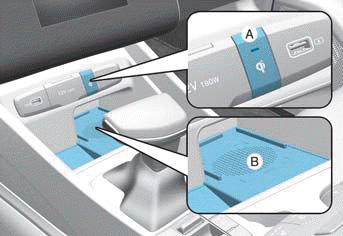
A: Indicator Light, B: Charging Pad
Charging Your Smartphone
The wireless smartphone charging system charges only Qi-compatible smartphones ( ). Visit your smartphone manufacturer's website to check whether your smartphone supports Qi technology.
Wireless charging starts when you place a Qi-compatible smartphone on the wireless charger with the screen facing up.
1. The wireless smartphone charger is available when all doors are closed and the ignition switch is in the ON or START position.
2. Turn on the wireless charging function from the settings menu on the instrument cluster or infotainment system.
Select:
- User Settings > Convenience > Wireless Charging System (for cluster type)
- Setting > Vehicle > Convenience > Wireless Charging System (for infotainment system type)
3. Place the smartphone in the center of the wireless charging pad. The indicator light turns orange while the smartphone is charging and turns blue when charging is complete.
Information
Remove other items, including the smart key and key card, from the wireless charging pad.
If your smartphone does not charge:
- Move the smartphone to the charging pad.
- Make sure the indicator light is orange.
The indicator light flashes orange for 10 seconds if there is a malfunction in the wireless charging system.
The system warns you with a message on the instrument cluster display if the smartphone is still on the wireless charger after the vehicle is turned off and the driver's door is opened.
Information
- The wireless smartphone charging system may not support smartphones that do not meet the Qi specification ().
- Wireless charging may stop temporarily when the smart key is used, or when the vehicle is started or the doors are locked/unlocked.
- When charging some smartphones, the indicator light may not change to blue when the smartphone is fully charged.
- The wireless charging process may stop temporarily when the temperature inside the wireless smartphone charging system rises abnormally. Wireless charging does not resume until the temperature drops.
- The wireless charging process may stop when a metal object, such as coins, is between the wireless charging pad and the smartphone.
- With some smartphones, the system may not give a warning even though the smartphone is left on the wireless charging pad. This is due to a special characteristic of the smartphone, not a malfunction of the wireless charger.
- When charging some smartphones with a self-protection function, the charging speed may decrease, and wireless charging may stop.
- If the smartphone has a thick case, it may not charge.
- Magnetic items such as credit cards, phone cards, or transportation cards may be damaged if left together with the smartphone during the charging process.
- When any smartphone without wireless charging function or a metal object is placed on the charging pad, a slight noise may be heard, because the vehicle is detecting the compatibility of the object placed on the charging pad. This does not affect your vehicle or smartphone.
- If the ignition switch is turned off, charging stops.
Test yourself
A quick Hyundai Tucson LM quiz: every answer comes with an explanation and a link to the manual page.