Lane Keeping Assist System Malfunction

• If there is a problem with the system, a message will appear. If the problem persists, the LKA malfunction indicator will illuminate.
LKA Malfunction Indicator

The LKA malfunction indicator (yellow) will illuminate if LKA is not operating properly. If this occurs, have the system inspected by an authorized Kia dealer.
LKA will be cancelled when:
- You change lanes using the turn signal. - Using the turn signal to change lanes. - If you change lanes without the turn signal, steering may be controlled.
- LKA may switch to steering assist mode when the vehicle is close to the center of the lane after the system is on or the lane has been changed. LKA may not assist steering if the vehicle follows a lane marking too closely continuously before switching to steering assist mode.
- Control of ESC (Electronic Stability Control) or VSM (Vehicle Stability Management).
- Steering assist will not operate when driving fast on a sharp curve.
- Steering assist will not operate when vehicle speed is below 60 km/h or above 180 km/h.
- Steering assistance will not operate when changing lanes quickly.
- Steering assistance will not operate when braking suddenly.
- Steering assist will not operate when the lane is very wide or narrow.
- Steering assist will not operate when only one side lane marking is detected.
- When there are more than two lane markings, such as in a construction area.
- The radius of the curve is too small.
- When the steering wheel is turned sharply, LKA will be temporarily deactivated.
- Driving on a steep slope or hill.
The driver should be careful in the following situations, as the system may not operate properly when lane markings are poor or limited:
► When the lane and road condition are poor
- It is difficult to distinguish the lane marking from the road when the lane marking is covered with dust or sand.
- It is difficult to distinguish the color of the lane marking from the road.
- There is something similar to a lane marking.
- Lane markings are faded or damaged.
- The number of lanes increases/decreases or lane lines intersect (driving through a toll plaza / toll gate, merging/splitting lanes).
- There are more than two lane markings.
- Lane markings are very thick or thin.
- The lane markings are not visible due to snow, rain, stains, puddles, or other factors.
- Shadows on the lane markings caused by the median strip, guardrails, noise barriers, and others.
- When the lane markings are complex or the road structure replaces lines, such as at an intersection area.
- There are pedestrian crossing signs or other symbols on the road.
- The lane suddenly disappears, for example at an intersection.
- Lane markings in a tunnel are covered with dirt or oil, etc.
- The lane is very wide or narrow.
► When external conditions interfere
- Sudden changes in brightness when entering or exiting a tunnel or passing under a bridge.
- The headlights are not on at night or in a tunnel, or the illumination level is low.
- There is a boundary structure on the road.
- Street light, sunlight, or the headlights of an oncoming vehicle reflected from water on the road.
- When bright light shines in the opposite direction of travel.
- The road surface is uneven.
- The distance to the vehicle ahead is very short, or the vehicle ahead is hiding the lane markings.
- You are driving on a steep slope or a sharp curve.
- The vehicle is vibrating excessively.
- The temperature near the rearview mirror is very high due to direct sunlight, etc.
► When forward visibility is poor
- The lens or windshield is covered with foreign material.
- The sensor cannot detect the lane due to fog, heavy rain or snow.
- The windshield is fogged up by humid air inside the vehicle.
- Application of any film or accessories on the windshield, etc.
WARNING
LKA is a system that helps prevent the driver from leaving the lane. However, the driver must not rely solely on the system and must always drive safely and observe safe driving rules.
Warning Volume
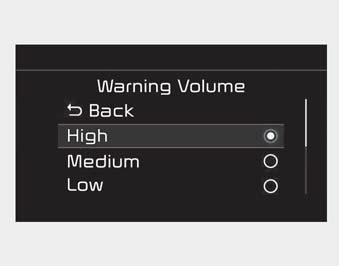
The driver can select "Settings > Vehicle > Driver Assistance > Warning Volume > High/Medium/Low".
✽ NOTICE
If you change the warning volume, the warning volume of other systems may also change. Always be aware of this before changing the warning volume.
Test yourself
A quick Kia Cadenza VG Owner's Manual quiz: every answer comes with an explanation and a link to the manual page.