Forward Collision-Avoidance Assist (FCA)
Description and Operation
Description
The FCA system is designed to help avoid a potential collision or reduce its impact when the driver applies insufficient brake force, applies the brakes late, or does not brake at all to avoid a collision.
The system detects road hazards using the front camera and radar sensor, warns the driver, and activates emergency braking to prevent a collision or reduce collision speed.
Deactivation Conditions
General Deactivation by Driver FCA OFF
ACC 2 OFF
Deactivation by Driver When the maximum operating speed is exceeded.
When the shift lever is in R or P position.
When the accelerator pedal is depressed halfway.When the system detects driver action to avoid a collision, such as sudden steering changes. Deactivation Due to System Malfunction Radar/camera/ECU malfunction
When related modules and CAN communication have malfunctions
Restrictions
Environmental Factors Bad weather, such as heavy rain or snow, blocks the field of view of the radar sensor or camera.
The driver's field of view is poorly lit (too dark, too many reflections, or too much backlight blocking the field of view)
Camera/radar is contaminated.
Limitations of Camera and Radar Detection A vehicle/pedestrian appears suddenly (outside the field of view).
The vehicle ahead is too small to be detected (e.g., motorcycle or bicycle, etc.).
The vehicle ahead does not have its taillights properly turned on.
The vehicle ahead approaches your vehicle or reverses.
The pedestrian is not fully recognized by the system, for example, if the pedestrian is leaning or not walking straight.
The pedestrian wears clothing that easily blends into the background, making detection by the system difficult.
The external lighting is too bright (for example, when driving in bright sunlight or sun glare) or too dark (for example, when driving at night on a dark rural road).
The pedestrian moves very fast or appears suddenly.
Operation
Basic Specification (Front camera applied)
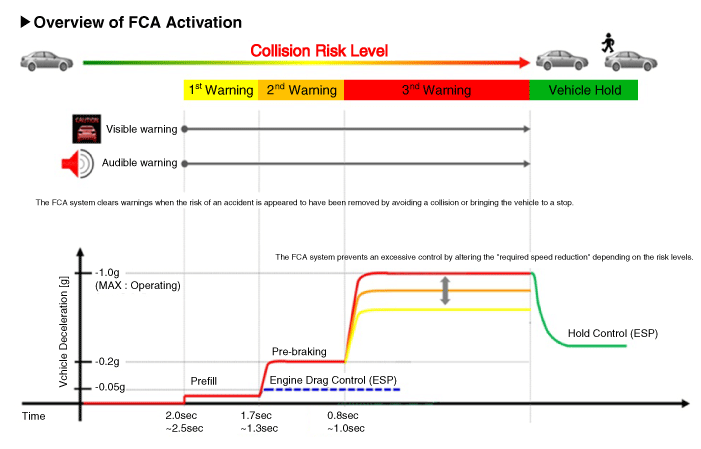
※ The indicated time will vary depending on vehicle speed.
Step 1: Provides a visual (display) and audible warning when a danger is detected.
Step 2: Reduce engine torque and activate FCA when there is a high probability of collision.
Step 3: Activate emergency braking when a collision is unavoidable.
After the vehicle stops: Maintain braking control for a certain time, then release it.
When Smart Cruise Control (with front radar) is applied simultaneously.
The specified time varies depending on vehicle speed.
Step 1: Provides a visual (display) and audible warning when a danger is detected.
Step 2: Reduce engine torque and activate FCA when there is a high probability of collision.
Step 3: Activate emergency braking when a collision is unavoidable.
After the vehicle stops: Maintain braking control for a certain time, then release it.
Components and Component Location
Components
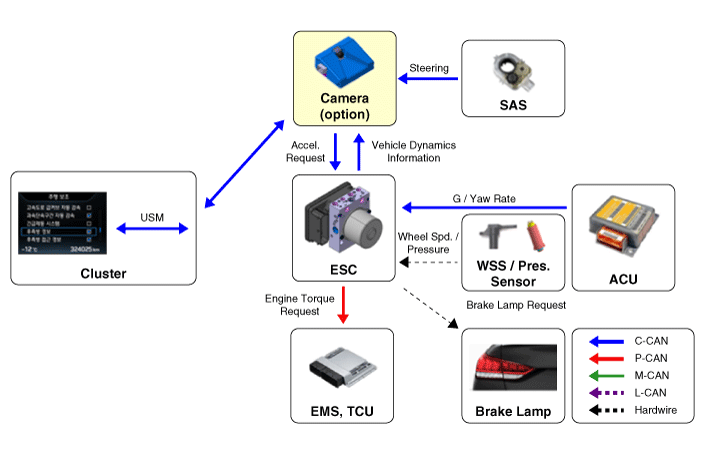
The FCA system configuration is shown below.
[Basic Specification (Front Camera Applied)]
Detection device (camera) capable of recognizing potential obstacles ahead.
Human Machine Interface (HMI) to warn the driver or change settings.
Brake system for automatic braking of the vehicle.
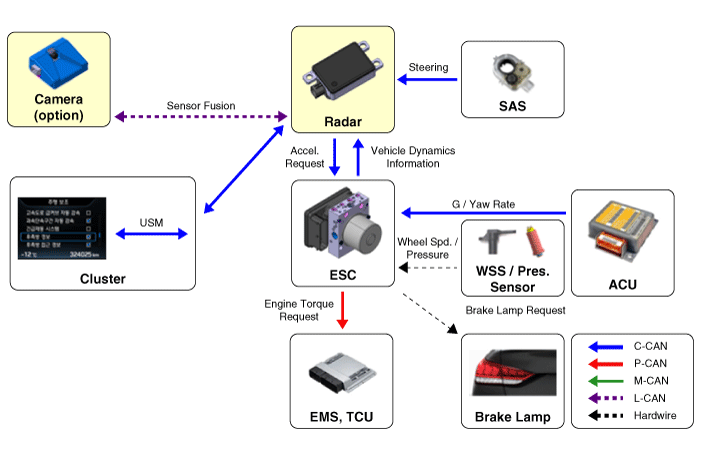
[When Smart Cruise Control is applied at the same time (front radar added)]
Detection device (radar and camera) capable of recognizing potential obstacles ahead.
Human Machine Interface (HMI) to warn the driver or change settings.
Brake system for automatic braking of the vehicle.
Unlike FCA (Smart Cruise Control), FCA must operate on a stationary vehicle, so the system uses the Fusion Target to combine the radar with the camera.
Test yourself
A quick Kia Forte BD quiz: every answer comes with an explanation and a link to the manual page.