Smart Cruise Control with Stop & Go
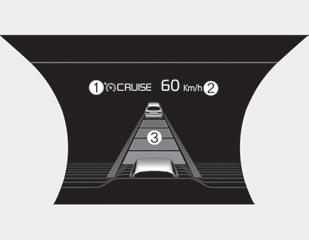
➀ CRUISE indicator
➁ Set speed
➂ Distance to vehicle ahead
The Smart Cruise Control system allows you to program the vehicle to maintain a constant speed and a set distance to the vehicle ahead without pressing the accelerator or brake pedal.
WARNING: Unintended activation of the Smart Cruise Control system.
If the Smart Cruise Control system remains on (the CRUISE indicator illuminated on the instrument panel), it may be activated unintentionally. Keep the Smart Cruise Control system off (CRUISE indicator off) when you do not intend to use the Smart Cruise Control system, to avoid setting a speed the driver is not aware of.
WARNING: Smart Cruise Control system. Limitations.
- The Smart Cruise Control system is a supplemental system and does not replace safe driving. It is the driver's responsibility to always check the speed and the distance to the vehicle ahead.
- Use the Smart Cruise Control system only on open highways in good weather.
- Do not use Smart Cruise Control when it may be unsafe to maintain a constant speed. For example:
- Road junctions and toll gates
- Roads surrounded by many steel structures (subway, steel tunnel, etc.)
- Parking lots
- Lanes adjacent to road barriers
- Slippery roads due to rain, ice, or snow
- Roads with sharp curves
- Steep hills
- Windy roads
- Off-road driving
- Roads under construction
- Rumble strips
- When driving near protective barriers
- When driving through a sharp curve
- When the vehicle detection capability is reduced due to vehicle modification, resulting in a height difference at the front and rear of the vehicle
- When driving in heavy traffic or when road conditions make it difficult to drive at a constant speed - Limited visibility (rain, snow, smog, etc.)
- The Smart Cruise Control system cannot detect a stopped vehicle, pedestrians, or an oncoming vehicle. Always look ahead carefully to prevent unexpected situations and sudden emergencies.
- Pay particular attention to driving conditions when using the Smart Cruise Control system.
- Be careful when driving downhill with SCC.
- Do not use the cruise function when towing a vehicle to prevent any damage.
- Always set the vehicle speed below the speed limit.
- Always pay constant attention to the road and driving, even when the Smart Cruise Control system is operating.
Smart Cruise Control Switch
O: Cancels cruise control operation.
 : Turns the cruise control system on or off.
RES +: Resumes or increases the cruise control speed.
SET - : Sets or decreases the cruise control speed.
 : Sets the distance between vehicles
Test yourself
A quick Kia Stinger CK quiz: every answer comes with an explanation and a link to the manual page.