Advanced Driver Assistance System (ADAS)
Surround View Monitor (SVM) Switch
In this manual: Advanced Driver Assistance System (ADAS)
8steps
~48min
2/5difficulty
Done 0 of 8
Circuit Diagrams
Connector and Terminal Function

| Pin | Function | Pin | Function |
| 1 | PAS Mode Switch | 13 | SVM Mode Indicator |
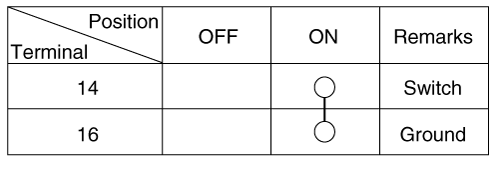
| 2 | PAS Mode Indicator | 14 | SVM Mode Switch |
| 3 | - | 15 | - |
| 4 | Latch | 16 | Ground |
| 5 | EPB1 Switch | 17 | EPB2 Switch |
| 6 | EPB3 Switch | 18 | EPB4 Switch |
| 7 | - | 19 | - |
| 8 | - | 20 | IGN1 |
| 9 | Battery (+) | 21 | Illumination (+) |
| 10 | - | 22 | - |
| 11 | ISG Mode Indicator | 23 | Illumination (-) |
| 12 | ISG Mode Switch | 24 | Auto Hold Mode |
Repair Procedures
Removal
Disconnect the negative battery cable.
Remove the console upper cover.
(Refer to Body - Floor Console Assembly)
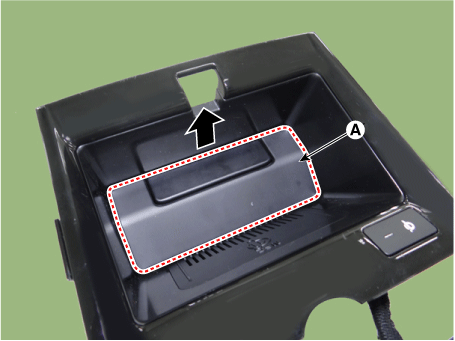
Remove the wireless charging pad (A).
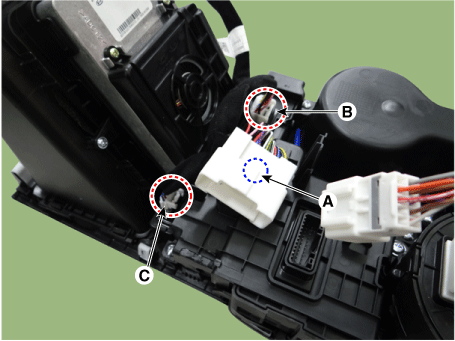
Disconnect the main connector bracket (A), the console switch connector (B), and the wireless charger indicator connector (C).
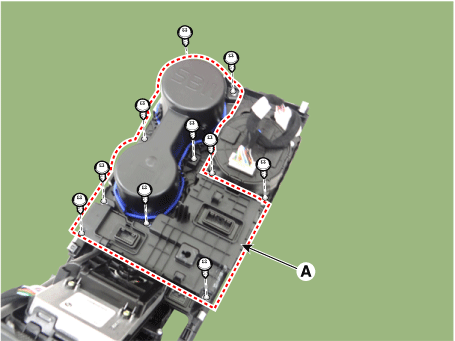
Remove the cup holder assembly (A) after loosening the mounting screws.
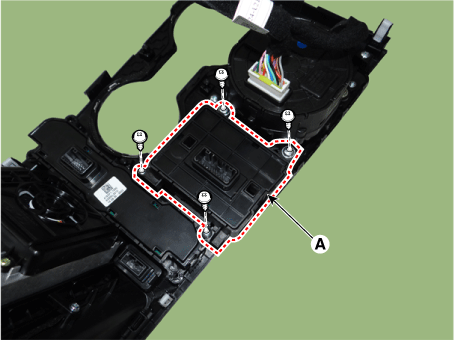
Remove the console switch (A) after loosening the mounting screws.
Installation
Install in the reverse order of removal.
Inspection
Remove the side hazard warning switch.
Turn on the SVM switch, then check the circuit continuity between the terminals.

Test yourself
A quick Kia Optima DL3 quiz: every answer comes with an explanation and a link to the manual page.
Was this page helpful?