Front View Camera System
Components and Component Location
Component Location
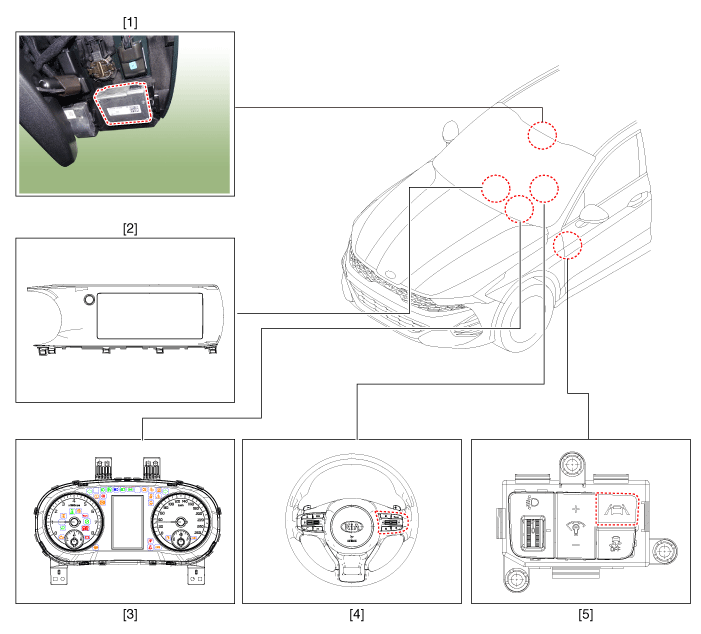
| 1. Front View Camera 2. AVN Head Unit 3. Cluster |
4. LFA, SCC ON/OFF Switch (Remote Control Switch) 5. LKA ON/OFF Switch |
Description and Operation
Description
System Features
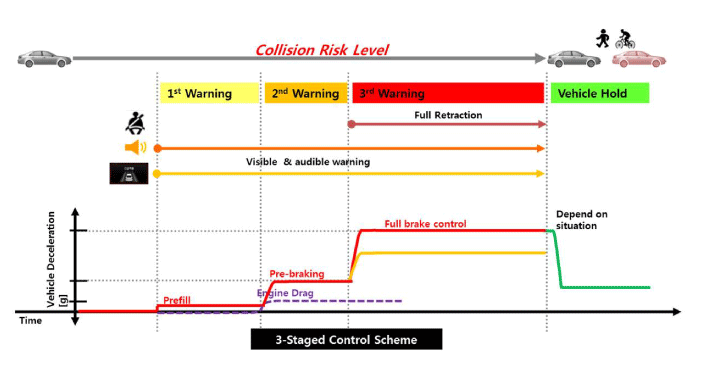
Forward Collision-Avoidance Assist (FCA): Detects road hazards, warns the driver, and activates emergency braking to prevent a collision or reduce collision speed.
FCA-JT (Junction Turning): Controls braking in case of a collision risk with an oncoming vehicle from the opposite side when turning left at an intersection.
Lane Keeping Assist (LKA): Detects unintended lane departure and assists the driver in staying in the lane using audible warnings and MDPS steering.
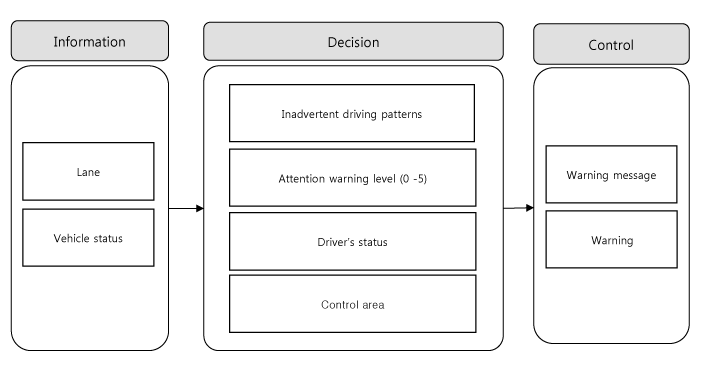
Driver Attention Warning (DAW): The system analyzes driving patterns and displays a message in the cluster along with an audible alarm.
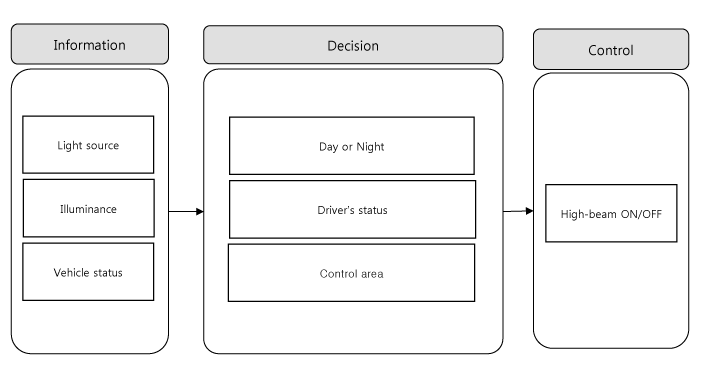
High Beam Assist (HBA): Detects headlights and taillights of vehicles ahead and turns the high beams on/off.
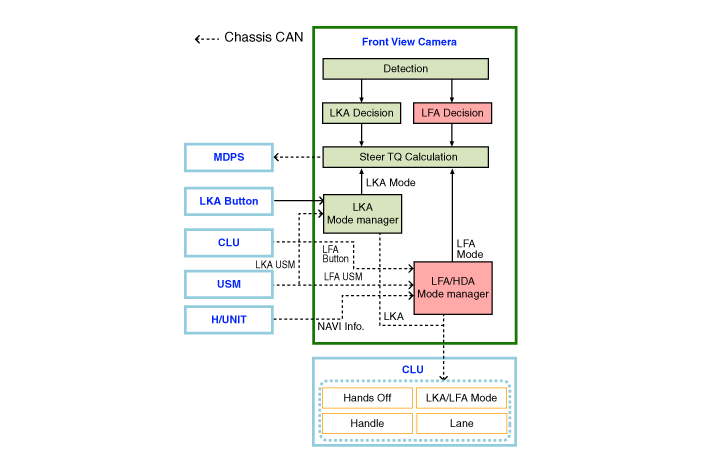
Lane Follow Assist (LFA): This system is designed to improve convenience by controlling the steering wheel to keep the vehicle centered in the lane, helping to reduce driver workload during driving.
Description of the System
Forward Collision-Avoidance Assist (FCA)
Operation Specification
Item Sensor Fusion (Front View Camera + Front Radar) Car Car Pedestrian Cyclist Connection Operating speed
(wheel speed)Warning 10–180 km/h 10–180 km/h 10–85 km/h 10–85 km/h 10–30 km/h FULL braking 10–75 km/h 10–85 km/h 10–65 km/h 10–65 km/h Notes Stationary Moving Vehicle - - Warning level Warning Visual/audible warning FULL braking Visual/audible warning + engine drag + FULL braking Alarm sensitivity (user settings menu) Normal - Late System components
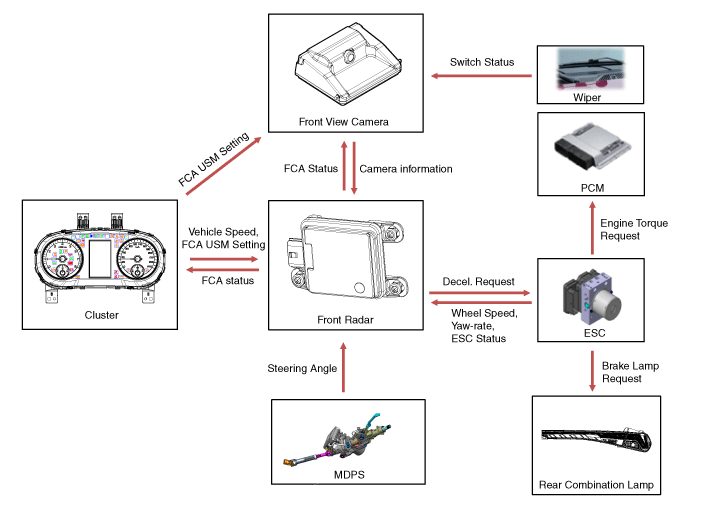
System Block Diagram
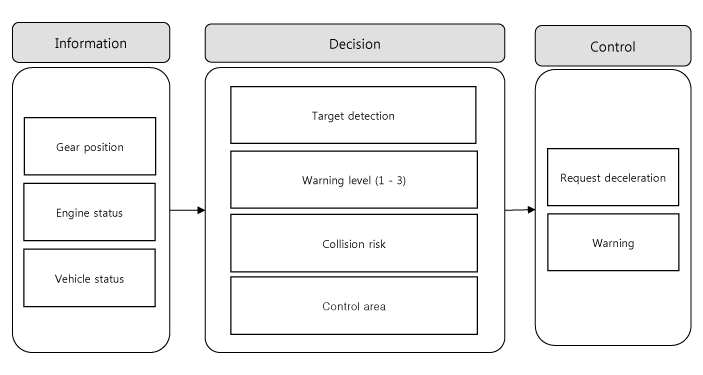
System Operation
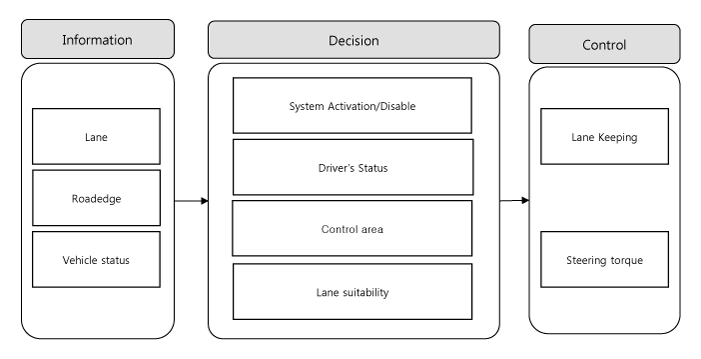
Lane Keeping Assist (LKA) system
Operation Specification
Item Specification Vehicle Speed ON 60–200 km/h OFF Less than 55 km/h / more than 210 km/h Lane width ON 2.7–5.3 m (8.8–17.4 ft) OFF Less than 2.5 m (8.2 ft) / more than 5.5 m (18 ft) Lane detection One or more lanes detected Turn Signal Indicator OFF or steering in the direction opposite to the turn signal Hazard Warning Switch OFF System components
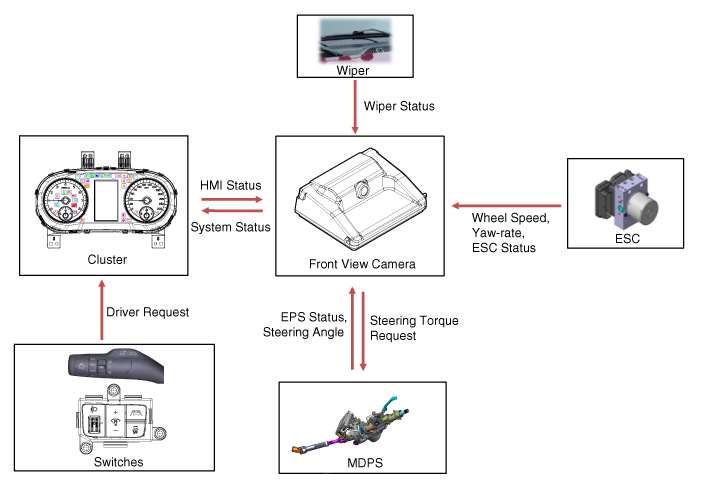
System Block Diagram
Driver Attention Warning (DAW)
Operation Specification
Item Specification System ON/OFF DAW ON (user settings menu) Vehicle Speed ON More than 0 km/h OFF Below 180 km/h Careless driving level Step 5 (Step 5: wake-up, Step 1: fatigue) Lane detection Entry: lane recognition for 2 seconds continuously
Clear: no lane recognition for 5 minutes continuouslySystem components
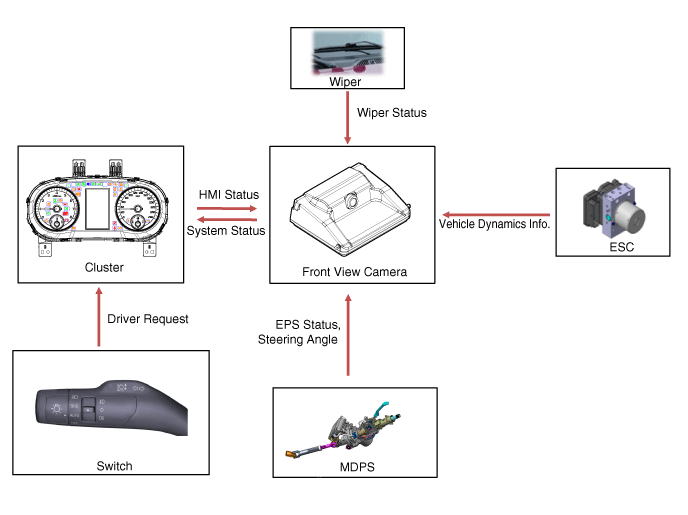
System Block Diagram
High Beam Assist (HBA)
Operation Specification
Item Specification System ON USM ON and high beam lever ON (with headlights ON) OFF USM OFF or high beam lever OFF Vehicle Speed ON 40–175 km/h OFF Less than 30 km/h / more than 180 km/h System components
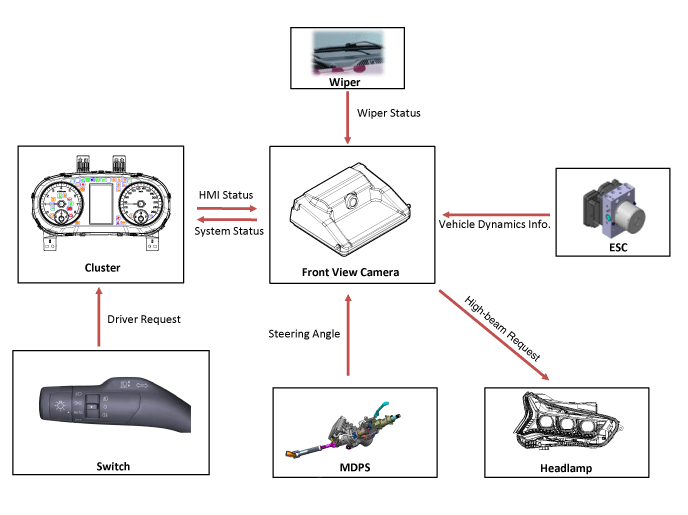
System Block Diagram
Lane Following Assist (LFA)
Operation Specification
Item Specification Vehicle Speed ON 0–180 km/h OFF More than 190 km/h Lane width ON 2.7–4.3 m (8.8–14.1 ft) OFF Less than 2.5 m (8.2 ft) / more than 4.5 m (14.7 ft) System components
System Block Diagram
System Limitations
This system monitors road conditions using the radar and camera. Therefore, the system may not operate normally in situations outside the detection range.
The system may be limited when:
The camera is obstructed by a foreign object or debris.
The camera lens is contaminated by window tinting or coating, the windshield is damaged, or foreign objects (stickers, insects, etc.) are stuck to the glass.
Severe weather, such as heavy rain or snow, blocks the camera field of view.
The target ahead is too small to be detected.
The vehicle ahead is an oversized vehicle or trailer that is too large to be detected by the camera recognition system (e.g., tractor trailer, etc.).
The camera field of view is poorly lit (either too dark, or excessive glare or backlight blocks the field of view).
The taillights of the vehicle ahead are not on, or the taillights are located in an unusual position (modified).
The windshield is fogged and the view of the road is obstructed.
The camera is damaged.
Test yourself
A quick Kia Optima DL3 quiz: every answer comes with an explanation and a link to the manual page.