Steering wheel audio controls (if equipped)
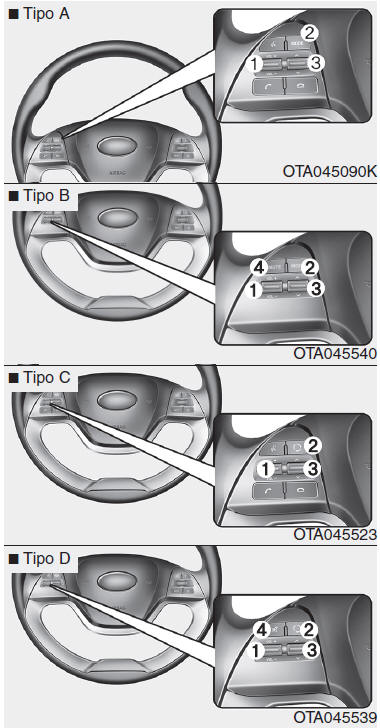
The steering wheel may incorporate audio control buttons.
WARNING Do not press two buttons on the audio remote control at the same time.VOLUME ( +/- ) (1)
- To increase the volume, push the lever up (+).
- To decrease the volume, push the lever down (-).
MODE ( ) (2)
Press the button to switch the audio source.
FM(1~2) ➟ AM ➟ CD ➟ USB AUX(iPod®) ➟ FM...
In addition to switching the mode, this button turns the system on/off when the ignition switch is in the ACC or ON position.
- To turn on: press the button when the audio is OFF.
- To turn off: press and hold the button for at least 0.8 seconds when the audio is ON.
SEEK/PRESET (  /
 ) (3)
The SEEK/PRESET lever has different functions depending on the system mode.
For the following functions, press and hold the lever for at least 0.8 seconds.
RADIO mode Works like the automatic station seek button.
CD/USB/iPod® mode Works like the fast forward/rewind button.
When pressed for less than 0.8 seconds, the SEEK/PRESET lever works differently depending on the selected mode.
RADIO mode Works like the preset station buttons.
CD/USB/iPod® mode Works like the previous/next track button.
MUTE ( ) (4, if equipped)
- Press the button to mute the audio.
- Press the button to mute the microphone during a call.
Detailed information on the audio system control buttons is described on the following pages of this chapter.
Auxiliary port, USB and iPod® (if equipped)
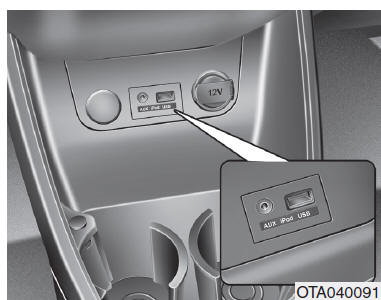
If your vehicle is equipped with an auxiliary and/or USB (universal serial bus) port, or an iPod® port, you can connect audio devices and USB devices, including an iPod®, to these ports.
NOTE When a portable audio device is connected to the power outlet, playback may be disturbed. In this case, use the portable audio device's own power supply.
❈ iPod® is a trademark of Apple Inc.
Test yourself
A quick Kia Picanto JA quiz: every answer comes with an explanation and a link to the manual page.