CD Care
In this manual: CD Care
4steps
~24min
2/5difficulty
Done 0 of 4
- If the temperature inside the vehicle is too high, open the windows to ventilate before using the system.
- It is illegal to copy and play MP3/WMA files without permission. Use only legal CDs.
- Do not apply volatile substances to the CD surface, such as benzene or thinners, normal cleaning products, or vinyl record cleaning sprays.
- To avoid damaging the surface, always hold CDs by the outer edges or the center hole.
- Before inserting a disc into the player, clean the surface with a soft cloth (wipe from the center outward).
- Do not damage the disc surface and do not attach labels or adhesive tape to it.
- Do not insert objects other than CDs into the player (also do not insert more than one CD at a time).
- After use, store CDs in their cases to protect them from scratches and dirt.
- Due to manufacturing or recording methods, some types of CD-R/CD-RW discs may not play normally. Continued use of such discs may in some cases damage the audio system.
NOTE - Playback of copy-protected audio CDs Your vehicle's audio system may not play some copy-protected CDs that do not conform to the international audio CD standard (Red Book).
Therefore, if a copy-protected CD does not play correctly, the CD may be defective rather than the player.
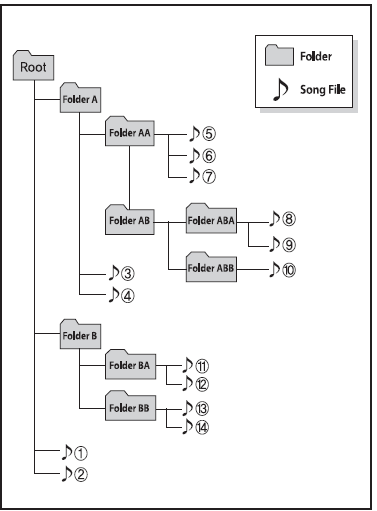
NOTE File (folder) playback order:
- Track playback order: from 1 to 14 in sequence.
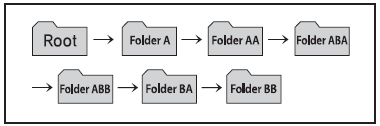
- Folder playback order:
❈ If a folder contains no files, it will not be displayed.
WARNING
- Do not look at the screen while driving. Looking at the screen for too long while driving may cause a traffic accident.
- Do not disassemble, install, or modify the audio system. Doing so may cause malfunction, fire, or electric shock.
- Using the phone while driving may distract your attention from traffic conditions and increase the risk of an accident. Use the phone function after parking the vehicle.
- Make sure water or foreign objects do not enter the device. Otherwise, fire or product malfunction may result.
- If the screen is blank or no sound is output, do not use the system, as these signs may indicate a product malfunction. Continued use under these conditions may cause an accident (fire, electric shock) or product malfunction.
- Do not touch the antenna during thunderstorms, as this may attract lightning and cause an electric shock.
- Do not stop or park in no-parking zones to operate the product. Doing so may cause an accident.
- Use the system with the vehicle ignition on. Prolonged use with the ignition off may discharge the battery.
WARNING
- Using the device while driving may distract your attention from the surroundings and increase the risk of an accident. Park the vehicle before operating the device.
- Adjust the volume to a level that allows the driver to hear sounds from outside the vehicle. Driving in a condition where outside sounds cannot be heard may cause an accident.
- Pay attention to the volume setting when switching on the device. A sudden sound at extremely high volume when the device is turned on may cause hearing damage. (Adjust the volume to an appropriate level before turning off the device.)
- If you want to change the installation position of the device, contact the dealer or service center. Installation or removal of the device must be carried out by a qualified technician.
- Turn on the vehicle ignition before using this device. Prolonged use of the audio system with the ignition off may discharge the battery.
- Do not subject the device to excessive shocks or impacts. Direct pressure on the front side of the monitor may damage the LCD screen or touch screen.
- When cleaning the device, turn it off and use a dry, soft cloth. Never use hard materials, chemical cloths, or solvents (alcohol, benzene, thinners, etc.), as they may damage or discolor the device panel.
- Do not place drinks near the audio system. Spilled drinks may cause the system to malfunction.
- If the product malfunctions, contact the dealer or service center.
- Placing the audio system in an environment with electromagnetic waves may cause interference.
NOTE - USE OF THE USB DEVICE
- To use an external USB device, make sure the device is not connected when the vehicle is started. Connect the device only after starting the vehicle.
- If the engine is started with the USB device connected, the USB device may be damaged. (USB flash drives are extremely sensitive to electrical surges.)
- If the engine is started or switched off while the external USB device is connected, the device may not work.
- Non-original MP3 and WMA files may not be played by the system.
- Only MP3 files with a bit rate between 8 Kbps and 320 Kbps can be played.
- Only WMA music files with a bit rate between 8 Kbps and 320 Kbps can be played.
- When connecting or disconnecting the external USB device, be careful of static electricity.
- Encoded MP3 players are not recognized.
- Some external USB devices may not be recognized due to their characteristics.
- If the sector/byte format of the external USB device is set to a value other than 512 BYTE or 2048 BYTE, the device may not be recognized.
- Use only USB devices formatted as FAT 12/16/32.
- USB devices without USB I/F authentication may not be recognized.
- Do not touch the USB device connection terminal with your hands or other objects.
- If the USB device is connected and disconnected repeatedly in a short time, it may be damaged.
- When connecting or disconnecting a USB device, you may hear an unusual noise.
- If the external USB device is disconnected during USB playback mode, it may be damaged or malfunction. Therefore, connect the external USB device with the audio system switched off or in another mode (e.g. Radio, CD).
- The time required for the external USB device to be recognized varies depending on the type and capacity of the device and the type of files stored on it.
- Do not use the USB device for purposes other than playing music files.
- Video playback via USB is not supported.
- Using the USB interface for accessories such as chargers or heaters may reduce performance and cause problems.
- If devices such as separately purchased USB hubs are used, the vehicle audio system may not recognize the connected USB device. In this case, connect the USB device directly to the vehicle's multimedia socket.
- If the USB device is partitioned, the car radio only recognizes files in the partition with the highest priority.
- Devices such as MP3 players, mobile phones and digital cameras that are not compatible with the standard USB interface may not be recognized.
- Charging via USB may not be supported for some mobile devices.
- USB HDDs or USB devices that cause disconnections due to vehicle vibration are not supported. (Pencil type)
- USB devices other than the standard type (WITH METAL COVER) may not be recognized.
- Some USB devices such as memory card readers (e.g. CF, SD, micro SD, etc.) or external HDDs may not be recognized.
- Music files protected by DRM (DIGITAL RIGHTS MANAGEMENT) are not recognized.
- Data stored on the USB device used with this audio system may be lost. It is recommended to back up data to other devices.
 Do not use USB devices that are also used as key rings or mobile phone accessories, as they may damage the USB plug. Make sure to use only products with a plug-in type connector.
NOTE - USING THE iPod® DEVICE
- Some iPod® models may not support the communication protocol, and files may not play correctly.
Supported iPod® models:
- iPhone® 3GS/4
- iPod® Touch 1st~4th generation
- iPod® Nano 1st~6th generation
- iPod® Classic
- The search or playback order of the tracks stored on the iPod® may differ from the search order used by the audio system.
- If the iPod® freezes due to a problem with the device itself, reset it. (For the reset procedure, refer to the iPod® manual.)
- The iPod® may not operate normally due to a low battery.
- Some iPod® devices, such as the iPhone, can be connected via Bluetooth® Wireless Technology. The device must be equipped with Bluetooth® Wireless Technology (such as Bluetooth® Wireless Technology stereo headphones). The device can play audio, but it will not be controlled by the audio system.
- To use the iPod® with the audio system, use the cable supplied with the iPod® at the time of purchase.
- Depending on the characteristics of the iPod®/iPhone used, skipping may occur or the device may not work correctly.
- If the iPhone is connected both via Bluetooth® Wireless Technology and USB, the content may not play correctly. On the iPhone, select Dock or Bluetooth® Wireless Technology to switch the audio output (source).
- When connecting the iPod® using the dedicated cable, fully insert the connector into the multimedia socket. If the cable is not fully inserted, communication between the iPod® and the audio system may be interrupted.
- When adjusting the sound effects of the iPod® and the audio system, the effects of both devices overlap and may reduce sound quality or distort the sound.
- When adjusting the audio through the audio system, turn off the iPod® equalizer; conversely, when using the iPod® equalizer, turn off the audio system equalizer.
- When not using the iPod® with the vehicle audio system, disconnect the iPod® cable from the iPod®. Otherwise, the iPod® will remain in accessory mode and will not operate properly.
Test yourself
A quick Kia Picanto JA quiz: every answer comes with an explanation and a link to the manual page.
Was this page helpful?