Lighting Controls
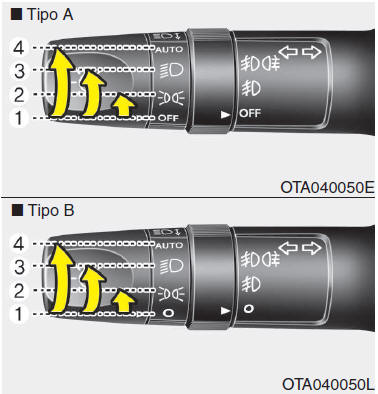
The light switch has one position for the headlights and one for the parking lights.
To turn on the lights, turn the knob at the end of the lever to one of the following positions:
- OFF
- Parking Lights
- Headlights
- Automatic Light Control Position (if equipped)
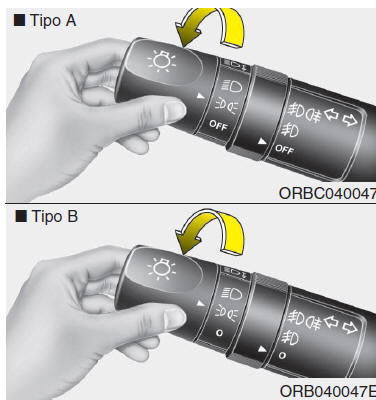
Parking lights (  ) Turning the light switch to the parking light position (1st position) turns on the tail lights, parking lights, license plate lights and the instrument cluster illumination.
NOTE To turn on the instrument cluster lights, the ignition switch must be in ON.
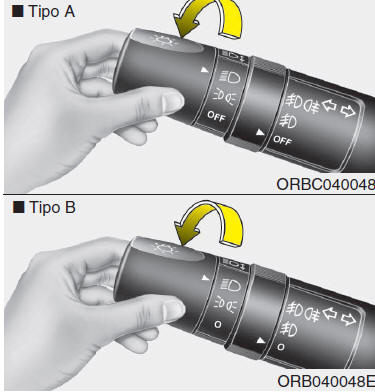
Headlight position (  ) Turning the light switch to the headlight position turns on the headlights, tail lights, license plate lights and the instrument cluster illumination.
NOTE To turn on the headlights, the ignition switch must be in ON.
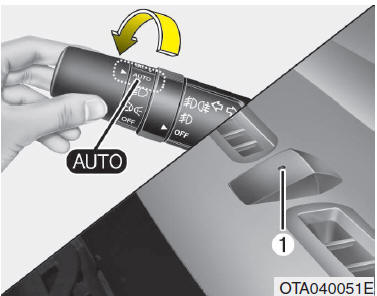
Automatic light control position (if equipped) Turning the light switch to the AUTO position turns on the tail lights and headlights automatically and turns them off based on the outside light level.
WARNING
- For the automatic light control system to function correctly, never place anything on the sensor (1) on the dashboard.
- Do not clean the sensor with glass cleaners; they may leave a film that interferes with the sensor.
- If your vehicle's windshield is heat-reflective or treated with anti-reflective coating, the automatic light control system may not function correctly.
Test yourself
A quick Kia Picanto JA quiz: every answer comes with an explanation and a link to the manual page.