Adjusting the Seats. Driving Position Memory
The driving position memory of the Lexus GS (4th generation, L10) stores individual settings for the seat, steering wheel, outside mirrors and head-up display. The desired position is recalled by pressing a button or by linking it to the Smart Key, which is ideal for multiple drivers. The power ingress/egress assist makes access easier, while numerous notes on correct use and occupant safety are provided. Comfort and personalization are the main focus here.
This function automatically adjusts the front seats, steering wheel and outside mirrors to make getting in and out of the vehicle easier, or to adapt the settings to your personal needs.
Power Ingress/Egress Assist
The automatic seat and steering wheel adjustment makes it easier for the driver and front passenger to get in and out of the vehicle.
Driver's seat

After all of the steps listed below have been carried out, the driver's seat and steering wheel automatically move to a position that allows the driver to get in and out easily.
- The shift lever has been placed in "P".
- The engine switch has been turned off.
- The driver's seat belt has been unbuckled.
If one of the following steps has been carried out, the driver's seat and steering wheel automatically return to their original positions.
- The engine switch has been switched to ACCESSORY or IGNITION ON mode.
- The driver's seat belt has been fastened.
Front passenger seat (if equipped)
If the front passenger door is opened while the vehicle is stationary, the adjusted lumbar support, the adjusted footrest (if equipped), etc. return to their original positions.
Electric entry assist function
If the seat is already in the rearmost position, etc., when leaving the vehicle, the electric entry assist function may not operate.
Customization
You can adjust the amount of seat movement for the electric entry assist to suit your personal needs.
Driving position memory
Your preferred driving position (position of the driver's seat, steering wheel, outside mirrors and HUD [Head-up Display] [if equipped]) can be stored and recalled at the touch of a button.
Three different driving positions can be stored.
Storing procedure
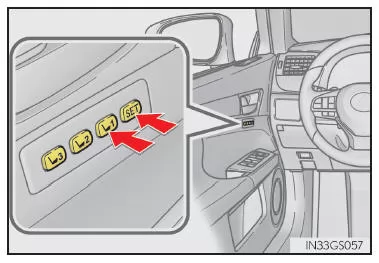
- Make sure the shift lever is in the "P" position.
- Switch the engine switch to IGNITION ON mode.
- Move the driver's seat, steering wheel, outside mirrors and HUD (Head-up Display) (if equipped) to the desired positions.
- Press button "1", "2" or "3" while pressing the "SET" button, or within 3 seconds after pressing the "SET" button, until a beep sounds.
If the selected button has already been programmed, the previously stored setting is overwritten.
Vehicles with driving position memory for the front passenger seat: To store the position of the front passenger seat, move the front passenger seat to the desired position and carry out step 4 using the buttons on the front passenger side.
Recall procedure
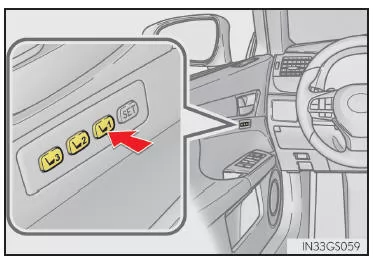
- Make sure the shift lever is in the "P" position.
- Switch the engine switch to IGNITION ON mode.
- Press and hold the button for the driving position to be recalled until a beep sounds.
Vehicles with front passenger seat footrest: The stored position is only recalled if the footrest is in a position higher than the stored position. It does not move upward.
How to stop position recall midway
Select one of the following procedures:
- Press the "SET" button.
- Press button "1", "2" or "3".
- Operate one of the seat adjustment switches (this only cancels the recall of the seat position).
- Operate the tilt/telescopic steering column adjustment switch (this only cancels the recall of the steering wheel position).
- Operate the head-up display position adjustment switch (if equipped) (this only cancels the recall of the head-up display position).
Seat positions that can be stored
- Vehicles without a seatback side support adjustment switch
All adjusted positions except the position set with the lumbar support switch can be stored.
- Vehicles with a seatback side support adjustment switch
All adjusted positions can be stored.
Automatic footrest adjustment (if equipped)
When the stored position is recalled and the front edge of the cushion touches the area around the instrument panel, the footrest is automatically stowed.
Activating driving position memory after the engine switch has been turned off
Driver's seat: Stored seat positions can still be activated for up to 180 seconds after opening the driver's door, and for a further 60 seconds after closing the driver's door.
Front passenger seat: Stored seat positions can still be activated for up to 180 seconds after opening the front passenger door.
Correct use of the driving position memory function
If the seat is already at its very front or very rear position and is moved further in the same direction, the system may not detect the current position correctly, and the stored position will not be recalled correctly.
Position recall function (driver's side only)
Each electronic key (including a card key) can be assigned to a preferred seat position.
Storing procedure
Store your driving position using one of the buttons "1", "2" or "3" before doing the following: While carrying only the key you want to program, close the driver's door.
If 2 or more keys are in the vehicle, the driving position cannot be stored correctly.
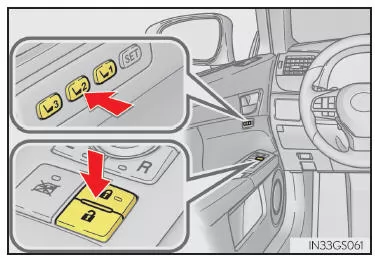
- Make sure the shift lever is in the "P" position.
- Switch the engine switch to IGNITION ON mode.
- Recall the driving position you want to store.
- While holding down the recall button, press and hold the door lock switch (to lock or unlock) until a beep sounds.
If the button could not be stored, a continuous beep sounds for approx. 3 seconds.
Recall procedure
- While carrying the electronic key that was programmed with the driving position, unlock and open the driver's door using the intelligent access and start system or the remote control.
The stored driving position is set (except for the steering wheel and HUD [Head-up Display] [if equipped] positions). However, the seat will move to a position slightly further back than the stored position to make getting in easier.
If the driving position matches a position that is already stored, the seat and outside mirrors do not move.
- Press the engine switch to ACCESSORY or IGNITION ON mode, or fasten a seat belt. The seat, steering wheel and HUD (head-up display) (if equipped) move to the stored position.
Clearing the Programming
Carry only the key whose programming you want to clear, and close the driver's door.
If 2 or more keys are inside the vehicle, the driving position cannot be cleared correctly.
- Switch the engine switch to IGNITION ON mode.
- While holding down the "SET" button, press and hold the power door lock switch (to lock or unlock) until the buzzer sounds twice.
If the button settings cannot be cleared, the buzzer sounds continuously for approx. 3 seconds.
Recalling the Driving Position Using the Memory Recall Function
- Different driving positions can be programmed for each electronic key. The recalled driving position may therefore differ depending on the key being carried.
- If a door other than the driver's door is unlocked with the smart access and start system, the driving position cannot be recalled. In this case, press the button for the stored driving position.
Customization
You can customize the memory recall function settings for unlocking the doors.
WARNING
Precaution When Adjusting the Seat
When adjusting the seat, make sure the seat does not strike a rear passenger or press your body against the steering wheel.
The driving position memory in the 4th generation Lexus GS stores your preferred settings for the seat, steering wheel and outside mirrors. These can be recalled automatically at the touch of a button or based on the key being used. This way, every trip starts with your familiar comfort.
The intelligent technology of the Lexus GS GRL1 ensures that the driver and front passenger enjoy an individually optimal seating position and makes getting in and out easier.
Test yourself
A quick Lexus GS quiz: every answer comes with an explanation and a link to the manual page.