Opening, closing and locking doors and the luggage compartment. Smart entry and start system
The smart entry and start system in the Lexus GS (2016–2020) makes the vehicle a model of convenience. Unlocking, engine starting and luggage compartment access work without contact, so the key can stay in your pocket. This chapter explains the antenna coverage areas, battery-saving functions and possible malfunctions caused by external influences. This allows the driver to use the technology optimally and avoid malfunctions or safety risks.
The following operations can be performed simply by carrying the electronic key (including the card key), e.g. in a pocket. The driver should always carry the electronic key.
- Locking and unlocking the doors (vehicles with smart entry)
- Opening the luggage compartment (vehicles with smart entry)
- Starting the engine
Antenna locations
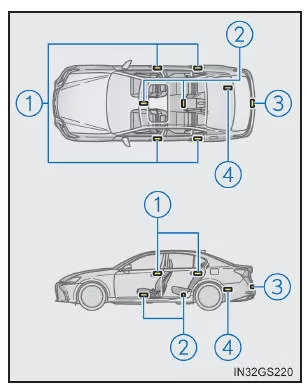
- Antennas outside the cabin (vehicles with smart entry)
- Antennas inside the cabin
- Antennas outside the luggage compartment (vehicles with smart entry)
- Antenna in the luggage compartment
Detection range (areas in which the electronic key is detected)
 When locking and unlocking the doors (vehicles with smart entry).
The system can be operated when the electronic key is within a range of 0.7 m of an outside door handle.
(Only doors that detect the key can be operated.)
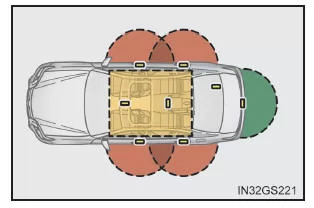
 When opening the luggage compartment (vehicles with smart entry)
The system can be operated when the electronic key is within a range of 0.7 m of the luggage compartment opener button.
 When starting the engine or changing the engine switch modes
The system can be operated when the electronic key is inside the vehicle.
Alarms and warning indicators
An audible alarm and a warning message on the multi-information display are intended to protect against vehicle theft and accidents caused by incorrect operation.
If a warning message is displayed, take the action indicated in the message. If only an audible alarm sounds, the following situations exist, which can be resolved with the corrective actions indicated.
| Alarm | Situation | Corrective action |
| The exterior alarm sounds once for 5 seconds | The luggage compartment was closed while the electronic key was still inside the luggage compartment and all doors were locked. | Remove the electronic key from the luggage compartment and close the luggage compartment lid. |
| An attempt was made to lock the vehicle while a door was open. | Close all doors and lock the doors again. | |
| The interior alarm sounds continuously | The engine switch was set to ACCESSORY mode while the driver's door was open (or the driver's door was opened while the engine switch was in ACCESSORY mode). | Turn the engine switch off and close the driver's door. |
Battery-saving function (vehicles with smart entry)
The battery-saving function is activated to prevent the batteries of the electronic key and the vehicle battery from discharging when the vehicle is not driven for an extended period.
- In the following situations, it may take somewhat longer to unlock the doors with the smart entry and start system.
- If the intelligent access and start system has not been used for 14 days or longer, the doors can only be unlocked using the driver's door. In this case, touch the driver's door handle or use the remote control or mechanical key to unlock the doors.
Battery-saving function of the electronic key
When the battery-saving function is activated, battery discharge is minimized by turning off the radio reception of the electronic key.
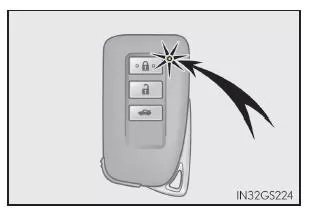
Press twice , while
 holding. Make sure that the electronic key indicator flashes 4 times.
When the battery-saving function is activated, the intelligent access and start system cannot be used. To deactivate the function, press any button on the electronic key.
Conditions affecting the function
The intelligent access and start system operates using weak radio waves. In the following situations, communication between the electronic key and the vehicle may be impaired so that the intelligent access and start system, the remote control and the immobilizer do not function properly.
- When the electronic key battery is discharged
- Near a TV tower, power station, gas station, radio station, large display, airport or other facility that generates strong radio waves or electrical noise
- When the electronic key comes into contact with or is covered by any of the following metallic objects
- When other remote control keys (which also transmit radio waves) are used in close proximity
- When you carry the electronic key together with any of the following devices that transmit radio waves
- When window tint film with metallic components or metallic objects are attached to the rear window
- When the electronic key is placed near a charger or other electronic device
Notes on the access function (if equipped)
- Even when the electronic key is within the operating range (detection area), the system may not operate properly in the following cases:
- Do not leave the electronic key on top of the instrument panel or near the door pockets when you leave the vehicle. Depending on radio wave reception conditions, it may be detected by the antenna outside the vehicle, so the doors may be locked from outside and the electronic key may be locked inside the vehicle.
- As long as the electronic key is within the operating range, anyone can lock or unlock the doors. However, only the doors that detect the electronic key can be used to unlock them.
- The doors may lock or unlock automatically if a large amount of water sprays against the door handle, for example in rain or in a car wash, while the electronic key is within the operating range. (If the doors are neither opened nor closed, they will automatically lock again after approx. 30 seconds.)
- If the remote control is used to lock the doors while the electronic key is near the vehicle, the doors may not be unlocked by the access function. (To unlock the doors, use the remote control.)
- If you touch the door handle lock sensor while wearing gloves, the sensor may respond slowly or not at all.
- If the door handle gets wet while the electronic key is within the operating range, the doors may lock and unlock several times in succession.
To prevent this when washing the vehicle, proceed as follows:
- If the electronic key is inside the vehicle and a door handle gets wet while washing the vehicle, a message may appear on the multi-information display and a warning buzzer will sound outside the vehicle. To turn off the alarm, lock all doors.
- The function of the lock sensor may be affected if it comes into contact with ice, snow, mud, etc. Clean the lock sensor and try operating it again, or use the lock sensor on the underside of the door handle.
- A sudden approach to the detection area or the door handle may prevent the doors from unlocking. In this case, return the door handle to its original position and make sure the doors have unlocked before pulling the door handle again.
- If you touch the door handle while wearing gloves, the door may not unlock.
- If another electronic key is within the detection area, the doors may take slightly longer to unlock after the door handle is touched.
Notes on the Push-Button Start System
- Even if the electronic key is within the detection area (operating range), the system may not operate properly if the electronic key is on the instrument panel, rear package tray, floor, in a door pocket or in the glove box when starting the engine or changing engine switch modes.
- Even if the electronic key is not inside the vehicle, the engine may be started if the electronic key is near a window.
If the vehicle is not driven for an extended period
- Vehicles with smart entry function: To prevent vehicle theft, make sure the electronic key is not within 2 m of the vehicle.
- The smart entry & start system can be deactivated in advance.
How to Operate the System Properly
- Make sure you have the electronic key with you when operating the system. Do not hold the electronic key too close to the vehicle when operating the system from outside. Depending on the position and holding angle of the electronic key, it may not be detected correctly and the system may not operate properly. (The alarm may be triggered unintentionally or the lock-out prevention function may not work.)
- Never leave the electronic key in the luggage compartment.
Depending on the location of the key (near a spare tire [if equipped], on the inner edge of the luggage compartment), its surrounding conditions (in a metal case, near metallic objects) and the radio waves in the surrounding area, the lock-out prevention function may not work.
If the smart entry & start system does not operate properly
- Locking/unlocking the doors and opening the trunk: Use the mechanical key.
- Starting the engine
Customization
You can change settings (e.g., of the smart entry & start system).
If the smart entry & start system has been deactivated by a customized setting
- Locking/unlocking the doors and opening the trunk: Use the remote control or the mechanical key.
- Starting the engine or changing engine switch modes
- Turning off the engine
WARNING
Precautions regarding interference with electronic devices
- Users of implantable cardiac pacemakers, cardiac resynchronization therapy pacemakers or implantable cardioverter defibrillators should always maintain an appropriate distance from the antennas of the smart entry & start system. Radio waves may interfere with the operation of these devices. The entry function can be deactivated if necessary. Ask your Lexus dealer or authorized repairer, or another qualified and properly equipped repair facility, for more information about the frequency and timing of the radio waves. Then consult your doctor to determine whether the entry function should be deactivated.
- Users of electrical medical devices other than implantable cardiac pacemakers, cardiac resynchronization therapy pacemakers or implantable cardioverter defibrillators should check with the manufacturer of their device regarding its operation under the influence of radio waves. Radio waves may have unexpected effects on the operation of such medical devices.
For further details on deactivating the entry function, contact any Lexus dealer or authorized repairer, or another qualified and properly equipped repair facility.
The smart entry & start system in the Lexus GS 2016–2020 combines comfort with high security. Drivers can control the doors, trunk and engine without actively operating a key – ideal for modern everyday use. The antennas and sensors are positioned to ensure reliable detection.
Special features such as battery-saving functions and audible warning signals protect against misuse and make the system easier to use. This makes the Lexus GS GRL1 a benchmark in its class.
Test yourself
A quick Lexus GS quiz: every answer comes with an explanation and a link to the manual page.