Opening, Closing and Locking the Doors and Trunk. Doors
The door and trunk controls of the Lexus GS (4th generation, L10, 2016–2020) combine convenience with advanced security technology. This chapter explains the functions of the Smart Entry system, the remote control and the mechanical key, from automatic locking when driving off to child locks for the rear doors. Special notes cover automatic alarm activation, the welcome lighting and safe handling when batteries are depleted. This keeps your Lexus GS reliable and secure in every situation.
Unlocking and Locking the Doors from Outside
Smart Entry & Start System (Vehicles with Entry Function)
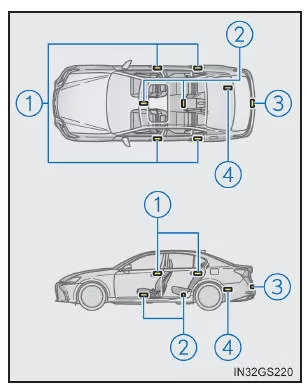
To use this function, you must carry the electronic key with you.
- Grasp the door handle to unlock the doors. Make sure to touch the sensor on the back of the handle. Once the doors have been locked, they cannot be unlocked for 3 seconds.
- To lock the doors, touch the lock sensor (the recess on the top of the door handle). Make sure the door is locked properly.
Remote Control

- Lock all doors. Make sure the door is locked properly.
Hold to close the windows and sunroof. (If equipped)*
- Unlock all doors. Hold to open the windows and sunroof. (If equipped)*
*: Customization of these settings must be performed at a Lexus dealer or authorized repairer, or another qualified workshop with the appropriate equipment.
Operating Signals
The hazard warning lights flash to indicate that the doors have been locked or unlocked.
(Locked: once; Unlocked: twice)
Safety function
If no door is opened within approx. 30 seconds of unlocking the vehicle, the security function automatically locks the vehicle again.
Welcome Light Control
The front parking lights, tail lights and license plate lights turn on automatically at night when the doors are unlocked using the entry function or remote control while the headlight switch is in the "AUTO" position.
If the door cannot be locked using the lock sensor on the top of the door handle (vehicles with entry function)
If the door does not lock when you touch the upper sensor area, try touching the upper and lower sensor areas at the same time.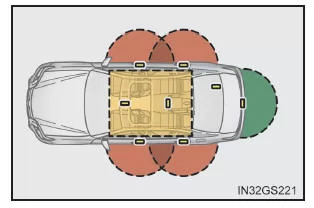
Door Lock Warning Buzzer
If you attempt to lock the doors while a door is not fully closed, a warning buzzer sounds for 5 seconds. Close the door fully to stop the buzzer, then lock the vehicle again.
Setting the Alarm System
Locking the doors activates the alarm system.
If the Smart Entry & Start System or the remote control does not operate properly
- Use the mechanical key to lock and unlock the doors. (→P. 618)
- Replace the key battery if it is depleted.
WARNING
Observe the following precautions.
Otherwise, fatal or serious injuries may result.
When using the remote control to operate the power windows or sunroof (if equipped)
Before operating the power windows or the sunroof, make sure that no passenger's body part can become trapped in a window or the sunroof. Also make sure that children do not operate the remote control.
Children or other passengers could become trapped in the window or sunroof.
Anti-pinch function
- Never try to trap a body part in order to intentionally activate the anti-pinch function.
- If an object becomes trapped when the window or sunroof is almost closed, the anti-pinch function may not activate.
Locking and unlocking the doors from inside
Power door lock switch

- Lock all doors
- Unlock all doors
Interior door lock buttons

- Lock the door
- Unlock the door
The front doors can be opened by pulling the inside door handle even when the interior door lock buttons are in the locked position.
Locking the front doors from outside without a key
- Set the interior door lock button to the locked position.
- Close the door while pulling the door handle.
The door cannot be locked if the engine switch is in ACCESSORY or IGNITION ON mode, or if the electronic key has been left in the vehicle. However, the key may not be detected correctly, and the door may still lock.
Rear door child lock

When the child lock is activated, the door cannot be opened from inside.
- Unlocking
- Lock
These locks can be activated to prevent children from opening the rear doors. Push down the door switch on each rear door to lock both rear doors.
Automatic door lock and unlock systems
You can enable or disable the following functions:
For information on customizing the functions, refer to.
| Function | Operation |
| Speed-sensing door lock function | All doors lock automatically when the speed reaches approx. 20 km/h or more. |
| Shift-linked door lock function | All doors lock automatically when the shift lever is moved to a position other than "P". |
| Shift-linked door unlock function | All doors unlock automatically when the shift lever is moved to "P". |
| Driver door-linked door unlock function | All doors unlock when the driver's door is opened within approx. 45 seconds after the engine switch is turned off. |
Switching the door unlock function (vehicles with smart entry system)
You can select which doors are unlocked by the smart entry function when using the remote control.
- Turn the engine switch off.
- To prevent the alarm from being triggered unintentionally while changing the setting, disable the intrusion sensor and tilt sensor of the alarm system. (If equipped)
- If the indicator light on the key does not illuminate, press and hold
 or
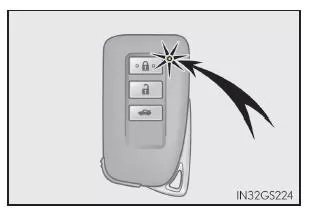 for approx. 5 seconds while pressing and holding
 and hold.
The setting changes each time the button is pressed, as described below. (To change the setting several times in succession, release the buttons, wait at least 5 seconds, and then repeat step 3.)
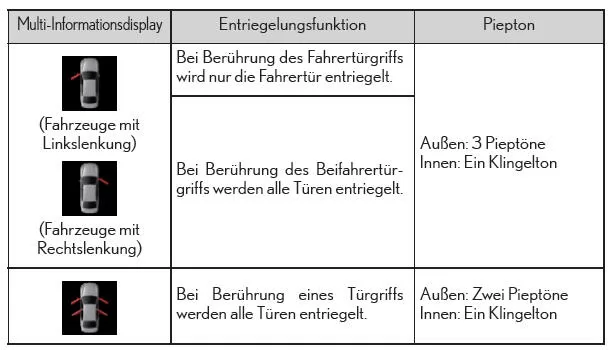
For vehicles with an alarm system: To prevent the alarm from being triggered unintentionally, after changing the settings, unlock the doors with the remote control and open and close a door. (If no door is opened within 30 seconds after pressingthe doors will lock again and the alarm system will be armed automatically.) If the alarm is triggered, cancel it immediately.
Automatic door unlock system in the event of a collision
If the vehicle is subjected to a strong impact, all doors will unlock. However, depending on the severity of the impact or the type of accident, this system may not activate.
Using the Mechanical Key
The doors can also be locked and unlocked with the mechanical key.
Conditions that affect the operation of the smart entry & start system or the remote control
Customization
You can change the settings (e.g. the key unlock function).
WARNING
How to avoid accidents
Observe the following precautions while driving.
Failure to observe these precautions may cause a door to open and an occupant to be thrown from the vehicle, which may result in death or serious injury.
- Make sure that all doors are properly closed.
- Do not pull on the inside door handles while driving. Pay particular attention to the front doors, as they can be opened even when the interior door lock buttons are in the locked position.
- Activate the rear door child locks when children are seated in the rear seats.
Opening and closing the doors of the Lexus GS GRL1 is especially convenient thanks to the smart entry & start system. Whether by sensor, remote control or mechanical key, this sports sedan offers versatile operating options. Every entry becomes an experience.
The combination of safety features such as child locks, automatic locking and warning signals underlines the premium character of the Lexus GS 4th generation. Driver and passengers enjoy the highest level of safety on every trip.
Thoughtful details such as the welcome lighting and convenient operation make the Lexus GS GRL1 an ideal choice for modern drivers who want to combine technology and safety.
Test yourself
A quick Lexus GS quiz: every answer comes with an explanation and a link to the manual page.