Drive Mode Selection
Drive Mode Selection (Automatic Transmission)
Drive mode selection is a function that allows you to switch the vehicle's drive mode.
When Sport mode is selected, the vehicle's response to accelerator pedal input is increased. Use Sport mode when you want faster response from the vehicle, for example when merging onto an expressway or when overtaking.
CAUTION
Do not use Sport mode on slippery road surfaces, such as after rain or snowfall. It may cause excessive wheel slip.
CAUTION
When Sport mode is selected, driving is performed at higher engine speeds and fuel consumption may increase. Mazda recommends turning off Sport mode during normal driving.
The drive mode cannot be changed under the following circumstances:
While the ABS/TCS/DSC systems are operating
During sudden steering maneuvers.
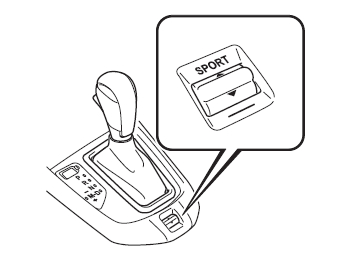
Drive Mode Selector Switch
Push the drive mode selector switch toward the marking (forward)
to select Sport mode.
Pull the drive mode selector switch toward the marking (rearward)
to turn off Sport mode.
CAUTION
Sport mode is also turned off when the ignition is switched off.
Depending on driving conditions, after Sport mode is selected the vehicle may downshift or accelerate slightly.
Mode Indicator Light
When Sport mode is selected, the indicator light for the selected drive mode illuminates in the instrument cluster.
CAUTION
If the mode cannot be switched to the selected drive mode, the indicator light for the selected drive mode flashes to notify the driver.
Test yourself
A quick Mazda 2 quiz: every answer comes with an explanation and a link to the manual page.