Rear view camera
The rear view camera displays the view behind the vehicle when reversing.
WARNING
Always exercise caution when reversing and check the conditions behind and to the sides of the vehicle yourself. Reversing only with the rear view camera may cause an accident or a collision with an object in the vehicle's path. The rear view camera is only an auxiliary device used when reversing. The image shown on the screen may differ from the actual situation.
CAUTION
Do not use the rear view camera in the following circumstances. Using the rear view camera in the following circumstances is dangerous and may result in injury and/or vehicle damage.
- Driving on roads covered with ice or snow
- Driving with snow chains or the spare wheel installed.
- Driving with the trunk lid not fully closed.
- The vehicle is parked on an incline.
When the display is cold, the image may move on the display, or be darker than usual and not reflect the actual situation. Always exercise caution when reversing and check the conditions behind and to the sides of the vehicle yourself.
Do not apply pressure to the camera. Its position or mounting angle may change.
Do not disconnect, modify, or remove the camera, as this may cause it to lose its water resistance.
The camera cover is made of plastic. Do not use degreasers, solvents, wax, or abrasive cleaners to clean it. If such a substance is spilled on the camera, wipe it off immediately with a soft cloth.
Do not wipe the camera cover vigorously, polish it with abrasive materials, or use a stiff brush. You may damage the camera cover, causing image distortion.
CAUTION
If water, snow, or mud covers the camera lens, wipe it with a soft cloth. If you cannot clean it this way, use a mild detergent.
If the camera temperature changes rapidly (from warm to cold, or from cold to warm), the rear view monitor may not function properly.
Before replacing the tires, contact a specialist workshop; we recommend a Mazda Authorized Dealer. Replacing the tires may cause the guide lines shown on the display to shift.
If the front, side, or rear of the vehicle has been involved in a collision, the rear view monitor camera setting (position, installation angle) may be incorrect. Always consult a specialist workshop; we recommend Mazda Authorized Dealers.
Rear view camera location
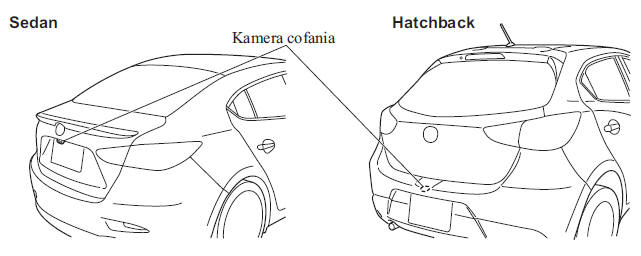
Switching to the rear view camera display
To display the rear view camera, shift the gear selector lever to the R position with the ignition switch in the ON position.
CAUTION
When the gear selector lever is moved out of the R position, the display returns to the function that was previously shown.
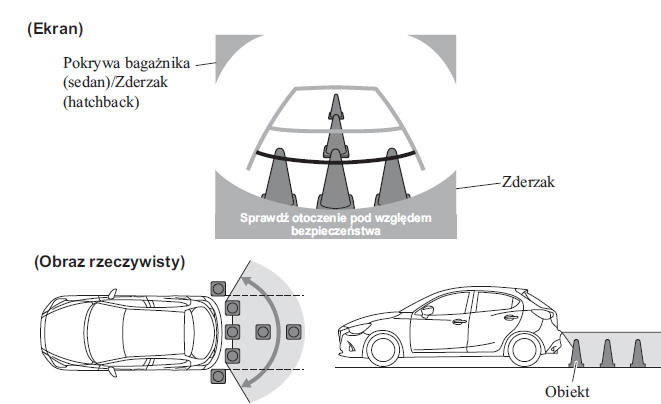
Area shown on the screen
The image shown on the screen may differ from the actual situation.
CAUTION
The displayed area depends on the vehicle and road conditions.
The displayed area is limited. Objects located below the bumper and at its ends will not be displayed.
Due to the specific design of the camera, the distance shown on the screen may differ from the actual distance.
Some optional equipment may be captured by the camera.
Do not install additional items that may affect the camera's field of view, such as light-emitting or reflective elements.
The displayed image may be unclear in the following circumstances, although this is not related to a system malfunction.
In dark areas.
When the temperature around the camera is low/high.
When the camera is wet, for example in rain or when humidity is high.
When a foreign substance, such as mud, adheres to the camera.
When the camera reflects sunlight or the lights of another vehicle.
The image may be displayed with a delay if the temperature around the camera is low.
Viewing the display
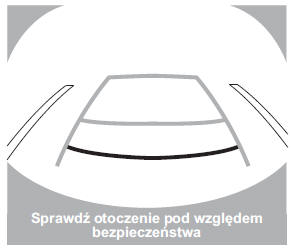
The guide lines indicating the vehicle width (yellow) are displayed on the screen as a reference for the approximate width of your vehicle relative to the width of the parking space into which you intend to reverse.
Use this display mode when parking in marked parking spaces or in garages.
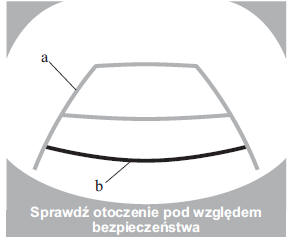
a) Guide lines indicating the vehicle width (yellow). These guide lines serve as a reference for the approximate width of the vehicle.
b) Distance lines.
These lines indicate the approximate distance measured from the rear of the vehicle (from the end of the rear bumper).
The red and yellow lines indicate distances of approximately 50 cm (red) and approximately 100 cm (yellow) from the rear bumper (at the center point of each line).
CAUTION
The guide lines on the screen are fixed lines. They are not synchronized with the steering wheel rotation by the driver. When reversing, be careful and always check the area behind the vehicle and the surroundings directly within your line of sight.
Rear View Camera Operation
The operation of the rear view camera may vary depending on traffic volume, road conditions, or the condition of the vehicle. The steering range and the time required to complete a maneuver also vary depending on circumstances, so always check the situation around the vehicle yourself and adjust your driving to the conditions.
Always keep the above warnings in mind when using the rear view camera.
CAUTION
The images from the rear view camera shown on the screen are reversed (mirror image).
1. Move the shift lever to the R position to display the rear view camera image.
2. After checking the surrounding conditions, reverse the vehicle.
Display view
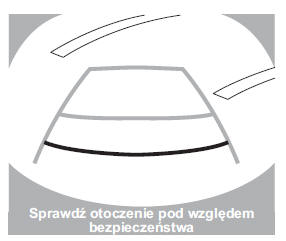
Vehicle view
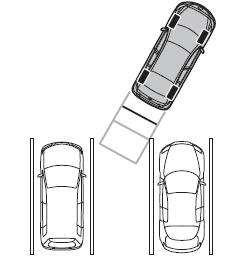
3. When your vehicle begins to enter the parking space, slowly continue reversing so that the distances between the vehicle width lines and the sides of the parking space on the left and right are almost identical.
4. Steer until the vehicle width lines are parallel to the lines of the right and left sides of the parking space.
5. When they are parallel to each other, straighten the wheels and slowly reverse the vehicle into the end of the parking space. Continue to monitor the area around the vehicle, then stop it in the best possible position. (If the parking space has marked dividing lines, check that the vehicle width lines are parallel to them.)
Display view
Vehicle view
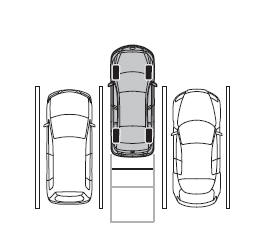
6. When the shift lever is moved from the R position to another position, the display returns to the previously displayed function.
CAUTION
Because differences may exist between the image shown on the screen, as illustrated below, and the actual conditions when parking, always check that there is no hazard behind the vehicle and observe the surroundings directly within your line of sight.
- In the parking space (or garage) shown in the illustration below, although the end line and the distance lines on the monitor appear to be parallel, in reality they may deviate somewhat from this indication.
- When parking in a space with a dividing line marked on one side only, this line and the vehicle width line may appear parallel on the monitor, but in reality they may deviate from this indication.
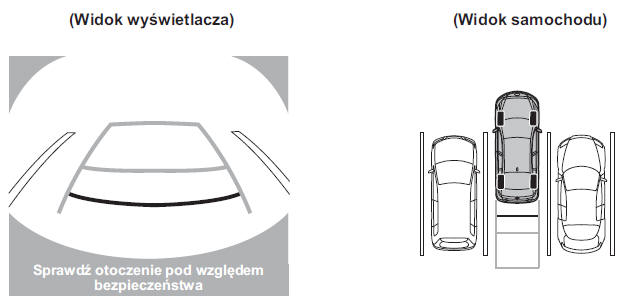
Differences between the displayed image and the actual situation
Differences may exist between the displayed image and the actual situation on the road.
Such a change in distance perspective may lead to an accident. Remember the cases in which differences in distance perspective may occur.
When the rear of the vehicle is loaded
When the rear of the vehicle is lowered, objects appear to be farther away than they actually are.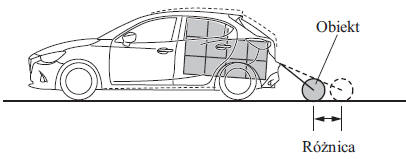
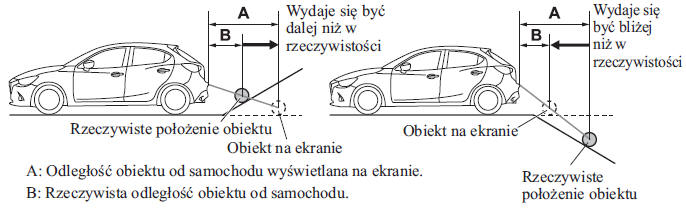
When the terrain behind the vehicle changes
When the terrain behind the vehicle slopes upward, objects on the screen appear to be farther away than they actually are. When the terrain behind the vehicle slopes downward, objects on the screen appear to be closer than they actually are.
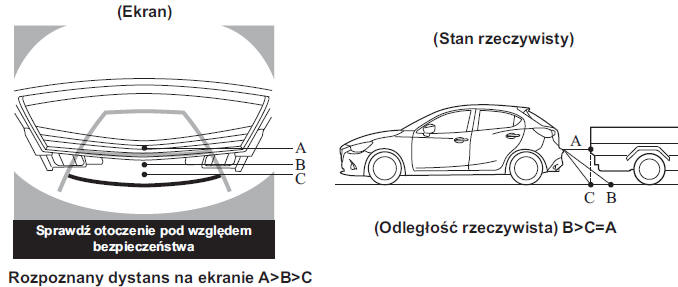
Three-dimensional object behind the vehicle
Because the distance lines refer to a flat surface, the distance to a three-dimensional object shown on the screen differs from its actual distance.
Adjusting image quality
WARNING
Always adjust the rear view camera image quality while the vehicle is stopped. Do not adjust the rear view camera image quality while driving. Adjusting the rear view camera image quality - i.e., brightness, contrast, color and color saturation - while driving is dangerous because it may distract the driver, which may lead to an accident.
Image quality can be adjusted when the shift lever is in the R position.
Four parameters can be adjusted: brightness, contrast, color saturation and color.
When making adjustments, pay attention to the conditions around the vehicle.
1. Select the icon on the screen to
display the individual options.
2. Select the desired item.
3. Adjust brightness, contrast, color saturation and color using the slider.
If you need to reset the setting, press the reset button.
4. Select the icon on the screen to
close the option.
Test yourself
A quick Mazda 2 quiz: every answer comes with an explanation and a link to the manual page.