Cruise control
Using cruise control, you can set and automatically maintain any speed above approximately 25 km/h.
WARNING
Do not use cruise control in the following conditions: Using cruise control may be dangerous and may cause loss of control of the vehicle in the conditions below.
- Hilly terrain
- Steep hills
- Heavy or unpredictable traffic
- Slippery or winding roads
- Similar conditions that require frequent speed changes
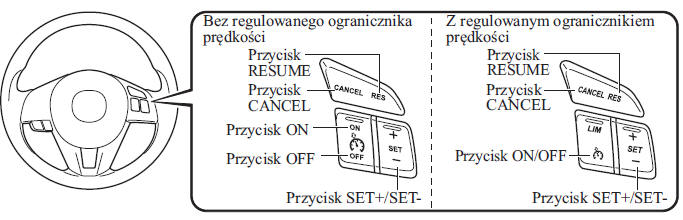
Cruise control switch
Main cruise control indicator (amber) / Cruise control set indicator (green)
 The indicator lamp can
illuminate in two colors.
Main cruise control indicator (amber)
The indicator lamp illuminates amber when cruise control is activated.
Cruise control set indicator (green)
The lamp illuminates green when a driving speed has been set.
- On/Off
With adjustable speed limiter
To turn the system on, press the ON/OFF button. The main cruise control indicator (amber) will illuminate.
To turn the system off, press the button again.
The main cruise control indicator (amber) will turn off.
Without adjustable speed limiter
To activate the system, press the ON button. The main cruise control indicator (amber) will illuminate.
To turn cruise control off, press the OFF button.
The main cruise control indicator (amber) will turn off.
WARNING
Always turn cruise control off when not in use: Leaving cruise control in standby when not in use is dangerous, because you may accidentally press one of the buttons and unexpectedly activate cruise control. This may cause loss of control of the vehicle and an accident.
To set the speed
1. (With adjustable speed limiter) Turn on cruise control by pressing the ON/OFF button. The main cruise control indicator (amber) will illuminate.
(Without adjustable speed limiter) Turn on cruise control by pressing the ON button. The main cruise control indicator (amber) will illuminate.
2. Accelerate to the speed you want to set. It must be higher than 25 km/h.
3. Press and release the SET + or SET - button once the vehicle reaches the desired speed. Cruise control will be set at the moment the SET + or SET - button is pressed.
At the same time, release the accelerator pedal. The cruise control set indicator (green) will illuminate.
CAUTION
Release the SET + or SET - button when the vehicle reaches the desired speed. Holding the SET + button will increase the speed further, and holding the SET - button will decrease it (except when the accelerator pedal is pressed).
When driving uphill, the vehicle may temporarily slow down; when driving downhill, it may speed up.
Cruise control will turn off if the vehicle speed drops below 21 km/h, even if cruise control is active when driving uphill.
Cruise control will turn off if the vehicle speed drops about 15 km/h below the set speed (this may happen when climbing a long, steep hill).
To increase driving speed while cruise control is on
Follow the instructions below.
To increase speed using the cruise control switch
Press and hold the SET + button.
Your vehicle will accelerate. Release the switch when the desired speed is reached.
Press the SET + button briefly and release it to adjust the set speed.
Pressing it repeatedly will increase the set speed by the number of presses.
Increasing speed by a single press of the SET + button
Vehicle speedometer reading in km/h: 1 km/h Vehicle speedometer reading in mph: 1.6 km/h
Increasing speed using the accelerator pedal
Press the pedal to accelerate to the desired speed. Then press and release the SET + or SET - button immediately.
CAUTION
Press the accelerator pedal if you want to temporarily increase speed while cruise control is on.
Acceleration will not affect or change the set speed. Release the accelerator pedal to return to the set speed.
To decrease driving speed while cruise control is on
Press and hold the SET - button.
The vehicle will decelerate gradually.
Release the switch when the desired speed is reached.
Press the SET - button briefly and release it to adjust the set speed.
Pressing it repeatedly will decrease the set speed by the number of presses.
Decreasing speed by a single press of the SET - button
Vehicle speedometer reading in km/h: 1 km/h Vehicle speedometer reading in mph: 1.6 km/h
To resume cruise control operation at a driving speed above 25 km/h
If you have turned off the system without using the OFF button (for example, by pressing the brake pedal) and the system is still active, the last set speed will be restored automatically when the RESUME button is pressed.
If the vehicle speed drops below 25 km/h, increase the speed to at least 25 km/h and press the RESUME button.
Temporary Deactivation
To temporarily disengage cruise control, use one of the following methods:
- Lightly press the brake pedal.
- Press the clutch pedal (manual transmission only).
- Press the CANCEL button.
If the RESUME button is pressed when the vehicle speed is 25 km/h or higher, the system returns to the previously set speed.
Disarming
With adjustable speed limiter
To turn the system off, press the ON/OFF button.
Without adjustable speed limiter
To turn cruise control off, press the OFF button.
Test yourself
A quick Mazda 2 quiz: every answer comes with an explanation and a link to the manual page.