Windows
Power windows
WARNING
Make sure all passengers have their hands, arms, etc. inside the vehicle when it is moving and before raising the windows. Use the window lock switch to prevent accidental operation of the power windows.
Never leave children unattended in the vehicle. They could accidentally operate the switches or power window controls and become trapped in a window opening. Children left unattended in a vehicle could be involved in serious accidents.
The power windows can be operated when the ignition switch is in the ON position or for a certain period after the ignition is turned off. However, power window operation is disabled if the driver's or front passenger's door is opened during this period.
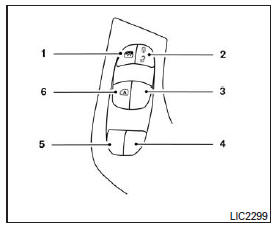
- Window lock switch
- Power door lock switch
- Front passenger side
- Rear right passenger side
- Rear left passenger side
- Driver's side auto switch
Driver's side power window switch assembly
The driver's side switch assembly has controls that allow you to open or close all of the vehicle's windows.
To open a window, press the control to the first detent and hold it there until the window reaches the desired position.
To close a window, pull the switch up to the first detent and hold it until the window reaches the desired position.
Front passenger power window switch
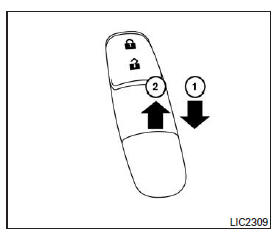
The front passenger power window switch only operates the front passenger's power window. To open the window, press the switch down to the first detent and hold it until the window reaches the desired position 1 . To close the window, pull the switch up to the first detent and hold it until the window reaches the desired position 2 .
Rear power window switches
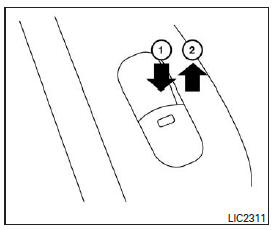
The rear power window switches open and close the power window for the corresponding passenger. To open the window, press and hold the switch 1 . To close the window, pull the switch up 2 .
Passenger window lockout
Only the driver's window can be opened or closed when the window lock switch is pressed. To unlock the windows, press the switch again.
Automatic operation
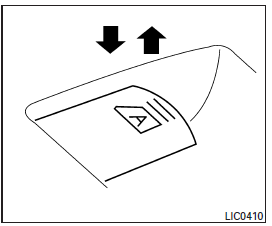
To fully open a window with the one-touch auto function, press the window switch to the second detent and release it. There is no need to hold it.
The window opens fully. To stop the window while it is opening, pull the switch up.
To fully close a window with the one-touch auto function, briefly pull the corresponding switch up to the second detent. There is no need to hold it in position.
To stop the window while it is closing, press the switch down.
Auto reverse function
If the control module detects an object caught in the window opening while the window is closing, the window immediately lowers.
The auto reverse function can be activated if the one-touch auto close function is used when the ignition switch is in the ON position, or for a certain period after the ignition is turned off.
The auto reverse function can also be activated by an impact or load that has the same effect as an object caught in the window opening, depending on the environment or driving conditions.
WARNING
Some very small areas close to the fully closed position are not covered by the detection function. Make sure nothing is in the window opening (for example, passengers' hands) before closing the windows.
When the power window auto mode does not operate
If the auto mode does not operate properly, perform the following procedure to initialize the power window switch.
- Turn the ignition switch to the ON position.
- Press and hold the driver's window switch until the window is fully open.
- Release the switch.
- Pull and hold the driver's window switch up to the second detent until the window is fully closed.
Continue holding the window switch in the raised position for five seconds after the window is fully closed. (Perform this entire step by pulling the window switch up only once.)
- Release the switch.
Initialization is complete. The power window auto mode should now operate normally.
If the auto mode still does not operate properly after performing the steps above, consult a NISSAN dealer for assistance.
No initialization is required for the other windows' switches.
Test yourself
A quick Nissan Altima quiz: every answer comes with an explanation and a link to the manual page.