Speed limiter
Function Overview
The desired maximum speed can be set using the cruise control switch. The speed limiter prevents the vehicle from exceeding the set speed.
Vehicles with monochrome display
- Indicator
- Speed limiter button
- Set speed
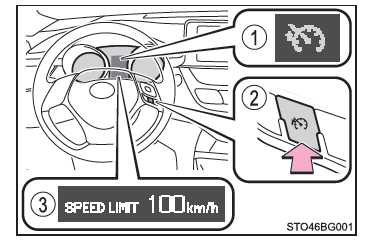
Vehicles with color display
- Indicator
- Speed limiter button
- Set speed
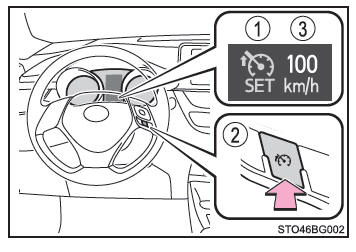
Setting the vehicle speed
1. Press the button to turn on the speed limiter.
Press the button again to turn off the speed limiter.
*1: Vehicles with monochrome display
*2: Vehicles with color display
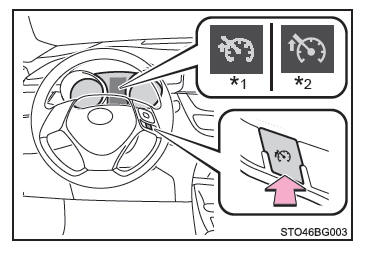
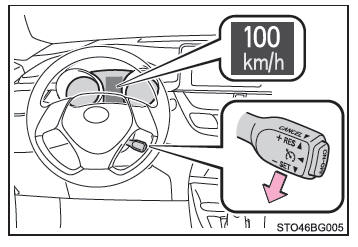
2. Accelerate or decelerate to the desired speed, then push the switch down to set the desired maximum speed.
If you push the switch while the vehicle is traveling below 30 km/h, the speed will be set to 30 km/h.
Monochrome display
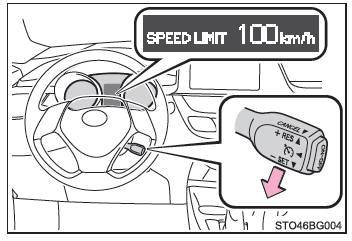
Color display
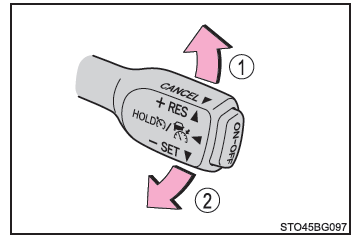
Setting the Set Speed
- Increase speed
- Decrease speed
Hold the switch in position until the desired speed is reached.
You can make a minor adjustment to the set speed by lightly tapping the switch up or down and then releasing it.
Canceling and resuming the speed limiter
- Cancel
Pull the switch toward you to cancel the speed limiter. - Resume
To resume speed-limited driving, push the switch up.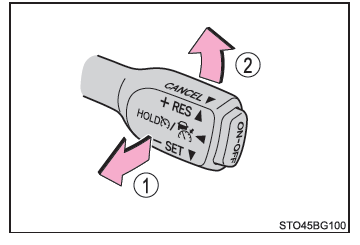
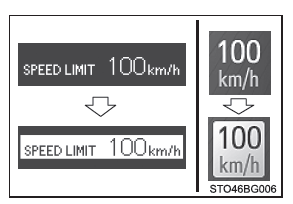
■ Exceeding the set speed In the following situations, the vehicle speed may exceed the set speed and the characters will be highlighted:
- When the accelerator pedal is fully depressed
- When driving downhill (a buzzer also sounds)
■ Automatic cancellation of the speed limiter
The speed limiter is automatically canceled in the following situations:
- Cruise control is on.
- When the VSC and/or TRC system is turned off by pressing the VSC OFF switch.
■ If the message "Check speed limiter system." is shown on the multi-information display Stop the vehicle in a safe place, switch the ignition off and then back on, and set the speed limiter again. If you cannot set the speed limiter, the system may be malfunctioning. Even if you can use it normally, have the vehicle inspected by a Toyota dealer, a Toyota authorized repairer, or any reliable repairer.
WARNING■ To prevent accidental operation of the speed limiter Set the speed limiter button to off when you are not using it.
■ Situations in which the speed limiter should not be used Do not use the speed limiter in the following situations.
Doing so may result in loss of vehicle control and cause a serious or fatal accident.
- On slippery roads (for example wet, icy or snow-covered roads)
- On steep downhill roads
- When towing a trailer or when towing in an emergency