RSA (Road Sign Assist)
Function overview
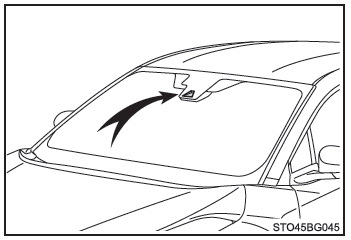
RSA recognizes certain road signs using the camera sensor and informs the driver via the multi-information display.
If the system determines that the vehicle is exceeding the speed limit, making prohibited maneuvers, etc., relative to the recognized road sign, it alerts the driver with a warning message and an alert sound*.
*: This function must be customized.
WARNING■ Before using RSA Do not place excessive trust in the RSA system. RSA is a system that assists the driver by providing information, but it does not replace the driver's own vision or awareness of the situation.
Drive carefully, always paying close attention to traffic rules.
Any improper or careless driving may lead to an unpredictable accident.
Display on the multi-information display
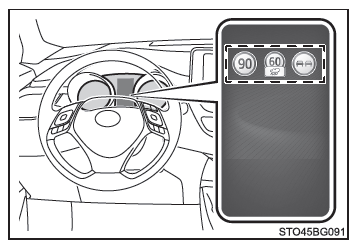
Once the camera sensor has recognized a sign, it is displayed on the multi-information display when the vehicle passes it.
- When driving support system information is selected, the system can display up to 3 signs.
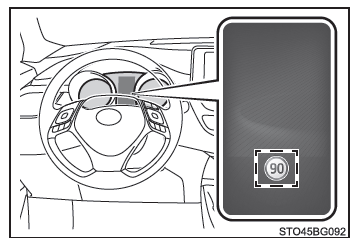
- When an option other than driving support system information is selected, the system can display speed limit signs or end-of-all-prohibitions signs.
The system does not display no-passing signs or speed limit signs accompanied by a supplementary plate.
However, if it recognizes signs other than speed limit signs, it displays them stacked below the speed limit sign currently in effect.
Types of road signs recognized
The types of road signs recognized, including electronic and flashing signs, are as follows.
A recently introduced road sign or one that is not official (not compliant with the Vienna Convention) may not be recognized.
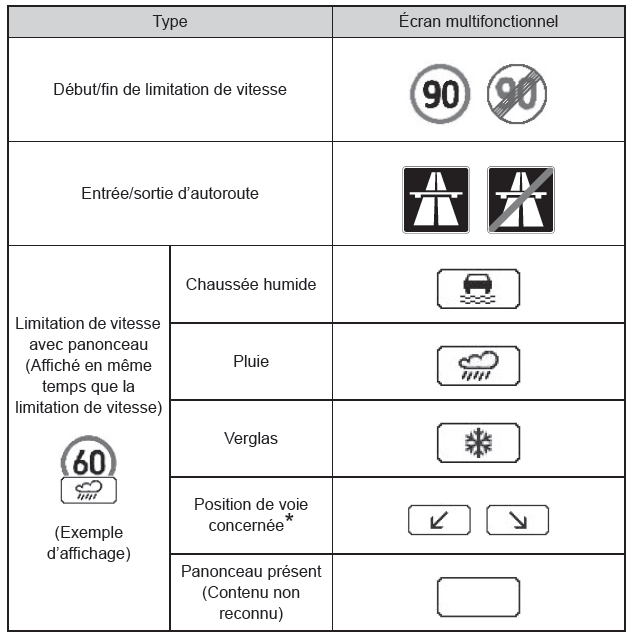
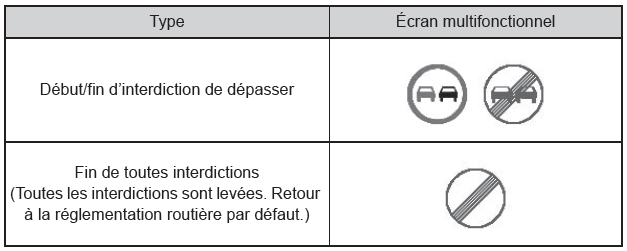
*: If you do not use the turn signal when changing lanes, the supplementary plate is not displayed.
Alert display
In the following situations, the RSA system warns the driver by means of an alert display.
- When the vehicle is traveling above the speed alert threshold applied to the speed limit of the sign displayed on the multi-information display, the colors of the sign are reversed.
- If the system detects that your vehicle is overtaking another vehicle while a no-overtaking sign is displayed on the multi-information display, the sign flashes.
■ Automatic deactivation of RSA sign display One or more signs disappear automatically in the following situations.
- No new sign is recognized over a certain distance.
- The road changes due to a left or right turn, etc.
■ Conditions in which the function may not operate or may not detect correctly In the following situations, the RSA may not operate normally and may fail to recognize signs, or display an incorrect sign, etc. However, this does not indicate a malfunction.
- The camera sensor is misaligned after a severe impact, etc.
- The part of the windshield near the camera sensor is dirty or covered with snow, an adhesive, etc.
- In bad weather, such as heavy rain, fog, snow or sandstorms
- The camera sensor is directly exposed to light from an oncoming vehicle, the sun, etc.
- The sign is dirty, faded, tilted or bent, or in the case of an electronic sign, the contrast is poor.
- The sign is wholly or partially hidden by tree leaves, a pole, etc.
- The sign is only visible to the camera sensor for a short moment.
- The driving situation (turning, changing lanes, etc.) is incorrectly assessed.
- Even though the sign does not apply to the lane the vehicle is traveling in, it is detected immediately after a freeway junction, or in an adjacent lane just before the merge.
- Stickers are attached to the rear of the vehicle ahead.
- A road sign resembling a compatible sign is recognized by the system.
- The vehicle is driven in a country where traffic drives on the opposite side of the road.
- Speed signs on an adjacent road may be detected and displayed (if they are within the field of view of the camera sensor) while the vehicle is driving on the main road.
- Speed signs at a roundabout exit may be detected and displayed (if they are within the field of view of the camera sensor) while the vehicle is driving in the roundabout.
- The speed information displayed on the instrument cluster may differ from that shown by the navigation system (on equipped models), because the navigation system uses map data.
■ When driving in a country that uses a different speed unit As the RSA recognizes signs based on the speed unit set for the instrument cluster, it is necessary to change this setting.
Set the instrument cluster to the speed unit used by the signs in the area where you are driving.
■ Activating/deactivating the system
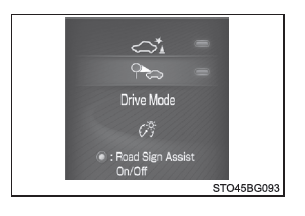
1. Press the or
 on the instrument selector and select
 .
2. Press or
 on the instrument selector and select
 , then press
 .
■ Display of speed limit signs If a speed limit sign was displayed on the multi-information display when the ignition switch was turned off, the same sign will be displayed again when the ignition switch is turned to "ON" (vehicles without a smart entry & start system) or to IGNITION ON mode (vehicles with a smart entry & start system).
■ Customization The settings of certain functions can be changed (e.g. the alert threshold for exceeding the speed limit).