Toyota Parking Assist-sensor
The distance between your vehicle and nearby obstacles when parking parallel or maneuvering in a garage is measured by the sensors and communicated via the multi-information display and an audible signal. Always look around the vehicle when using this system.
Sensor Types
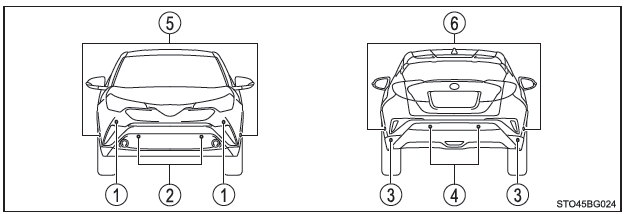
- Front corner sensors
- Front center sensors
- Rear corner sensors
- Rear center sensors
- Front side sensors
- Rear side sensors
Turning the Toyota Parking Assist-sensor System On/Off
You can use the multi-information display to turn this system on or off.
1. Press the or
 Using the instrument panel selector, select
 .
2. Press or
 Using the instrument panel selector, select
 .
3. Press meter switch to turn the system on or off.
When the Toyota parking assist-sensor system is on, its indicator light comes on.
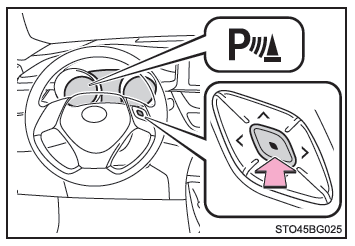
Once you turn the Toyota parking assist-sensor system off, it remains OFF until you turn it back ON via the multi-information display. (The system does not automatically switch back ON when you restart the engine.)
Display
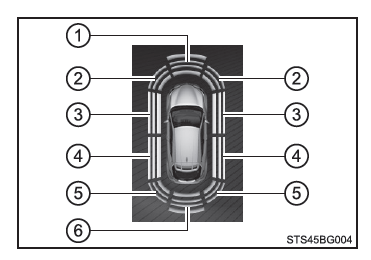
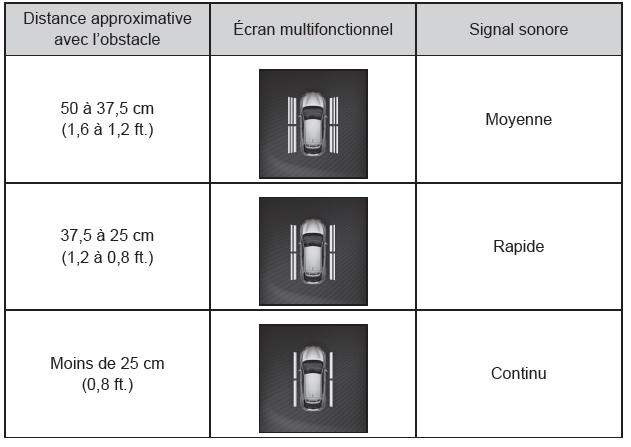
When the sensors detect an obstacle, a graphic display appears on the multi-information display. The display changes depending on the position and distance of the obstacle.
- Front center sensor active
- Front corner sensor active
- Front side sensor active
- Rear side sensor active
- Rear corner sensor active
- Rear center sensor active
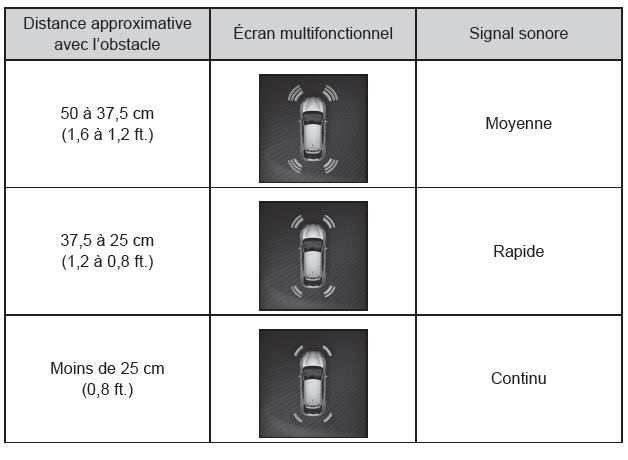
Distance Display and Audible Signal
When a sensor detects an obstacle, the display shows the direction and approximate distance of the obstacle, and the audible signal sounds.
The volume and rhythm of the audible signal can be adjusted.
■ Corner sensors
■ Side sensors
■ Center sensors
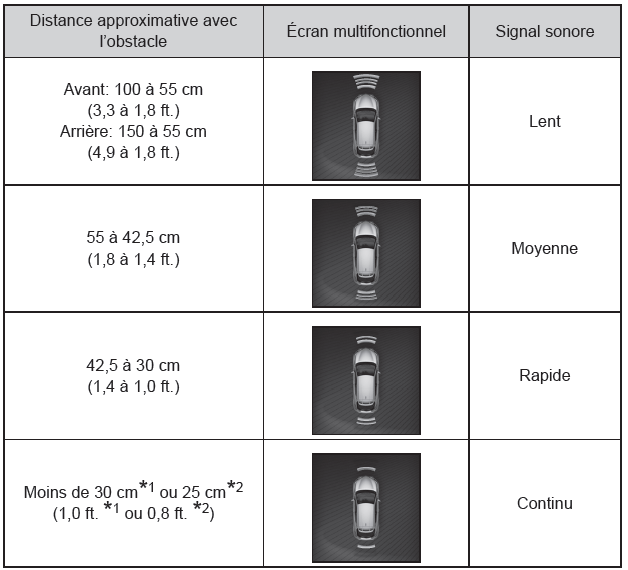
*1: The S-IPA system is not operating.
*2: The S-IPA system is operating.
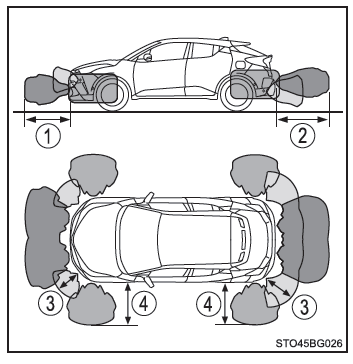
Sensor Detection Range
- Approx. 100 cm (3.3 ft.)
- Approx. 150 cm (4.9 ft.)
- Approx. 50 cm (1.6 ft.)
- Approx. 50 cm (1.6 ft.)
- The detection range is shown in the illustration on the right. However, the sensor cannot detect an obstacle that is too close.
- For more details on detecting obstacles on the sides,
- The distance at which an obstacle can be detected, and whether it can be detected at all, depends on its shape and condition.
The obstacle detection range can be configured.
■ Toyota Parking Assist-sensor System Operating Conditions
Vehicles without smart entry & start system: The ignition switch is ON.
Vehicles with a smart entry & start system: The engine switch is in IGNITION ON mode.
- Front corner sensors/front center sensors:
- Vehicles with Multidrive: The shift lever is not in P.
- The vehicle is traveling below approx. 10 km/h
- Front side sensors/rear side sensors:
- Vehicles with Multidrive: The shift lever is not in P.
- The vehicle is traveling below approx. 10 km/h
- The steering wheel is turned more than approx. 90°
- Rear corner sensors/rear center sensors: The shift lever is in R.
■ Useful Information About Sensor Detection
- The sensor detection areas are limited to the area around the vehicle bumpers.
- Depending on the shape of the obstacle and other factors, the detection distance may be shorter, or detection may not be possible.
- Obstacles may not be detected if they are too close to the sensor.
- There will be a short delay between obstacle detection and the display. Even when driving at low speed, if you get too close to an obstacle before the system activates the display and audible signal, they may not activate at all.
- Thin poles or objects lower than the sensor may not be detected as the vehicle approaches them, even if they were detected once before.
- It may be difficult to hear the beeps due to the audio system volume or the noise of air flow from the air conditioning system.
■ Side Obstacle Warning Function
When an obstacle on the side of the vehicle is within the vehicle's path while moving forward or in reverse, this function alerts the driver using the display and audible signal.
- Obstacle not alerted (outside the vehicle's path)
- Calculated vehicle path
- Obstacle alerted (within the vehicle's path)
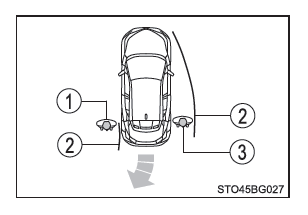
- Only side obstacles within the vehicle's path will alert the driver (display and audible signal).
- The display is active whether the vehicle is stopped or moving, but the audible signal sounds only while the vehicle is moving.
■ Side Obstacle Detection
- Side obstacles may not be detected until analysis is complete. After you turn the ignition switch ON (vehicles without smart entry & start system) or the power switch to ON mode (vehicles with smart entry & start system), the vehicle must be driven for a short time for analysis to complete. The function display is grayed out until analysis is complete.
- When an obstacle such as another vehicle, pedestrian, or animal is detected by the side sensors, it may continue to be detected even after it has left the side sensor's detection area.
■ If "Clean parking assist sensor." is displayed on the multi-information display A sensor may be dirty or covered with snow or frost. In this case, clean the sensor and the system should return to normal operation.
If the sensor is covered with ice in very cold weather, a warning message may be displayed or an obstacle may not be detected. Once the sensor thaws, the system should return to normal operation.
■ If the message "Parking Assist Malfunction" is shown on the multi-information display The system may not be operating due to a faulty sensor.
Have the vehicle inspected by a Toyota dealer, an authorized Toyota repairer, or any reliable repairer.
■ Customization The volume of the warning tone can be changed.
WARNING■ When using the Toyota parking assist sensor Observe the following precautions to avoid an unexpected accident.
- Do not exceed the speed limit of 10 km/h.
- The detection areas of the sensors and their response times are limited.
When driving forward or in reverse, make sure the area around the vehicle is clear (especially to the sides) and drive slowly, using the brake to control the vehicle speed.
- Do not install accessories within the detection range of the sensors.
■ Sensors Certain vehicle conditions and environmental factors may affect the ability of the sensors to correctly detect obstacles. Below is a list of specific examples in which this may occur.
- The sensor is dirty, or covered with snow or ice. (Cleaning the sensors will resolve the problem.)
- The sensor is frozen. (Thawing the area around the sensor will resolve the problem.) Particularly in cold weather, if a sensor is frozen, the display may not appear normally, or obstacles may not be detected.
- The sensor is covered in some way.
- In intense sunlight or in very cold weather
- On rough, gravel, sloped, or grassy roads
- The area around the vehicle is noisy due to vehicle horns, motorcycle engines, air brake noise from trucks, or other loud noises that generate ultrasonic waves.
- The sensor is splashed with water or soaked by heavy rain.
- The sensor is soaked with water on a flooded road.
- The vehicle is leaning significantly to one side.
- The vehicle is equipped with a fin antenna or a radio antenna.
- The vehicle is approaching a high or curved curb.
- The detection range is reduced by the presence of an object, such as a road sign.
- The area directly below the bumpers is excluded from the detection range.
- If obstacles are too close to the sensor.
- The bumper or sensor has been subjected to a severe impact.
- The vehicle has been fitted with a suspension system that is not genuine Toyota (lowered suspension, etc.).
- Another vehicle equipped with parking assist sensors is nearby.
- The towing eyelets are installed.
- The vehicle has been fitted with an illuminated license plate, a license plate holder, etc.
In addition to the examples listed above, depending on the shape and condition of obstacles, detection may not be possible or the detection range may be shorter.
WARNING■ Side sensors In the following situations, the clearance sonar may not operate normally, which may lead to an unexpected accident. Drive carefully.
- Obstacles may not be detected on the sides until the vehicle has been driven for a short time and the analysis of the side areas is complete.
- Even after the side area analysis is complete, obstacles such as other vehicles, pedestrians, or animals approaching from the sides cannot be detected.
- Even after the side area analysis is complete, obstacles may not be detected due to the situation around the vehicle.
In this case, the graphic display of the side sensors temporarily disappears.
■ Obstacles that may not be detected correctly
- The shape of an obstacle may prevent the sensors from detecting it. Pay particular attention to the following obstacles:
- Cables, fences, ropes, etc.
- Cotton, snow, or other materials that absorb sound waves
- Objects with protruding corners
- Low obstacles
- Tall obstacles whose upper part overhangs the vehicle
- People may not be detected if they are wearing certain types of clothing.
- Moving obstacles, such as pedestrians or animals
■ When using the Toyota parking assist sensor In the following situations, the system may not operate correctly due to a sensor malfunction or other causes. Have the vehicle inspected by a Toyota dealer, an authorized Toyota repairer, or any reliable repairer.
- The Toyota parking assist sensor display flashes and a beep sounds when no obstacle is detected.
- If the area around a sensor collides with something or is subjected to a severe impact.
- If the bumper collides with something.
- If the display remains on continuously without a beep.
- If a display error occurs, first check the sensor.
If the error occurs when there is no ice, snow, or mud on the sensor, the sensor is very likely faulty.
■ Notes for washing the vehicle Do not direct a strong jet of water or steam at the sensors.
Otherwise, the sensors may malfunction.