Driving Support Systems
To improve driving safety and performance, the following systems operate automatically in response to certain situations. However, never forget that these systems are aids, and you must not place blind trust in them when operating your vehicle.
ABS (Anti-lock Braking System)
Helps prevent the wheels from locking when braking hard or on slippery road surfaces
Brake Assist
Boosts braking force after the brake pedal is depressed when the system detects an emergency braking situation
VSC (Vehicle Stability Control)
Helps the driver control skidding during swerving or cornering on slippery road surfaces
VSC+ (Vehicle Stability Control+)
Coordinates the ABS, TRC, VSC and EPS systems. Helps maintain directional stability during swerving on slippery road surfaces by regulating steering action.
TRC (Traction Control)
Helps maintain traction and prevents the drive wheels from spinning when starting or accelerating on slippery road surfaces
Hill-start Assist Control
Helps limit backward rolling of the vehicle when starting on a hill
Dynamic Torque Control 4WD System (4WD models) Automatically controls the distribution of torque and power between the front wheels and all four wheels (4WD) according to driving conditions, which helps improve stability and handling. For example, the system switches to 4WD when cornering, climbing a slope, starting or accelerating, and whenever the road is slippery due to snow, rain, etc.
EPS (Electric Power Steering)
Uses an electric motor to reduce the effort required to turn the steering wheel
Trailer Sway Control
Helps the driver control trailer sway by selectively and individually applying the brakes on the wheels and reducing engine torque when sway is detected.
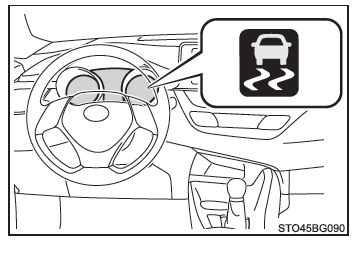
When the TRC/VSC systems are operating
The loss of traction indicator flashes while the TRC/VSC systems are operating.
Turning off the TRC system
If the vehicle is stuck in mud or snow, the TRC system may reduce the engine power available to the wheels. Press to turn off the system and make it easier to rock the vehicle forward and backward to free it.
To turn off the TRC system, briefly press and release .
A message is displayed on the multi-information display.
Press again to turn the system back on.
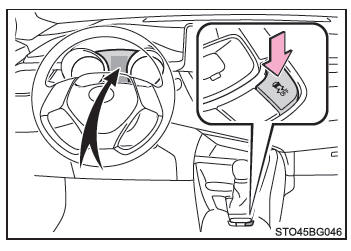
■ Turning off the TRC and VSC systems To turn off the TRC and VSC systems, press and hold for more than 3 seconds while the vehicle is stopped.
The VSC OFF indicator light comes on and a message is displayed on the multi-information display.* Press again to turn the system back on.
*: On vehicles equipped with the Pre-Collision System, the Pre-Collision Emergency Brake Assist and the Pre-Collision Braking will also be deactivated. The PCS warning light illuminates and a message appears on the multi-information display.
■ When the multi-information display shows that the TRC system has been deactivated even though you have not pressed the The TRC system is inoperative. Contact a Toyota dealer, an authorized Toyota repairer, or any reliable repairer.
■ Noises and vibrations caused by the ABS, Brake Assist, VSC, TRC and Hill-start Assist Control systems
- A distinctive noise may be heard from the engine compartment when the brake pedal is pressed repeatedly, when the engine is started, or immediately after the vehicle starts moving. This noise does not indicate a malfunction of any of these systems.
- The following phenomena may occur when any of these systems is operating. None of them indicates a malfunction.
- Vibrations may be felt through the vehicle body and steering wheel.
- An electric motor noise may also be heard after the vehicle has stopped.
- Slight pulsations may be felt in the brake pedal after the ABS activates.
- The brake pedal may sink slightly after the ABS activates.
■ EPS operation noise When you turn the steering wheel, the operation is accompanied by an electric motor noise (whirring). This does not indicate a malfunction.
■ Automatic reactivation of the TRC and VSC systems When the TRC and VSC systems have been deactivated, they are automatically reactivated under the following conditions:
- Vehicles without the smart entry & start system: When the power switch is set to "LOCK"
Vehicles with the smart entry & start system: When the power switch is turned off - If only the TRC system has been deactivated, it reactivates as soon as the vehicle speed increases.
If both the TRC and VSC systems have been deactivated, automatic reactivation does not occur even when the vehicle speed increases.
■ Reduced EPS operation EPS operation is reduced to prevent overheating if the steering wheel is operated frequently for an extended period. As a result, the steering may feel heavy. In this case, avoid excessive steering or stop the vehicle and turn off the engine. The EPS system should return to normal within 10 minutes.
■ Conditions for Hill-start Assist Control operation When all of the following four conditions are met, Hill-start Assist Control operates:
- Vehicles with a Multidrive transmission: The shift lever is not in P or N (when moving forward or backward on an incline to start the vehicle).
- Vehicles with a manual transmission: The shift lever is not in R when starting on an incline in forward gear, or it is in R when starting on an incline in reverse.
- The vehicle is stopped.
- The accelerator pedal is released.
- The parking brake is not applied.
■ Automatic deactivation of Hill-start Assist Control Hill-start Assist Control is deactivated in the following situations:
- Vehicles with a Multidrive transmission: The shift lever is moved to P or N.
- Vehicles with a manual transmission: The shift lever is moved to R to start on an incline in forward gear, or to a position other than R to start on an incline in reverse.
- The accelerator pedal is pressed.
- The parking brake is applied.
- Approximately 2 seconds after the brake pedal is released.
■ Conditions in which the ABS does not operate normally
- The tire grip limits have been exceeded (for example, heavily worn tires on a snow-covered road).
- The vehicle hydroplanes while driving at high speed on wet or slippery roads.
■ Stopping distance with the ABS operating may be longer than under normal conditions The ABS is not designed to shorten the vehicle's stopping distance. Always keep a sufficient safe distance from the vehicle ahead, particularly in the following situations:
- When driving on dirt, gravel or snow-covered roads
- When driving with snow chains installed
- When driving over obstacles on the road
- When driving on roads with potholes or uneven surfaces
■ Conditions in which the TRC/VSC systems do not operate effectively The road is so slippery that, even with the TRC/VSC systems operating, it is not possible to maintain sufficient traction and directional control.
Drive carefully when conditions may cause the vehicle to lose traction and stability.
■ Conditions in which Hill-start Assist Control does not operate effectively
- Do not rely solely on Hill-start Assist Control.
Hill-start Assist Control may not operate effectively on steep slopes and icy roads.
- Unlike the parking brake, Hill-start Assist Control is not intended to hold the vehicle in place for an extended period. Never use Hill-start Assist Control to hold the vehicle on a slope, as this may cause an accident.
■ When the VSC system is operating The skid control indicator light flashes. Always drive carefully. Reckless driving may cause an accident. Exercise extreme caution when the indicator light is flashing.
WARNING■ When the TRC/VSC systems are turned off Stay especially alert and adjust your speed to traffic conditions. The TRC/VSC systems are designed to help maintain the vehicle's stability and directional control, so only turn them off when necessary.
The trailer sway control is an integral part of the VSC system, and it does not operate if the VSC system is turned off or malfunctioning.
■ Replacing tires Make sure that all tires conform to the recommendations for size, brand, tread pattern and total load capacity. In addition, make sure the tires are always inflated to the recommended tire inflation pressure.
The ABS, TRC and VSC systems will not function properly if the vehicle is fitted with tires of different types.
Contact a Toyota dealer, a Toyota-approved repairer, or any reliable repairer for further information when you need to replace tires.
■ Tire and suspension behavior Using tires with any problem and modifying the suspension affect the driving assist systems and may cause one of them to malfunction.
■ Precautions with the trailer sway control The trailer sway control system cannot prevent the trailer from swaying in all situations.
Several factors, such as the condition of the vehicle, trailer or road surface, or traffic conditions, may cause the trailer sway control system to be ineffective. Refer to the owner's manual for your trailer for further information on proper towing practices.
WARNING■ If the trailer starts to sway
Observe the following precautions.
Failure to do so could result in serious or fatal injury.
- Hold the steering wheel firmly. Keep the vehicle travelling in a straight line.
Do not try to regain control of trailer sway by turning the steering wheel.
- Immediately begin to release the accelerator pedal, but very gradually, to reduce speed.
Do not accelerate. Do not apply the vehicle brakes.
If you do not make excessive steering or brake corrections, the vehicle and trailer should stabilize.