All-speed dynamic radar cruise control
Function Overview
In dynamic radar cruise control mode, the vehicle automatically accelerates, decelerates and stops to follow the speed changes of the vehicle ahead, without the driver having to operate the accelerator pedal. In constant speed control mode, the vehicle travels at a steady set speed.
Use all-speed dynamic radar cruise control on motorways and expressways.
- Dynamic radar cruise control mode
- Constant speed control mode
- Display
- Indicators
- Set speed
- Following distance button
- Cruise control switch
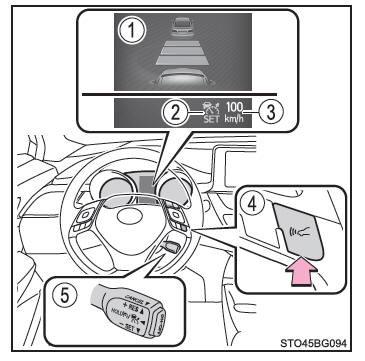
■ Before using all-speed dynamic radar cruise control On the road, the driver alone is responsible for safety.
Do not place excessive trust in the system, and drive carefully, always paying close attention to your surroundings.
All-speed dynamic radar cruise control assists the driver by reducing part of the driving workload. However, there are limits to the assistance provided.
Even when the system operates normally, the driving conditions of the vehicle ahead as detected by the system may differ from those perceived by the driver. Therefore, the driver must always remain alert, assess the danger of each situation and drive carefully. Relying on the system or assuming that it can guarantee safety while the vehicle is in motion is an error that may lead to a serious or fatal accident.
■ Warnings regarding driving assist systems Observe the following precautions, as there are limits to the assistance provided by the system.
Failure to do so may result in a serious or fatal accident.
- Driver assistance in judging distance between vehicles
The full-speed-range active cruise control is only intended to help the driver judge the distance between their vehicle and the vehicle ahead. It must not be used as a reason to drive carelessly or inattentively, nor is it a system that can assist the driver in poor visibility. The driver must always remain fully attentive to everything around the vehicle. - Driver assistance in judging the correct distance between vehicles
The full-speed-range active cruise control determines whether the distance between the driver's vehicle and the vehicle ahead is within a defined range. It cannot judge anything else. The driver must therefore remain alert at all times and be able to determine whether a hazard exists in any given situation. - Driver assistance in taking action with the vehicle
The full-speed-range active cruise control has limited ability to prevent or avoid a collision with the vehicle ahead. If any hazard exists, the driver must immediately take direct control of the vehicle and act appropriately to ensure the safety of everyone.
■ To prevent accidental activation of the full-speed-range active cruise control When you are not using the full-speed-range active cruise control, switch it off with the "ON-OFF" button.
■ Situations in which the full-speed-range active cruise control must not be used Do not use the full-speed-range active cruise control in any of the following situations.
You may not be able to control the vehicle speed, which could cause a serious or fatal accident.
- On roads used by pedestrians, cyclists, etc.
- In heavy traffic
- On roads with very tight bends
- On winding roads
- On slippery roads (for example wet, icy or snow-covered roads)
- On steep downhill slopes or on roads with frequent closely spaced climbs and descents
The vehicle speed may exceed the set speed on steep downhill slopes. - On motorway and expressway access ramps
- When weather conditions are so poor that the sensors cannot detect properly (fog, snow, sandstorm, heavy rain, etc.)
- When the area in front of the radar sensor or camera sensor is covered by rain, snow, etc.
- When traffic conditions require repeated acceleration and deceleration
- When your vehicle is towing a caravan or trailer, or during emergency towing
- When the proximity warning buzzer sounds frequently
Driving in vehicle-distance control mode
This mode uses a radar sensor to detect vehicles up to approximately 100 m (328 ft.) ahead of your vehicle, to measure the distance between your vehicle and the vehicle ahead and to keep that distance at a sufficient value.
Note that the distance between vehicles tends to decrease on long downhill slopes.
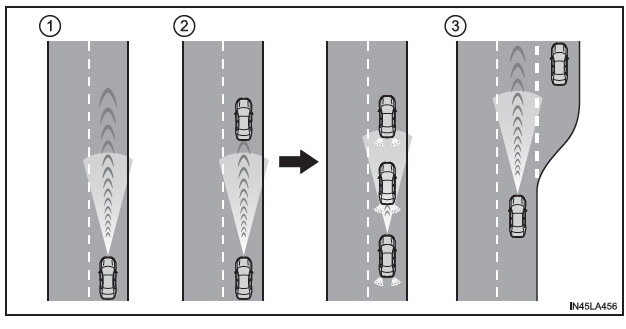
- Example of constant cruise speed
When there is no vehicle ahead
The vehicle travels at the speed set by the driver. You can also set the desired distance between vehicles using the corresponding button. - Example of deceleration and variable cruise speed
When a slower vehicle appears ahead
When a vehicle is detected ahead of yours, the system automatically reduces the vehicle speed. If further deceleration is required, the system applies the brakes (the brake lights come on at this time).The system responds to changes in the speed of the vehicle ahead in order to keep the distance between vehicles set by the driver constant.
A proximity warning alerts you when the system cannot reduce the speed sufficiently to prevent your vehicle from getting too close to the vehicle ahead.
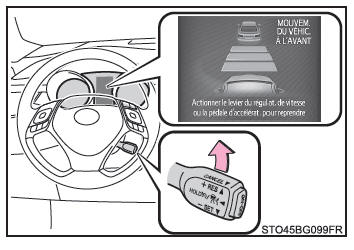
When the vehicle ahead stops, your vehicle also stops (under system control). After the vehicle ahead starts moving again, push the cruise control stalk up or press the accelerator pedal to resume driving at variable cruise speed.
- Example of acceleration
When no vehicle ahead is travelling slower than the set speed
The system accelerates the vehicle until it reaches the set speed. The system then returns to constant cruise control mode.
Setting the vehicle speed (vehicle-distance control mode)
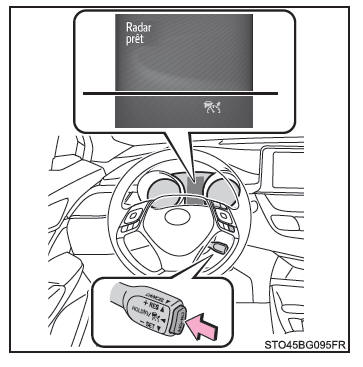
1. Press the "ON-OFF" button to turn on the cruise control.
The cruise control active indicator light comes on and a message is displayed on the multi-function display.
Press the button again to turn off the cruise control.
If you press and hold the "ON-OFF" button for more than 1.5 seconds, the system activates in constant cruise control mode.
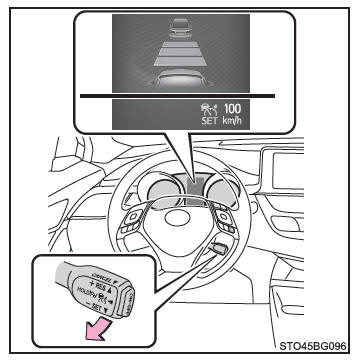
2. Accelerate or decelerate the vehicle to the desired speed (above approximately 50 km/h [30 mph]) using the accelerator pedal, then push the stalk down to set the speed.
The cruise control "SET" indicator light comes on.
The speed at which the vehicle is travelling when you release the stalk becomes the set speed.
If you operate the control lever while the vehicle is traveling below approx. 50 km/h and is following another vehicle, the set speed is corrected to approx. 50 km/h.
Setting the Set Speed
To change the set speed, push the control lever down/up until the desired speed is displayed.
- To increase the speed
(Except when the vehicle has stopped under system control in distance control mode) - To decrease the speed
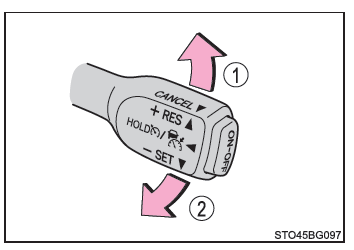
Fine adjustment: Tap the control lever in the desired direction.
Large adjustment: Push and hold the control lever up or down to change the speed, then release it when the desired speed is reached.
In distance control mode, the set speed is increased or decreased as follows:
Fine adjustment: By 5 km/h*1 or 8 km/h*2 each time the control lever is tapped
Large adjustment: Increased or decreased in steps of 5 km/h*1 or 8 km/h*2 while the control lever is held
In constant speed cruise control mode, the set speed is increased or decreased as follows:
Fine adjustment: By 1 km/h*1 or 1.6 km/h*2 each time the control lever is tapped
Large adjustment: The speed continues to change while the control lever is held.
*1: When the set speed is displayed in "km/h"
*2: When the set speed is displayed in "MPH"
Changing the Following Distance (distance control mode)
Press the button to select the following distance as follows:
- Long
- Medium
- Short
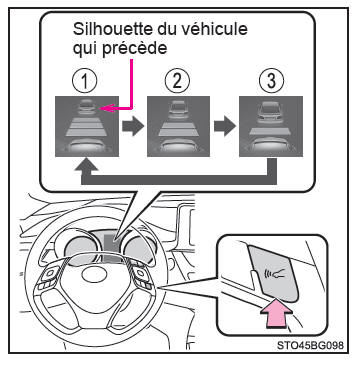
The following distance is automatically set to the longest setting when the ignition switch is set to "ON" (vehicles without the smart entry and start system) or to IGNITION ON mode (vehicles with the smart entry and start system).
If a vehicle is ahead of you on the road, a vehicle icon is also displayed to indicate it.
Following Distance Values (distance control mode)
Select a distance from the table below. The distances shown are for a vehicle speed of 80 km/h. The following distance increases or decreases depending on the vehicle speed. When the vehicle has stopped under system control, the following distance is approx. 3 m (10 ft.) to 5 m (16 ft.), regardless of the following distance setting selected.
| Distance Options | Following Distance |
| Long | Approx. 50 m (160 ft.) |
| Medium | Approx. 40 m (130 ft.) |
| Short | Approx. 30 m (100 ft.) |
Resuming Driving at Variable Cruise Speed When the Vehicle Has Stopped Under System Control (distance control mode)
After the vehicle ahead starts moving again, push the control lever up.
Your vehicle will also resume driving at variable cruise speed if you depress the accelerator pedal after the vehicle ahead starts moving again.
Cancelling and Resuming Cruise Control
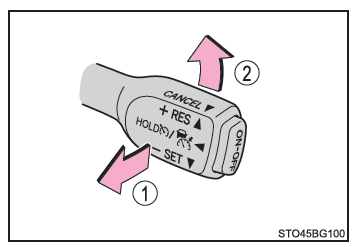
- Pull the control lever toward you to cancel cruise control.
Cruise control is also cancelled when you depress the brake pedal.
(When the vehicle has stopped under system control, the set speed is not cancelled by depressing the brake pedal.)
- Push the control lever up to reactivate cruise control and resume the set speed.
However, when no vehicle is detected ahead of you, cruise control cannot be resumed while the vehicle is traveling below approx. 40 km/h.
Proximity Alert (distance control mode)
If your vehicle follows the vehicle ahead too closely and the cruise control system cannot decelerate the vehicle sufficiently on its own, a warning is given by a flashing display and a warning tone. This may happen when another vehicle cuts in between you and the vehicle ahead. Depress the brake pedal to maintain a sufficient following distance.
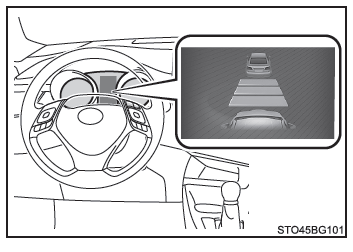
■ Conditions in which alerts may not be triggered In the following cases, alerts may not be triggered even if the following distance is short.
- When the vehicle ahead is traveling at a speed equal to or higher than your vehicle's speed
- When the vehicle ahead is traveling at very low speed
- Immediately after setting the maximum set speed
- When the accelerator pedal is depressed
Selecting Constant Speed Cruise Control Mode
When constant speed cruise control mode is selected, your vehicle maintains the set speed regardless of the following distance. Select this mode only when distance control mode does not operate properly because the radar sensor is dirty.
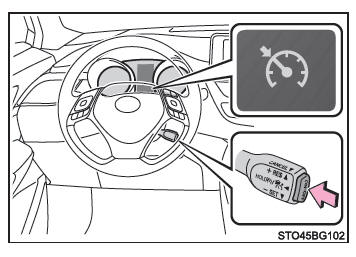
1. With dynamic radar cruise control inactive, press the "ON-OFF" button for more than 1.5 seconds.
Immediately after you press the "ON-OFF" button, the dynamic radar cruise control indicator light comes on. It then changes to the cruise control indicator light.
To select constant speed cruise control mode, dynamic radar cruise control must be inactive when you operate the control lever.
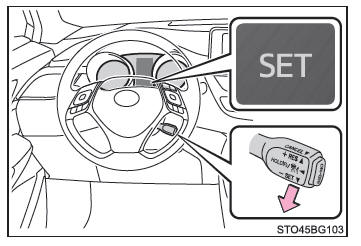
2. Accelerate or decelerate the vehicle to the desired speed (above approximately 50 km/h [30 mph]) using the accelerator pedal, then push the stalk down to set the speed.
The cruise control "SET" indicator light comes on.
The speed at which the vehicle is travelling when you release the stalk becomes the set speed.
■ Conditions for setting dynamic radar cruise control across the full speed range
- The shift lever is in D.
- The vehicle is traveling at more than approximately 50 km/h.
However, when a vehicle is detected ahead of you, you can set dynamic radar cruise control across the full speed range even if the vehicle is traveling below approx. 50 km/h.
■ Acceleration after setting the vehicle speed
The vehicle can accelerate normally by pressing the accelerator pedal.
After acceleration, the set speed is restored. However, in dynamic radar cruise control mode, the vehicle may decelerate to a speed lower than the set speed in order to maintain the distance from the vehicle ahead.
■ Automatic cancellation of dynamic radar cruise control mode
Dynamic radar cruise control mode is automatically cancelled in the following situations.
- The actual vehicle speed drops below approximately 40 km/h when there is no vehicle ahead.
- The vehicle ahead leaves the lane while your vehicle is following it at a speed below approximately 40 km/h. Otherwise, the sensor is unable to detect the vehicle properly.
- The VSC system is operating.
- The TRC system has been operating for some time.
- When you turn off the VSC system or TRC system by pressing the VSC OFF switch.
- The sensor is unable to detect properly because it is obstructed in some way.
- The pre-collision braking system is active.
- The parking brake is applied.
- The vehicle has stopped on a steep slope under system control.
- The system detects the following while the vehicle is stopped under its control:
- The driver is not wearing the seat belt.
- The driver's door is open.
- The vehicle has been stopped for approximately 3 minutes.
If dynamic radar cruise control mode is automatically cancelled for any other reason, the system may be malfunctioning. Contact a Toyota dealer, an authorized Toyota repairer, or any reliable repairer.
■ Automatic cancellation of constant speed control mode
Constant speed control mode is automatically cancelled in the following situations:
- The actual vehicle speed is lower than the set speed by more than approximately 16 km/h.
- The actual vehicle speed drops below approximately 40 km/h.
- The VSC system is operating.
- The TRC system has been operating for some time.
- When you turn off the VSC system or TRC system by pressing the VSC OFF switch.
- The pre-collision braking system is active.
If constant speed control mode is automatically cancelled for any other reason, the system may be malfunctioning. Contact a Toyota dealer, an authorized Toyota repairer, or any reliable repairer.
■ Dynamic radar cruise control warning messages and chimes over the full speed range
The system uses warning messages and chimes to indicate a malfunction or to alert the driver to the need for increased attention while driving. If a warning message appears on the multi-information display, read it and follow its instructions.
■ When the sensor may not detect the vehicle ahead correctly
In the following cases, depending on the conditions, depress the brake pedal if the deceleration by the system is insufficient, or depress the accelerator pedal when you need to accelerate.
The sensor may not be able to detect these types of vehicles correctly, so the approach alert may not activate.
- Vehicles suddenly cutting in
- Vehicles travelling at reduced speed
- Vehicles not travelling in the same lane
- Narrow vehicles at the rear (empty trailers, etc.)
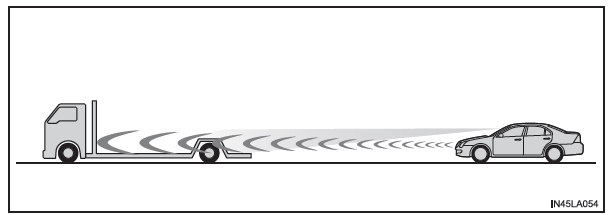
- Motorcycles travelling in the same lane
- When water or snow spray thrown up by surrounding vehicles interferes with sensor detection
- When the front of your vehicle is raised upward (caused by a heavy load in the luggage compartment, etc.)
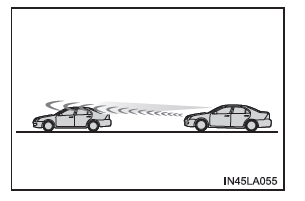
- The vehicle ahead has an extremely high ground clearance
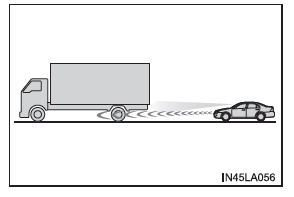
■ Conditions in which dynamic radar cruise control mode may not operate correctly
Under the following conditions, depress the brake pedal (or the accelerator pedal, depending on the situation) as necessary.
The sensor may not be able to detect vehicles ahead of your vehicle correctly, so the system may not operate normally.
- When the road is winding or the lanes are narrow
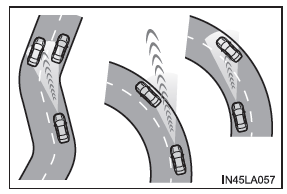
- When you are weaving within your lane or your lane position is unstable
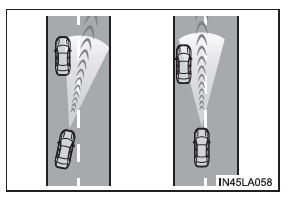
- When the vehicle ahead decelerates suddenly