PCS (Pre-Collision System)
The Pre-Collision System uses a radar sensor and a camera sensor to detect vehicles ahead of your vehicle, as well as pedestrians*. When the system determines that the risk of a frontal collision with another vehicle or a pedestrian is high, it issues an alert to urge the driver to take evasive action and increases the available braking force to help avoid the collision. If the system determines that the risk of a frontal collision with another vehicle or a pedestrian is extremely high, it automatically applies the brakes to help avoid the collision or reduce its severity. You can turn the Pre-Collision System on or off and change the alert timing.
*: Depending on the region where the vehicle is sold, the pedestrian detection function may not be available. For details, contact a Toyota dealer, a Toyota-authorized repairer, or any reliable repairer.
Pre-collision alert
When the system determines that the risk of a frontal collision is high, a warning beep sounds and a message appears on the multi-information display, prompting the driver to take evasive action.
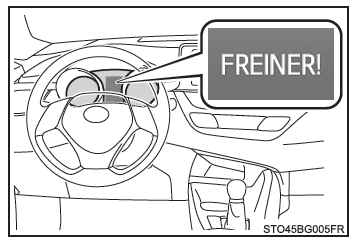
Pre-Collision Emergency Brake Assist
When the system determines that the risk of a frontal collision is high, it automatically increases braking force in proportion to the force you apply to the brake pedal.
Pre-Collision Braking
When the system determines that the risk of a frontal collision is high, it warns the driver. If the system determines that the risk of a frontal collision is extremely high, it automatically applies the brakes to help avoid the collision or reduce the collision speed.
WARNING■ Pre-collision safety system limitations
- The driver is solely responsible for driving safely. Always drive carefully and keep a constant watch on your surroundings.
Never use the pre-collision safety system as a substitute for normal braking under any circumstances. This system cannot avoid collisions or reduce the severity of resulting damage or injuries in all situations. Do not place excessive trust in this system. Failure to do so could cause a serious or fatal accident.
- Although this system is designed to help avoid collisions and reduce their effects, its effectiveness varies depending on conditions. As a result, it may not always be able to provide the same level of performance.
Read the following conditions carefully. Do not place excessive trust in this system and always drive carefully.
- Conditions in which the system may operate even when a collision is not possible
- Conditions in which the system may not operate correctly
- Do not attempt to test the pre-collision safety system yourself. The system may not operate normally, and you could cause an accident.
■ Pre-collision braking
- Pre-collision braking may not operate due to certain driver actions. If the driver firmly depresses the accelerator pedal or turns the steering wheel, the system may judge that an evasive maneuver is being performed and prevent pre-collision braking from activating.
- In certain situations, while pre-collision braking is operating, it may be canceled if the driver firmly depresses the accelerator pedal or turns the steering wheel. The system then judges that an evasive maneuver is being performed.
- If the driver depresses the brake pedal, the system may judge that an evasive maneuver is being performed and may delay the activation of pre-collision braking.
■ When to turn off the pre-collision safety system In the following situations, turn off the system, as it may not operate normally, which could result in a serious or fatal accident:
- When the vehicle is being towed
- When you are using your vehicle to tow another vehicle
- When the vehicle is being transported by truck, ship, train or any similar means of transport
- When the vehicle is raised on a lift with the engine running and the wheels free to turn
- When the vehicle is being tested on a roller test bench, such as a dynamometer or speedometer calibration bench, or when a vehicle-mounted wheel balancer is in use
- When the front bumper or grille has been subjected to a severe impact, due to an accident or any other reason
- If the vehicle can no longer be driven reliably, in particular if it has been involved in an accident or is malfunctioning
- When you are using the vehicle for sport driving or off-road driving
- When the tires are not inflated to the correct pressure
- When the tires are severely worn
- When tires of sizes other than those recommended are fitted
- When snow chains are fitted
- When you are using the compact spare tire or the temporary tire repair kit
- If the vehicle is temporarily fitted with equipment (snow plow, etc.) that may block the radar sensor or camera sensor
Pre-collision safety system settings
■ Turning the pre-collision safety system on/off
Monochrome display
You can turn the pre-collision safety system on/off on the multi-information display as follows. The system is automatically turned on each time the ignition switch is set to "ON".
1. Press "DISP" on the instrument selector and select , then press and hold "DISP".
2. Press "DISP" on the instrument selector and select , then press and hold "DISP".
3. Press "DISP" on the instrument selector and select the on/off mode of the pre-collision safety system.
4. Press and hold "DISP" on the instrument selector to select the setting of your choice (on/off).
If the system is off, the PCS warning light comes on and a message appears on the multi-information display.
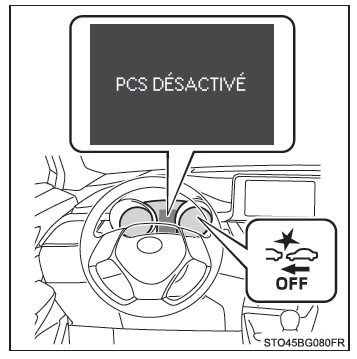
Color display
You can turn the pre-collision safety system on/off on the multi-information display as follows. The system is automatically turned on each time the ignition switch is set to "ON" (vehicles without a smart entry and start system) or to START mode (vehicles with a smart entry and start system).
1. Press the or "
 on the instrument selector and select
 .
2. Press or
 on the instrument selector and select
 , then press
 .
3. Press or
 on the instrument selector and select
 , then press
 to select the setting of your choice (on/off).
If the system is off, the PCS warning light comes on and a message appears on the multi-information display.
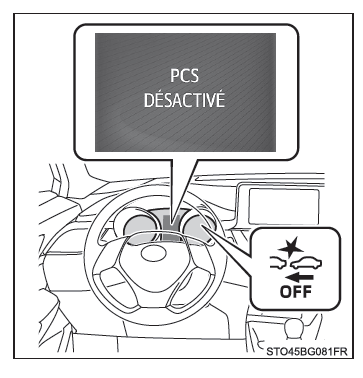
■ Changing the Pre-Collision Warning Timing
Monochrome display
You can change the pre-collision warning timing on the multi-information display as follows. The timing setting is retained when the ignition switch is turned off.
1. Press "DISP" on the instrument selector and select , then press and hold "DISP".
2. Press "DISP" on the instrument selector and select , then press and hold "DISP".
3. Press “DISP” on the instrument cluster selector switch to select the pre-collision warning timing setting, then press and hold “DISP”.
4. Press and hold “DISP” on the instrument cluster selector switch to select the desired setting.
Early
The warning activates earlier than with the default timing.Medium
This is the default setting.Late
The warning activates later than with the default timing.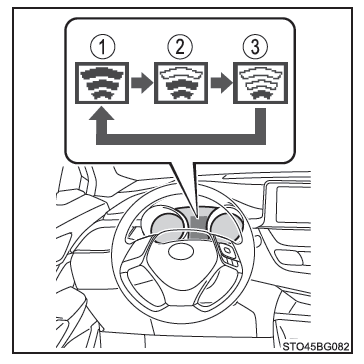
Color display
You can change the pre-collision warning timing on the multi-information display as follows. The timing setting is retained when the ignition switch is turned off.
1. Press the or
 on the instrument selector and select
 .
2. Press or
 on the instrument selector and select
 , then press
 .
3. Press or
 of the instrument cluster selector switch and select “
 Sensitivity”, then press
 to select the desired setting.
Early
The warning activates earlier than with the default timing.Medium
This is the default setting.Late
The warning activates later than with the default timing.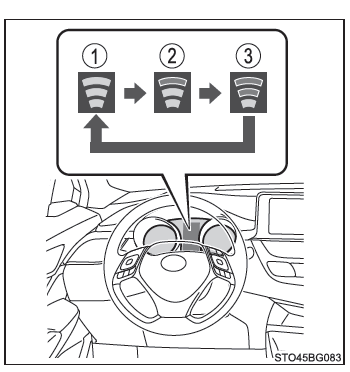
■ Operating Conditions Availability of the pedestrian detection function varies depending on the region where the vehicle is sold.
| Regions | Function Availability |
| Region A | The pedestrian detection function is available |
| Region B | The pedestrian detection function is not available |
Refer to the following for details:
Region A (The pedestrian detection function is available)
The pre-collision safety system is active and has determined that the risk of a frontal collision with another vehicle or a pedestrian is high.
Each function operates at the following speeds:
- Pre-collision warning:
- Vehicle speed is approximately between 10 and 180 km/h.
(For pedestrian detection, vehicle speed is approximately between 10 and 80 km/h [7 and 50 mph].)
- The relative speed between your vehicle and the vehicle or pedestrian ahead is greater than approximately 10 km/h.
- Vehicle speed is approximately between 10 and 180 km/h.
- Pre-collision emergency brake assist:
- Vehicle speed is approximately between 30 and 180 km/h.
(For pedestrian detection, vehicle speed is approximately between 30 and 80 km/h [19 and 50 mph].)
- The relative speed between your vehicle and the vehicle or pedestrian ahead is greater than approximately 30 km/h.
- Vehicle speed is approximately between 30 and 180 km/h.
- Pre-collision braking:
- Vehicle speed is approximately between 10 and 180 km/h.
(For pedestrian detection, vehicle speed is approximately between 10 and 80 km/h [7 and 50 mph].)
- The relative speed between your vehicle and the vehicle or pedestrian ahead is greater than approximately 10 km/h.
- Vehicle speed is approximately between 10 and 180 km/h.
The system may not operate in the following situations:
- If the battery terminal has been disconnected and reconnected, and the vehicle has not been driven for a certain period of time
- If the shift lever is in R
- If the VSC system is turned off (only the pre-collision warning function will operate)
Region B (The pedestrian detection function is not available)
The pre-collision safety system is active and has determined that the risk of a frontal collision with another vehicle is high.
Each function operates at the following speeds:
- Pre-collision warning:
- Vehicle speed is approximately between 15 and 180 km/h.
- The relative speed between your vehicle and the vehicle ahead is greater than approximately 10 km/h.
- Pre-collision emergency brake assist:
- Vehicle speed is approximately between 30 and 180 km/h.
- The relative speed between your vehicle and the vehicle ahead is greater than approximately 30 km/h.
- Pre-collision braking:
- Vehicle speed is approximately between 15 and 180 km/h.
- The relative speed between your vehicle and the vehicle ahead is greater than approximately 10 km/h.
- If the battery terminal has been disconnected and reconnected, and the vehicle has not been driven for a certain period of time
- If the shift lever is in R
- If the VSC system is turned off (only the pre-collision warning function will operate)
■ Pedestrian Detection Function*
The pre-collision safety system detects pedestrians based on the size, profile and movement of the detected object. However, a pedestrian may not be detected if the ambient brightness, or the movement, posture or angle of the detected object, prevents the system from operating normally.
*: Depending on the region where the vehicle is sold, the pedestrian detection function may not be available.
■ Cancelling Pre-Collision Braking
- If either of the following situations occurs while pre-collision braking is operating, it is cancelled:
- You press the accelerator pedal firmly.
- You turn the steering wheel quickly or abruptly.
■ Conditions in Which the System May Operate Even When No Collision Is Possible
- In certain situations such as those described below, the system may determine that a frontal collision is possible and activate.
- When passing a vehicle or pedestrian
- When changing lanes while passing a vehicle ahead of you
- When passing a vehicle ahead of you while it changes lanes
- When passing a vehicle ahead of you while it turns left/right
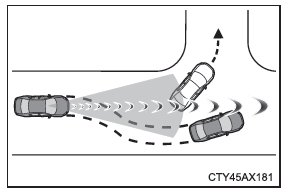
- When passing a vehicle stopped in the opposite lane while it turns right/left
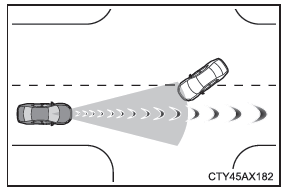
- When driving on a road where the relative position with the vehicle ahead may change in an adjacent lane, such as on a winding road
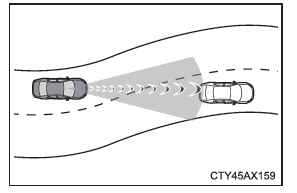
- When rapidly approaching a vehicle ahead of you
- If the front of the vehicle pitches up or down, such as when the road surface is uneven or undulating
- When approaching an obstacle at the side of the road, such as a guardrail, a signpost, a tree or a wall
- When a vehicle, pedestrian or obstacle is at the side of the road at the entrance to a curve
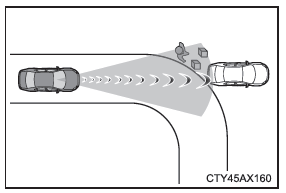
- When passing through a narrow area surrounded by structures, such as a tunnel or a steel bridge
- When there is a metal object on or at the side of the road (a manhole cover or other object, etc.), a step or a protrusion
- When a pedestrian approaching in the opposite direction comes very close to the vehicle
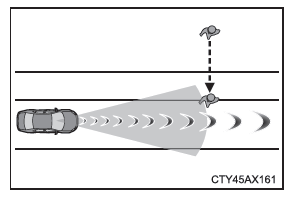
- When passing a location with a low structure over the road (low ceiling, road sign, etc.)
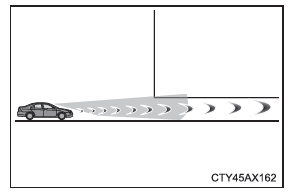
- When passing under an obstacle (billboard, etc.) at the top of an uphill road
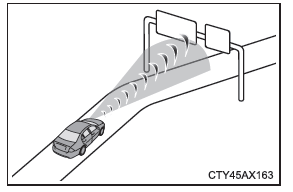
- When rapidly approaching an electronic toll gate or parking gate, or any barrier that opens and closes
- When using an automatic car wash
- When driving over or under an obstacle the vehicle may contact, such as tall grass, tree branches or a banner
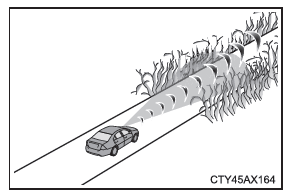
- When the vehicle is hit by water, snow or dust, etc., kicked up by a vehicle ahead
- When driving through a cloud of steam or smoke
- When the road or a wall creates patterns or has paint that may be mistaken for a vehicle or pedestrian*
- When driving near an obstacle that reflects radio waves, such as a large heavy goods vehicle or a crash barrier, for example
- When driving near a TV relay, radio station, power plant or any other source of strong radio waves or electrical interference
*: Depending on the region where the vehicle is sold, the pedestrian detection function may not be available.
■ Situations in which the system may not operate correctly
- In certain situations, such as those described below, a vehicle may not be detected by the radar sensor and camera sensor, which prevents the system from intervening correctly:
- If a vehicle travelling in the opposite direction approaches your vehicle
- If the vehicle ahead of yours is a motorcycle or a bicycle
- When you approach another vehicle from its side or front
- If the vehicle ahead has a small rear section, such as an unladen heavy goods vehicle, for example
- If the vehicle ahead has a low rear section, such as a flatbed truck, for example
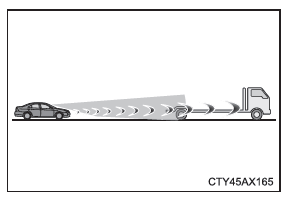
- If the vehicle ahead is carrying a load that overhangs its rear bumper
- If the vehicle ahead has a very high ground clearance
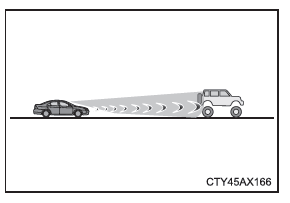
- If the vehicle ahead has an irregular shape, such as a tractor or a sidecar, for example
- If sunlight or other light is reflected directly off the vehicle ahead
- If a vehicle cuts in front of your vehicle or emerges from behind another vehicle
- If the vehicle ahead performs a sudden manoeuvre (in particular a swerve, or sudden acceleration or deceleration)
- When you cut in abruptly in front of the vehicle ahead
- When the vehicle ahead is not directly in front of your vehicle
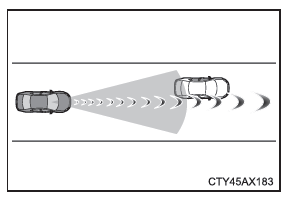
- When driving in bad weather, such as heavy rain, fog, snow or sandstorms
- When the vehicle is hit by water, snow or dust, etc., kicked up by a vehicle ahead
- When driving through a cloud of steam or smoke
- When driving in an area where the ambient brightness changes suddenly, such as when entering or leaving a tunnel, for example
- When very bright light, such as sunlight or the headlights of oncoming vehicles, shines directly onto the camera sensor
- When ambient brightness is low, such as at dawn or dusk, at night or in a tunnel, for example
- After the engine has been started, when the vehicle has not moved for a certain time
- When turning left/right or a few seconds after having done so
- When driving around a bend or for a few seconds after having done so
- If your vehicle skids
- If the front of the vehicle pitches up or dives
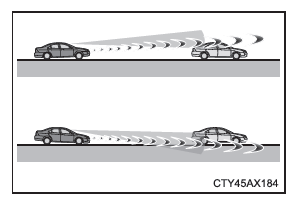
- If the wheel alignment is out of adjustment
- If a windscreen wiper blade masks the camera sensor
- The vehicle is zigzagging.
- You are using the vehicle at extremely high speeds.
- When driving uphill
- If the radar sensor or camera sensor is misaligned
- In certain situations, such as those described below, the braking force achieved may not be sufficient, which prevents the system from intervening as it should:
- If the brake components cannot operate at their full capacity, in particular when they are too cold or too hot, or wet
- If the vehicle is not properly maintained (excessively worn brakes or tyres, incorrect tyre inflation pressure, etc.)
- When driving on gravel or any other slippery road surface
- Certain pedestrians, such as those listed below, may not be detected by the radar sensor and camera sensor, which prevents the system from intervening correctly*:
- Pedestrians shorter than approximately 1 m (3.2 ft.) or taller than approximately 2 m (6.5 ft.)
- Pedestrians wearing very loose clothing (raincoat, long skirt, etc.) that makes their outline difficult to identify
- Pedestrians carrying large luggage or holding an umbrella, etc., that partially hides their body
- Pedestrians leaning forward or kneeling
- Pedestrians pushing a pram, wheelchair, bicycle or any other vehicle
- Pedestrians in groups close to one another
- Pedestrians dressed in white who appear extremely bright
- Pedestrians in darkness, at night or in a tunnel, for example
- Pedestrians whose clothing has the same colour or brightness as their surroundings
- Pedestrians standing near walls, fences, crash barriers or large obstacles
- Pedestrians standing on a metal object on the road (manhole cover or other, etc.)
- Pedestrians walking quickly
- Pedestrians whose speed of movement changes rapidly
- Pedestrians running out from behind a vehicle or large obstacle
- Pedestrians extremely close to the side of the vehicle (outside mirror, etc.)
*: Depending on the region where the vehicle is sold, the pedestrian detection function may not be available.
■ If the PCS warning light flashes or lights up and a warning message appears on the multi-function display The pre-collision safety system may be temporarily unavailable or faulty.
- In the following situations, the warning light goes out, the message disappears and the system becomes operational again once normal operating conditions are restored:
- When the temperature of the radar sensor or camera sensor, or of the area surrounding either of them, is high, for example in strong sunlight
- When the temperature of the radar sensor or camera sensor, or of the area surrounding either of them, is low, for example in extremely cold weather
- When the radar sensor or the grille emblem is dirty or covered with snow, etc.
- When the windscreen in front of the camera sensor is fogged up or covered with condensation or frost
- If the camera sensor is blocked, for example when the bonnet is open or an adhesive label is attached to the windscreen near the camera sensor
- If the PCS warning light continues to flash or remains on, or if the warning message does not go off, the system may be malfunctioning. Have the vehicle inspected as soon as possible by a Toyota dealer, a Toyota-authorized repairer, or any reliable repairer.
■ If the VSC system is turned off
- Turning off the VSC system also turns off the Pre-collision Emergency Brake Assist and Pre-collision Braking.
- The PCS warning light comes on and the message "VSC OFF. PCS BRAKING NOT AVAILABLE." (monochrome display)/"VSC OFF.
PCS Braking Not Available." (color display) is shown on the multi-information display.