City Safety Sub-Functions
City Safety1 can help prevent a collision or lower the vehicle's speed at the point of impact. The function consists of several subfunctions.
Ability to reduce speed
If the difference in speed between your vehicle and the obstacle is greater than the speeds specified below, the City Safety auto-brake function cannot prevent a collision, but it can help mitigate its effects.
Vehicles
City Safety can help prevent a collision with a vehicle ahead by reducing your vehicle's speed by up to 60 km/h.
Cyclists
City Safety can help prevent a collision with a cyclist ahead by reducing your vehicle's speed by up to 50 km/h.
Pedestrians
City Safety can help prevent a collision with a pedestrian ahead by reducing your vehicle's speed by up to 45 km/h.
Large animals
If there is a risk of colliding with a large animal, City Safety can help reduce your vehicle's speed by up to 15 km/h.
The braking function for large animals is primarily intended to mitigate the force of a collision at higher speeds. Braking is most effective at speeds above 70 km/h and less effective at lower speeds.
City Safety Steps
City Safety performs three steps in the following order:
- Collision Warning
- Brake Assist
- Automatic Braking
1 - Collision warning
The driver is first warned of the risk of an unavoidable collision.
In vehicles equipped with a head-up display*, a flashing warning symbol will be displayed on the windshield.
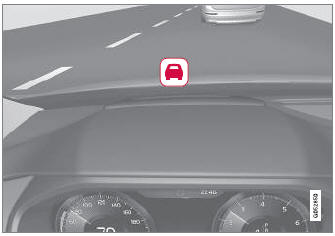
Collision warning symbol on the windshield
City Safety can detect pedestrians, cyclists or vehicles that are stationary, are moving in the same direction as your vehicle and are ahead of your vehicle. City Safety can also detect pedestrians, cyclists or large animals that are crossing the road in front of your vehicle.
If there is a risk of a collision with a pedestrian, large animal, cyclist or another vehicle, the driver will be alerted with light, sound and pulsations in the brake pedal. At lower speeds, during hard braking or if the accelerator pedal is pressed, the brake pedal pulsation warning will not be given. The intensity of the brake pedal pulsations varies according to the vehicle's speed.
2 - Brake assist
If the risk of a collision increases after the collision warning, brake support will be activated.
If the system determines that the pressure the driver is exerting on the brake pedal is insufficient to prevent the collision, brake support will increase pressure.
3 - Automatic braking
The automatic braking function is activated at the last moment.
If the driver has not taken evasive action by this stage and a collision is imminent, the automatic braking function will be triggered. This occurs whether or not the driver is pressing the brake pedal. Full braking force will be applied to reduce the speed at impact or reduced braking effect will be applied if this is sufficient to avoid the collision.
The seat belt tensioner may be activated when the automatic braking function is triggered.
In certain situations, auto-braking may begin with a limited braking force before applying full braking force.
If City Safety has prevented a collision, the vehicle will be kept at a standstill until the driver takes action. If the vehicle has slowed to avoid colliding with a slower-moving vehicle ahead, your speed will be reduced to that vehicle's speed.
Auto-braking can always be cancelled if the driver presses hard on the accelerator pedal.
When City Safety applies the brakes, a text message will appear in the instrument panel to notify the driver that the function is/was activated.
1 This function is not available in all markets.
* Option/accessory.
Test yourself
A quick Volvo XC90 quiz: every answer comes with an explanation and a link to the manual page.