Using Park Assist Pilot
(Option/accessory.)
Park Assist Pilot (PAP1) helps the driver park using three different steps. The function can also help the driver pull out of a parking space.
The function measures the space and steers the vehicle. The driver's role is to:
- Keep a careful watch on the area around the vehicle
- Follow the instructions on the center display
- change gears (reverse/forward) – an audible signal indicates when the driver needs to change gears
- Regulate and maintain a safe speed
- Apply the brakes and stop the vehicle.
Information about the actions required by the driver are provided in the center display using symbols, graphics and/or text.
The function can be activated if the following criteria have been met after the engine is started:
- Trailer not attached to the vehicle
- The speed of your vehicle is below 30 km/h.
Parking with Park Assist Pilot
The function helps park the vehicle using the following steps:
- The system searches for and measures potential parking spaces.
- The vehicle is steered while it is assisted into the parking space.
- The vehicle is positioned in the parking space (the driver may be prompted to shift gears and apply the brakes).
Searching for and measuring potential parking spaces
 The function can be activated in the center display's Function view.
It can also be accessed from the camera views.
- Green button indicator - the function is activated.
- Gray button indicator - the function is deactivated.
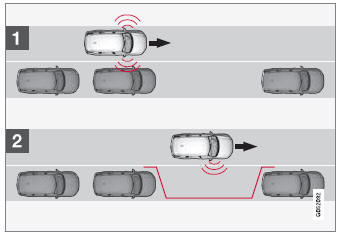
Parallel parking space search overview.
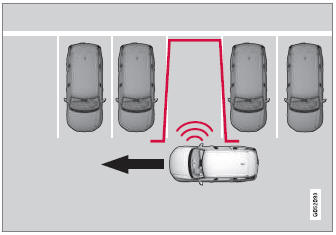
Perpendicular parking space search.
The vehicle's speed may not exceed 30 km/h when parallel parking or 20 km/h when perpendicular parking.
- Tap Park in Function view or in Camera view.
- The function will search for a potential parking space and measure it to determine if it is big enough.
- Be prepared to stop the vehicle when a graphic and message in the center display indicate that a suitable parking space has been found.
- A pop-up window appears.
- Select Parallel Park or Perpendicular Park and engage reverse gear.
Returning to the parking space
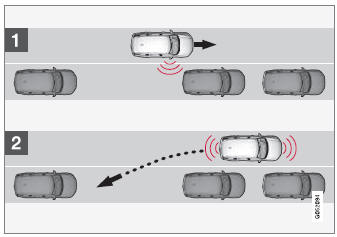
Returning to the parallel parking space overview.
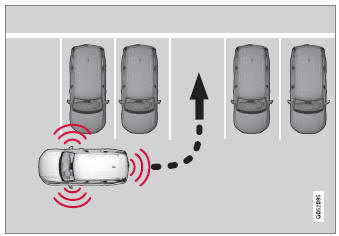
Assistance for perpendicular parking.
- Make sure the path behind your vehicle is clear and engage reverse gear.
- Back up slowly and carefully without touching the steering wheel and do not exceed a speed of 7 km/h.
- Be prepared to stop the vehicle when instructed to do so by a graphic and message in the center display.
- Keep your hands away from the steering wheel when the function is activated.
- Make sure that the steering wheel is not hindered in any way and can rotate freely.
- To achieve the best results – wait until the steering wheel is finished turning before beginning to drive forward/in reverse.
Positioning the vehicle in the parking space
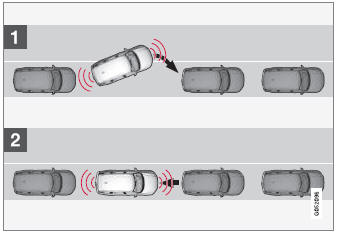
Parallel parking positioning overview.
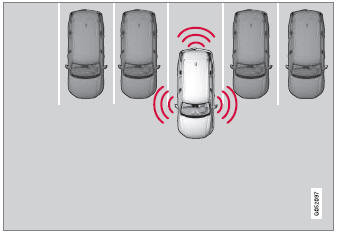
Perpendicular parking positioning overview.
- Move the gear selector to the gear instructed by the system. Wait until the steering wheel turns and then drive slowly forward.
- Be prepared to stop the vehicle when instructed to do so by a graphic and message in the center display.
- Engage reverse gear and slowly reverse.
- Be prepared to apply the brakes when instructed to do so by a graphic and message in the center display.
The function will switch off automatically and a graphic and message will appear to indicate that parking has been completed. Adjustments can always be made by the driver afterward. Only the driver can determine when the vehicle is parked correctly.
Automatic Braking During the Parking Sequence
If, while parking, the parking sensors detect a vehicle or pedestrian in the vehicle's intended direction of travel behind or in front of the vehicle, the auto-brake function will bring the vehicle to a standstill.
A pop-up message will then appear in the instrument panel and the driver can tap Cancel to cancel the parking sequence or Resume to continue the parking sequence.
After selecting Resume:
- Check that the area around the vehicle is free of obstructions and follow the instructions on the center display, such as:
To continue – Gently accelerate away from object.
1 Park Assist Pilot
Test yourself
A quick Volvo XC90 quiz: every answer comes with an explanation and a link to the manual page.