Park Assist sensor
If the vehicle is equipped with Park Assist (PAS1), distances will be shown in the Park Assist Camera's (PAC2) 360° view with colored fields for each sensor that has detected an obstacle.
Front and rear sensors
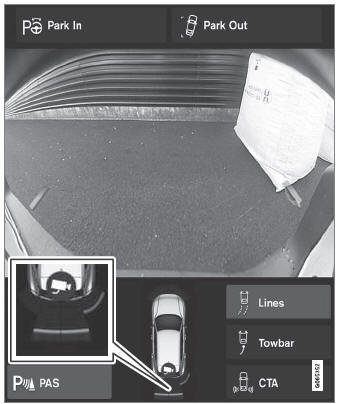
The screen can display colored sensor fields on the vehicle symbol.
The front and rear fields change colors (from YELLOW to ORANGE to RED) as the vehicle moves closer to an obstacle.
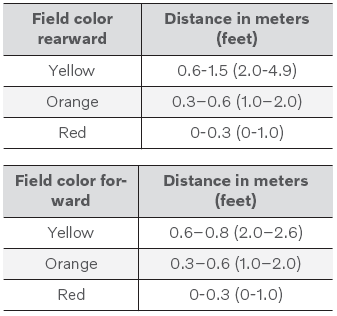
When the sensor field color is red, the audible pulsing sounds will change to a continuous tone.
Side sensor fields
Warning signals vary depending on the intended direction of vehicle travel. Depending on the steering wheel position, warnings may be given for obstacles diagonally in front of or behind the vehicle, not only directly behind the vehicle.
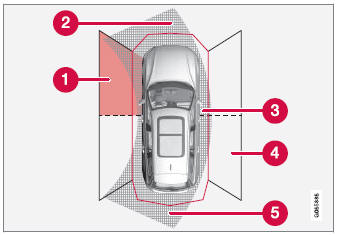
Park Assist sensor sectors where obstacles can be detected.
 Left-side front sensor field
 Obstacle sector in the vehicle's intended direction of travel forward – varies according to steering wheel position
 Sector with RED field color and rapidly pulsing tone
 Right-side rear sensor field
 Obstacle sector in the vehicle's intended direction of travel rearward – varies according to steering wheel position.
The color of the side field changes as the vehicle moves closer to the object – from YELLOW to RED.
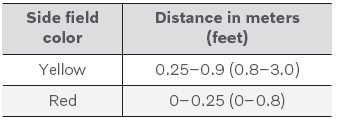
When the sensor field is red, the audible pulsing signal becomes faster.
1 Park Assist system
2 Park Assist Camera
Test yourself
A quick Volvo XC90 quiz: every answer comes with an explanation and a link to the manual page.