Driver Support
Selecting and Activating Cruise Control
In this manual: Driver Support
2steps
~12min
2/5difficulty
Done 0 of 2
The Cruise Control (CC1) function must be selected and activated in order to regulate speed.
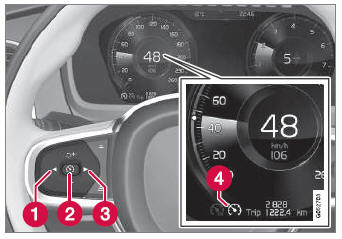
In order to start Cruise Control from standby mode, the vehicle's current speed must be 30 km/h or higher.
- Press the
 (1) or
 (3) button on the steering wheel keypad and scroll to the cruise control symbol
 (4).
- Grey symbol – cruise control is in standby mode.
- When cruise control is selected, press
 (2) on the steering wheel keypad to activate.
- White symbol – cruise control starts and the current speed is stored as the maximum speed. The lowest speed that can be set is 30 km/h.
Resuming Cruise Control to the Last Stored Speed
- When cruise control is selected, press
 on the steering wheel keypad to activate.
- The Cruise Control marking in the instrument panel will change from GRAY to WHITE and the vehicle will then return to the most recently set speed.
1 Cruise Control
Test yourself
A quick Volvo XC90 quiz: every answer comes with an explanation and a link to the manual page.
Was this page helpful?