BMW Display Key. Display. Operating principle. Display Key battery. Malfunction
This section explains the BMW Display Key display in detail. Menu navigation, page switching and battery status are covered, as well as possible malfunctions and resetting the device. This allows drivers of the BMW 5 Series G30 to monitor security, climate and vehicle data at all times, directly on the key.
Display
General
The display is divided into the upper status bar, the information area and the lower status bar.
Upper status bar
The upper status bar shows the following information:
 Vehicle locked.
 Vehicle not locked.
 State of charge of the Display Key battery.
Information area
Information can be retrieved and additional functions carried out in the information area.
If the information area contains more than one page, page indicators are shown below the information.
 The indicator for the current page is filled in.
Swipe left or right with your finger to switch between pages.
If further information is available on a page, tap the corresponding symbol.
To return to the higher-level page: Tap the symbol below the display.
Lower status bar
The lower status bar shows whether the Display Key is within the reception range.
- "Connected": The Display Key is within the reception range.
- "Updated": The Display Key is outside the reception range. The time of the last data transmission from the vehicle is shown.
Switching on/off
To conserve the battery, the display indication automatically fades out after a short time.
To hide the display manually: press the button on the left side of the Display Key. Overview.
To show the display indication:
- Press the button on the left side of the Display Key.
- Swipe up from the bottom with your finger to release the screen lock.
To switch off the display and extend battery life:
- Press and hold the button on the left side of the Display Key for longer than 4 seconds.
- "OK"
To switch on the display: press the button on the left side of the Display Key.
Operating principle
Depending on the equipment, there are up to five main menus, from which the sub-menus are accessed.
| Main menu | Information/Function |
| "Info Security" |  Door status. |
Alarm system status.
After alarm activation: date, time and reason for the alarm activation.
 Window status.
Glass roof status.
Parking light status
Without auxiliary heating: operate parking ventilation.
Display Key battery
General
Observe the following notes:
- If the state of charge of the Display Key battery drops, the display switches off automatically. The battery must be charged before the display can be switched on again. The standard buttons remain functional until the battery is completely discharged.
- Charge the battery for at least three hours before using the Display Key for the first time or if the key has not been used for a long period.
- The display key can be used while charging. If the battery is completely discharged, it may take some time before the display key can be used again.
- Due to the large number of USB chargers available on the market, proper function cannot be guaranteed for every charger. The charging time depends on the charger used.
- The charger and the display key may heat up during charging. At higher temperatures, the display key may reduce the charging current. In rare cases, charging is temporarily interrupted.
Charging
Connect the display key to a USB port using the micro USB charging connector.
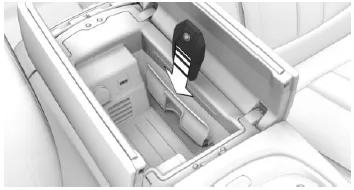
- Vehicles with manual transmission: Place the display key in the recess of the wireless charging tray below the center armrest.
Make sure that the display is on the side of the retaining clip and that the lock button faces up.
Close center armrest.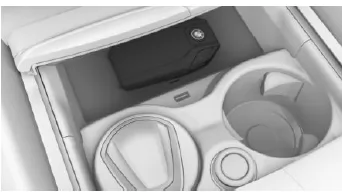
- Vehicles with Steptronic transmission: Place the display key centrally in the wireless charging tray in front of the cup holders.
Make sure that the display faces up.
Close storage compartment cover.Malfunction
General
A Check Control message is displayed.
Recognition of the BMW display key by the vehicle may be disrupted, among other things, by the following circumstances:
- The battery of the display key is discharged.
Do not carry the display key together with metal objects or electronic devices.
In the event of a malfunction, the vehicle can be unlocked and locked from outside with the mechanical key.
Switching on ready-to-drive mode via emergency recognition of the BMW display key
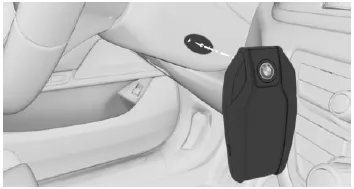
- Hold the back of the display key against the marking on the steering column.
- Switch on driving readiness within 10 seconds.
Resetting the BMW display key
If the charged display key can no longer be switched on or the display no longer responds to inputs, the display key can be reset.
Press and hold the button on the left side of the display key for at least 20 seconds until the display shows a message.
The operating concept of the BMW display key is designed for maximum ease of use. Clearly structured menus and intuitive navigation provide quick access to important vehicle functions and information.
The combination of touch operation and conventional buttons makes handling particularly flexible. In terms of key technology, the BMW 5 Series G30/G31 thus lives up to its standing as a modern premium vehicle.
Thanks to the charging options, the display key is always ready for use, another contribution to a well-thought-out overall concept.
Test yourself
A quick BMW 5 quiz: every answer comes with an explanation and a link to the manual page.