Remote Control
This section on the BMW 5 Series G30 remote control covers everything from comfort closing to battery replacement. Safety functions, emergency unlocking and protective mechanisms are also explained. Ideal for drivers who want to use all functions of their key efficiently and safely.
General
The scope of delivery includes two remote controls with integrated key.
Each remote control contains a replaceable battery. Replacing the battery.
Depending on equipment and country version, the functions of the buttons can be configured. Settings.
Personal settings for each remote control are stored in the vehicle. Driver profiles.
Information on service requirements is stored in the remote controls. Service data in the remote control.
Comfort Closing
Safety information
WARNING When closing comfortably, body parts can become trapped. There is a risk of injury.
When using comfort closing, make sure the range of movement is clear.
Locking
 After locking, press and hold the button on the remote control.
The windows and the glass roof close for as long as the button on the remote control is pressed.
The exterior mirrors are folded in.
The exterior mirrors do not fold in when the hazard warning flashers are switched on.
Malfunction
General
A Check Control message is displayed.
Recognition of the remote control by the vehicle may be disrupted by the following, among other things:
- The battery of the remote control is discharged.
Replace the battery, see page 56.
Do not carry the remote control together with metal objects.
Do not carry the remote control together with electronic devices.
In the event of a malfunction, the vehicle can be unlocked and locked from outside with the integrated key, see page 62.
Safety notes
WARNING Persons or animals inside the vehicle can lock the doors from inside and shut themselves in. In this case, the vehicle cannot be opened from outside. There is a risk of injury. Take the remote control with you so the vehicle can be opened from outside.
WARNING On some country versions, unlocking from inside is only possible with special knowledge.
If people stay in the vehicle for a longer period and are exposed to extreme temperatures as a result, there is a risk of injury or even risk to life. Do not lock the vehicle from outside when people are inside it.
WARNING Unattended children or animals in the vehicle can set the vehicle in motion and endanger themselves or other road users, for example through the following actions:
- Pressing the Start/Stop button.
- Releasing the parking brake.
- Opening and closing the doors or windows.
- Engaging selector lever position N.
- Operating vehicle equipment.
There is a risk of accident or injury. Never leave children or animals unattended in the vehicle. When leaving the vehicle, take the remote control with you and lock the vehicle.
Unlocking
 Press the button on the remote control.
Depending on the settings, the following access points are unlocked:
- The driver's door and the fuel filler flap.
The following additional functions are also performed:
- The settings stored in the driver profile are applied.
- The interior light switches on unless it was switched off manually. To switch the interior light on and off manually, see page 147.
- The exterior lighting activated in the settings switches on.
- Exterior mirrors that fold in automatically are folded out. This function must be activated in the settings. Exterior mirrors folded in via Comfort Close must be folded out via Comfort Open.
- With anti-theft protection: the anti-theft protection is switched off.
- The alarm system is switched off.
After the driver's door is opened, the vehicle is ready to drive 18.
The lighting functions may depend on the ambient brightness.
Comfort Open
 After unlocking, press and hold the button on the remote control.
The windows and the glass roof open for as long as the button on the remote control is pressed.
Lock
- Close the driver's door.

- All doors and the tailgate are locked.
- The exterior mirrors are folded in.
If driving readiness is still switched on when locking, the vehicle sounds the horn twice.
In this case, switch off driving readiness using the Start/Stop button.
Switching on interior lighting and exterior lighting
 Press the button on the remote control while the vehicle is locked.
- The interior light switches on unless it was switched off manually. To switch the interior light on and off manually, see page 147.
- The exterior lighting activated in the settings switches on.
The lighting functions may depend on the ambient brightness.
If the button is pressed again within 10 seconds of locking, the interior motion sensor and tilt alarm sensor of the alarm system 75 are switched off.
After locking, wait 10 seconds before pressing the button again.
Tailgate
General
To avoid locking the remote control inside the vehicle, do not leave the remote control in the luggage compartment.
Depending on equipment and country variant, you can set whether the doors are also unlocked. Make the settings.
Safety notes
WARNING Body parts can be trapped when operating the tailgate. There is a risk of injury. When opening and closing, make sure the movement range of the tailgate is clear. NOTE The tailgate swings up and back when opening. There is a risk of property damage. When opening and closing, make sure the movement range of the tailgate is clear.
Open
 Press and hold the button on the remote control for approx. 1 second.
With automatic tailgate operation: Close
 Press and hold the button on the remote control.
Releasing the button stops the movement.
If the doors were not unlocked, the tailgate locks again as soon as it is closed.
Switch on follow-me-home lighting
 Press the button on the remote control.
Set the duration.
Replacing the battery
- Remove the integrated key from the remote control, see page 62.
- Place the integrated key below the battery compartment cover, arrow 1, and use a levering motion of the integrated key to lift the cover, arrow 2.
- Press the battery in the direction of the arrow with a pointed object and lift it out.
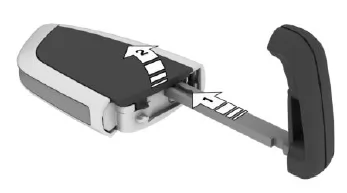
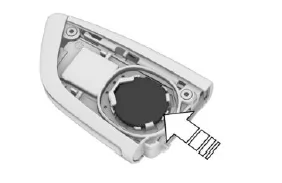
- Insert a CR 2032 battery with the positive side facing up.
- Press the cover closed.
 Have old batteries disposed of by a manufacturer service partner, another qualified service partner or a specialist workshop, or take them to a collection point.
Additional remote controls
Additional remote controls are available from a manufacturer service partner, another qualified service partner or a specialist workshop.
Lost remote controls
A lost remote control can be blocked and replaced by a manufacturer service partner, another qualified service partner or a specialist workshop.
Switching on driving readiness via emergency detection of the remote control
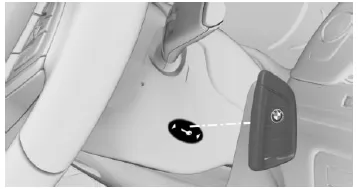
- Hold the back of the remote control against the marking on the steering column.
- Switch on driving readiness within 10 seconds.
If the remote control is not detected, change the position of the remote control slightly and repeat the procedure.
The remote control of the BMW 5 G30/G31 stands out for its versatility and well-thought-out security functions. It enables not only convenient opening and locking, but also individual adaptation to driver preferences.
Particularly noteworthy are the comfort functions, such as automatic folding in of the exterior mirrors or targeted switching on of the lighting. These details contribute considerably to the everyday practicality and safety of the BMW 5 G30/G31.
In this way, every interaction with the vehicle becomes an expression of modern technology and high ergonomics.
Test yourself
A quick BMW 5 quiz: every answer comes with an explanation and a link to the manual page.