BMW Display Key. General. Safety notes. Overview. Reception range
The BMW Display Key offers far more than conventional remote controls. This section explains how to control vehicle status, range and climate functions remotely. The reception range guide shows which functions are available depending on distance – ideal for technology-minded users of the BMW 5 7th Gen.
General
The BMW Display Key comes with a mechanical key. When using the Display Key, carry the mechanical key with you, e.g. in your wallet.
The Display Key supports all functions of the standard remote control.
In addition, the following functions are available:
- Retrieve the status of doors and windows.
- Retrieve the status of the anti-theft alarm system.
- With auxiliary heating: operate auxiliary heating.
Safety notes
WARNING Persons or animals inside the vehicle can lock the doors from the inside and trap themselves. The vehicle cannot then be opened from the outside. There is a risk of injury. Take the remote control with you so that the vehicle can be opened from the outside. WARNING On some country versions, unlocking from the inside is only possible with special knowledge.
If people stay in the vehicle for a longer period and are exposed to extreme temperatures as a result, there is a risk of injury or even risk to life. Do not lock the vehicle from outside when people are inside it.
WARNING Unattended children or animals in the vehicle can set the vehicle in motion and endanger themselves or other road users, e.g. by the following actions:
- Pressing the Start/Stop button.
- Releasing the parking brake.
- Opening and closing the doors or windows.
- Engaging selector lever position N.
- Operating vehicle equipment.
There is a risk of accident or injury.
Never leave children or animals unattended in the vehicle. When leaving the vehicle, take the remote control with you and lock the vehicle.
Overview
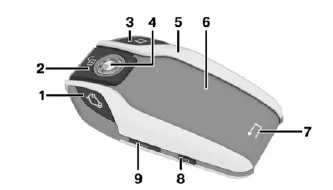
- Open trunk lid. With automatic tailgate operation: Open/close trunk lid.
- Unlocking
- Follow-me-home lighting
- Lock
- Park button
- Display
- Back
- Switch display on/off
- Micro-USB charging port
Reception range
The number of functions available on the Display Key depends on the distance to the vehicle.
- Within the close reception range, all Display Key functions are available.
- Within the extended reception range, status information can be retrieved.
With auxiliary heating: The auxiliary heating can be operated.
Without auxiliary heating: the parking ventilation can be operated. The symbol is shown on the display when one of the buttons is pressed outside the reception range.
The BMW Display Key in the 5 Series G30/G31 combines modern design with innovative functions. It offers far more than a conventional remote control, such as retrieving vehicle status or operating the auxiliary heating.
The integrated display keeps the driver informed of all relevant information at all times. The Display Key emphasizes the premium character of the BMW 5 Series G30/G31 and adds convenience and security to everyday driving.
FAQQuestion 1: Which functions are also available outside the reception range?
Answer: The last transmitted status information can be displayed, e.g. door or window status.
Question 2: Can I use the BMW Display Key without the display function?
Answer: Yes, the standard remote control functions remain available even when the display is deactivated.
Test yourself
A quick BMW 5 quiz: every answer comes with an explanation and a link to the manual page.