Central locking buttons
These instructions show how to use the central locking buttons on the BMW 5 Series G30 efficiently. Whether locking, unlocking or opening, every detail is explained with illustrations and safety information. Emergency unlocking after an accident, in which the vehicle unlocks automatically, is particularly helpful. An essential function for everyday use and emergencies.
General
In the event of an accident of sufficient severity, the vehicle unlocks automatically. The hazard warning lights and interior lighting switch on.
Overview
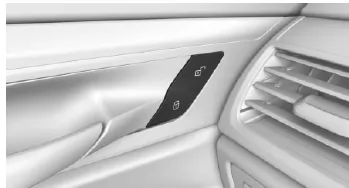
Central locking buttons.
Lock
 Press the button with the front doors closed.
- The fuel filler flap remains unlocked.
- When locking, the vehicle is not protected against theft.
Unlocking
 Press the button.
Open
 Press the button to unlock all doors together, then pull the door opener above the armrest.
- Pull the door opener of the door to be opened.
The central locking buttons in the BMW 5 Series (G30/G31) offer a convenient way to lock or unlock the vehicle securely. Thanks to their easily reached position, all doors can be operated conveniently without taking your eyes off the road.
The automatic unlocking in an emergency is particularly useful and further underlines the safety standard of the BMW 5 Series (G30/G31). In an emergency, this function ensures rapid assistance and maximum safety for all occupants.
This well-designed system contributes significantly to safe and comfortable driving and is a further example of the model's innovative strength.
Test yourself
A quick BMW 5 quiz: every answer comes with an explanation and a link to the manual page.