Operating Elements
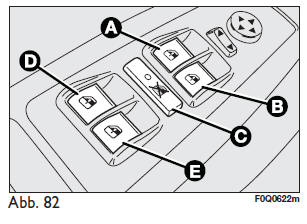
Driver's front door, Fig. 82
On the cover of the driver's door panel are the buttons which, with the ignition key at MAR, perform the following functions:
- open/close the left front window; "continuous, automatic" movement while the window is opening/closing;
- open/close the right front window; "continuous, automatic" movement while the window is opening/closing;
- enable/disable the rear door window regulators;
- open/close the left rear window (where fitted); "continuous, automatic" operation while the window is opening and closing;
- open/close the right rear window (where fitted); "continuous, automatic" operation while the window is opening and closing;
Press button A or B to open/close the required window. A short press on either button causes the window to move "in jerks", while a longer press produces "continuous, automatic" movement, for both opening and closing. The window stops in the required position when button A or B is pressed again.
 Note
Improper use of the electric windows can cause injury.
Before and during operation, check that the window movement cannot injure the occupants, either directly or by catching or striking objects. When leaving the vehicle, always remove the ignition key to prevent the window regulators, if operated accidentally, from injuring persons on board the vehicle.
Passenger's front door/ rear doorsThe control buttons A (Fig. 83) for the corresponding window are on the trim of the front passenger's door panel and, on some versions, on the rear doors.
Test yourself
A quick Fiat Bravo quiz: every answer comes with an explanation and a link to the manual page.