Exterior lights
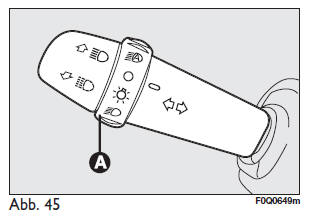
The left lever, fig. 45, is used to operate the exterior lights.
The exterior lights can only be switched on with the ignition key in the MAR position.
Lights offRing to position O.
Parking lightsTurn the ring to position turn.
The warning light on the instrument panel comes on. .
Dipped beam
Turn the ring to position turn.
The warning light on the instrument panel comes on. .
High beam
With the ring in position
push the lever towards the dashboard (locking position).
The warning light on the instrument panel comes on. .
To switch off high beam, pull the lever towards the steering wheel (dipped beam switches back on).
Parking and side lights
The parking lights can only be switched on with the ignition key in STOP or removed, by turning the ring on the left lever from position O to the positions or
 switched on.
The warning light on the instrument panel comes on: . Operating
the turn indicator lever allows the side (right or left) of the lights to be selected.
Pull the lever towards the steering wheel (non-locking position), regardless of the position of the ring.
The warning light on the instrument panel comes on. .
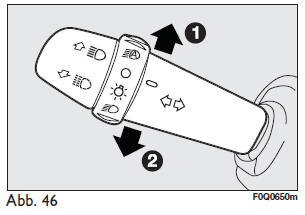
Turn indicators fig. 46
Move the lever to the (locking) position:
- Up (position 1): the right turn indicator flashes
- Down (position 2): the left turn indicator flashes; the warning light on the instrument panel flashes.
 Or
 .
The turn indicator cancels automatically when the steering wheel is turned back to the straight-ahead position.
"Lane change" functionTo signal a lane change, move the left lever to the non-locking position for less than half a second. The turn indicator on the selected side is activated for 3 flashes, then switches off automatically.
"Cornering lights"
With the dipped beam on and speed below 40 km/h, a light built into the fog light lights up in the dark when the steering wheel is turned sharply or the indicator is switched on, illuminating the area in the direction of turn.
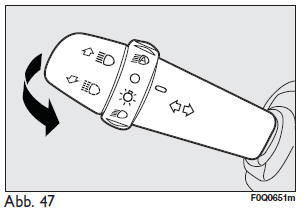
"Follow me home" device fig. 47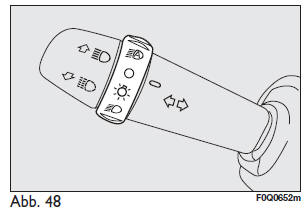
With the ignition key in STOP or removed, pull the lever towards the steering wheel within 2 minutes of switching off the engine.
Each operation of the lever extends the lighting time by 30 seconds, up to a maximum of 210 seconds; after that it switches off automatically.
Each time the lever is operated, the warning light on the
instrument panel comes on, and a message appears on the display (see the chapter "Warning lights and indicators").
Hold the lever pulled towards the steering wheel for more than 2 seconds.
Automatic light activation sensor (light sensor) fig. 48 (where fitted)This sensor detects the brightness of the exterior light based on the light sensitivity setting: the higher the sensitivity, the lower the exterior light level required for the headlights to switch on. The light sensor sensitivity can be adjusted in the "Setup" menu of the instrument panel.
ActivationTurn the ring to AUTO:
the parking and dipped beam lights switch on automatically based on the brightness outside the vehicle.
When the sensor is activated, only the headlight flasher works.
Switching offAfter the sensor issues the switch-off command, the high beam switches off and the parking lights switch off after approx. 10 seconds.
The sensor cannot detect the presence of fog. In this case, the exterior lights must be switched on manually.
Test yourself
A quick Fiat Bravo quiz: every answer comes with an explanation and a link to the manual page.