Radio Data System (RDS)
The audio system allows you to use a number of functions provided by the Radio Data System (RDS).
When traveling in different regions, you can listen to a specific FM station's broadcasts even when the broadcast frequency changes.
RDS functions are automatically activated when the radio is turned on.
When tuned to an RDS station, the station name appears on the display instead of the station's operating frequency. If the station broadcasts on several frequencies, the audio system automatically tunes to the frequency with the strongest signal. Therefore, while driving, there is no need to manually retune the radio to another frequency within the same RDS network.
The RDS system can be turned on or off. The RDS system also allows you to select stations broadcasting programs of a certain type. To activate the RDS functions and select the program type, turn on the audio system by pressing the power switch and hold it for at least 2 seconds. An audible signal will sound. To select a function, press any of the six preset buttons (1 to 6). The preset buttons have the following functions. Pressing a preset button turns the function on or off (in clock mode, it switches between 24-hour and 12-hour display modes).
Preset button 1:
Turning the AF function on and off
Turning the alternative frequency search function on or off
Preset button 2:
Turning the REG function on and off
Turning the local station tuning function on or off
Preset button 3:
Turning the PS DISP function on and off
Turning the station name display function on or off
Preset button 4:
AUTO TP function
Turning the automatic tuning to stations broadcasting traffic messages function on or off
Preset button 5: Turning the NEWS function on and off
Turning the tuning to stations broadcasting news function on or off
Preset button 6:
CLOCK – switching between 24-hour and 12-hour time format
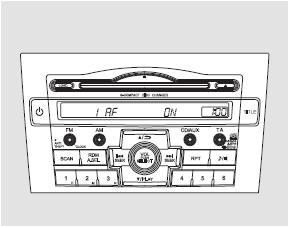
To activate the RDS functions, select 1 AF ON by pressing preset button 1. To deactivate the RDS functions, select 1 AF OFF. To store the selected setting in the system, press the power switch
AF (Alternative Frequency search function) – this function automatically retunes the radio to alternative frequencies of the same station within the RDS network.
REG (Regional function) – this function allows tuning to local stations without changing the tuning frequency, even when the signal is weak.
PS DISP (Program Service display function) – this function displays the name of the station being listened to.
AUTO TP (Traffic Program function) – this function allows the radio to automatically tune to a station broadcasting traffic messages.
NEWS (News Program function) – this function automatically tunes the radio to a station broadcasting news programs.
CLOCK – this function switches between 24-hour and 12-hour time display formats.
If the RDS station signal becomes too weak for the radio to receive, the system retains the last tuned frequency, which is shown on the display instead of the station name.
In some countries, not all stations support RDS functions, and you may not be able to fully use all RDS system features.
Displaying the station name or program type
When tuned to an RDS station, the tuning frequency disappears from the display and is replaced by either the station name or the program type. For more detailed information on the PTY function, refer to page 251.
Traffic announcement (TA) standby mode
If the TA button is pressed and released, the system enters standby mode for traffic messages, and the TA indicator appears on the display.
When the automatic tuning mode for traffic message stations (AUTO TP ON) is selected, the TP indicator appears on the display. This indicates that the radio is ready to receive traffic messages from stations broadcasting this type of information.
Thanks to AUTO TP cross-referencing, traffic messages can be received while stations broadcasting other program types within the same RDS network are playing.
You can also listen to traffic information while playing a compact disc or operating another audio device. If the radio was tuned to a traffic message station before you started playing a compact disc or connected an external audio device, pressing the TA button puts the system into standby mode for traffic messages, indicated by the lit TA indicator. As soon as a traffic message begins, the audio system automatically pauses CD playback or the operation of the external device connected to the AUX jack.
The TA-INFO indicator appears on the display. When the traffic message ends, the system returns to CD playback or to the external audio device operation.
While listening to a traffic message, you can return to the audio source by pressing the TA button. Traffic announcement standby mode (TA) remains active.
You can adjust the traffic announcement volume by turning the VOL/SELECT knob. The volume level is stored in memory, and the next traffic announcement will be played at the selected volume level.
If you set the traffic announcement volume below the minimum level, the system will return to the default volume level (level 9) when the next traffic announcement is played. You can also adjust the volume level for PTY NEWS and PTY ALARM announcements.
If the vehicle battery is discharged or disconnected, the traffic announcement volume will also be set to the default level 9.
To turn off traffic announcement standby mode, press the TA button again.
The TA indicator will disappear from the display.
Pressing the TA button during a traffic announcement does not turn off traffic announcement standby mode. It only switches to the selected audio system mode.
If TA mode is active, the audio system will only tune to radio stations broadcasting traffic announcements during automatic tuning.
Program Type (PTY) Display
When the or
 button is pressed, the display shows the program type of the RDS station to which the radio is tuned. For example, if the station broadcasts a radio drama, "DRAMA" appears on the display.
If a science program is broadcast, "SCIENCE" appears on the display. The main program types are listed below.
NEWS: Short news: facts, events, commentary, reports, etc.
CURRENT AFFAIRS: Detailed news and current affairs.
INFORMATION: General information, useful tips.
SPORT: Sports programs.
EDUCATION: Educational programs.
DRAMA: Radio dramas and serials.
CULTURE: Programs about national or local culture.
SCIENCE: Programs about nature, science and technology.
VARIED SPEECH: Various entertainment programs.
POP MUSIC: Popular music.
ROCK MUSIC: Contemporary rock music.
EASY LISTENING: Light music.
LIGHT CLASSICS M: Easy-listening classical music.
SERIOUS CLASSICS: Traditional classical music.
OTHER MUSIC: Miscellaneous music: rhythm and blues, reggae, etc.
WEATHER/METR: Weather forecasts.
FINANCE: Economic information.
CHILDREN'S PROGS: Children's programs.
RELIGION: Programs about religion.
SOCIAL AFFAIRS: Programs about public life.
PHONE IN: Interactive programs with telephone calls from listeners.
TRAVEL/TOURING: Travel programs.
LEISURE/HOBBY: Programs about hobbies and leisure.
JAZZ MUSIC: Jazz.
COUNTRY MUSIC: Country music.
NATION MUSIC: National music.
OLDIES M: Retro music based on "Golden Age" programs.
FOLK MUSIC: Folk music.
DOCUMENTARY: Documentary programs.
When the button is pressed,orThe program types are shown on the display one after another in the order listed on the previous page.
After selecting the desired program type, the system starts searching for stations with the specified program type code. When the PTY search function is used for the first time, "NEWS" appears on the display because this setting is factory-preset.
After selecting the program type, press any search function button within 5 seconds or
 . The system starts searching for a radio station broadcasting the selected program type. If no suitable station is found, the system displays "NO PTY" after 5 seconds and exits search mode.
If the selected RDS station does not transmit program type information, "NO PTY" appears on the display. If the radio is tuned to a station that does not transmit RDS signals, "NO RDS" appears on the display for approximately 5 seconds.
If no action is taken within 5 seconds after selecting the program type using theorbutton, the program type search mode is cancelled.
Some radio stations may broadcast content that does not match the program type name.
Test yourself
A quick Honda CR-V quiz: every answer comes with an explanation and a link to the manual page.