Voice Recognition Phone System Operating Rules
The ignition switch must be in the ACCESSORY (I) or ON (II) position.
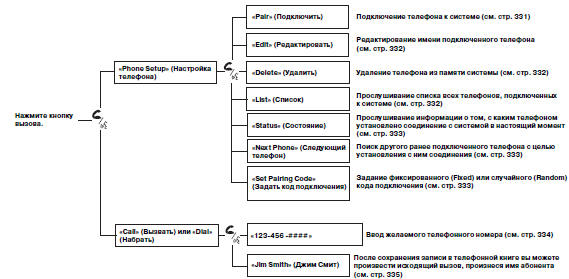
 Press and release the talk button before speaking a command.
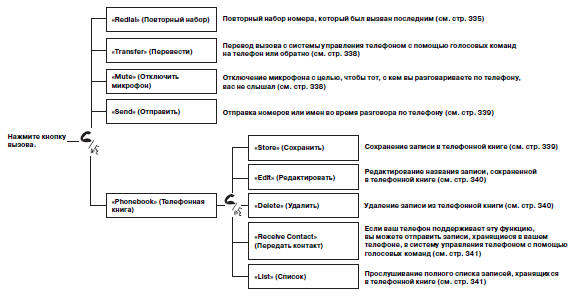
 Press and release the talk button before speaking a command.
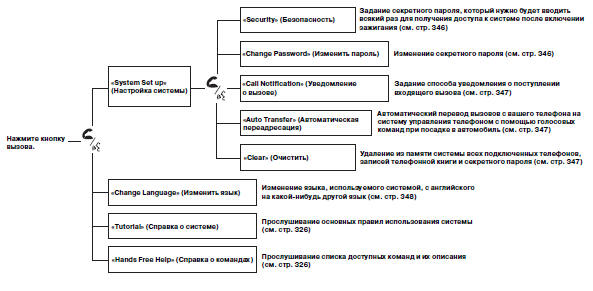
Press and release the talk button before speaking a command.
To use the Voice Recognition Phone System, you must connect a Bluetooth-compatible mobile phone to the system.
"Phone Setup"
This command group is available for connected mobile phones.
Phone Pairing Tips
The phone cannot be paired while the vehicle is in motion.
• To pair, the phone must be in discoverable or search mode. Refer to the phone's owner's manual.
• Up to six phones can be paired with the system.
• When a phone is connected to the Voice Recognition Phone System, the phone battery may discharge more quickly.
• If your phone is not made ready for pairing or is not detected within three minutes, the system will exit pairing mode.
Mobile Phone Pairing Procedure:
1. Press and release the talk button.
If you are pairing a mobile phone to the system for the first time, the system will provide pairing instructions. If you are pairing a mobile phone that has been paired before, say "Phone setup", then say "Pair".
2. Follow the Voice Recognition Phone System instructions and set your phone to discoverable or search mode. The system will provide a 4-digit pairing code and start searching for your phone.
3. When your phone detects the Bluetooth device, select the Voice Recognition Phone System (HFT) and enter the 4-digit code provided in the previous step.
4. Follow the Voice Recognition Phone System instructions and enter a name for the newly paired phone.
Changing the Name of a Paired Phone:
Press and release the talk button before speaking a command.
1. Say "Phone setup".
2. After the prompt, say "Edit".
3. If more than one phone is paired with the system, the system will ask which phone name you want to change.
Follow the Voice Recognition Phone System instructions and change the phone name.
Deleting a Paired Phone:
Press and release the talk button before speaking a command.
1. Say "Phone setup".
2. After the prompt, say "Delete".
3. The voice-activated phone control system will ask which phone you want to delete.
Follow the instructions of the voice-activated phone control system to continue the deletion procedure.
Listening to the names of all paired phones:
Press and release the talk button before speaking a command.
1. Say "Phone setup".
2. Say "List" after the prompt.
3. The voice-activated phone control system will announce the names of all paired phones.
Listening to information about which phone is currently connected to the system:
Press and release the talk button before speaking a command.
1. Say "Phone setup".
2. Say "Status" after the prompt.
3. The voice-activated phone control system will announce which phone is currently connected.
Switching the connected phone:
Press and release the talk button before speaking a command.
1. Say "Phone setup".
2. Say "Next phone" after the prompt.
3. The system will disconnect from the phone and start searching for another paired phone.
4. Once another phone is found, the system will connect to it. The system will then inform you which phone is now connected.
If no other phone is found or connected, the system will inform you that the original phone is connected again.
Changing the pairing code:
Press and release the talk button before speaking a command.
1. Say "Phone setup".
2. Say "Set pairing code" after the prompt.
3. If you want the code to be different each time a phone is paired, say "Random".
If you want to select your own 4-digit code to be used each time a phone is paired, say "Fixed" and follow the system instructions.
Test yourself
A quick Honda CR-V quiz: every answer comes with an explanation and a link to the manual page.