Outgoing calls
You can dial any number, including by saying the name stored in the phone book of the voice-activated phone control system. You can also redial the last number called.
Bluetooth is a wireless technology that connects your phone to the voice-activated phone control system. The phone control system uses Bluetooth Class 2, which provides a connection between the phone and the system at a range of up to 10 m.
You can remove the key from the ignition switch during a phone call and continue the conversation for up to 30 minutes. However, this may drain the vehicle battery.
Making an outgoing call by dialing the number (using the call button):
Press and release the talk button before speaking a command.
1. Say "Call" or "Dial".
2. Follow the instructions of the voice-activated phone control system and say the phone number you want to dial.
3. Follow the instructions of the voice-activated phone control system to confirm the dialed number. Then say "Call" or "Dial".
Once connected to the other party, you will hear their voice through the audio system speakers.
Making an outgoing call by dialing the number (using the navigation system display):
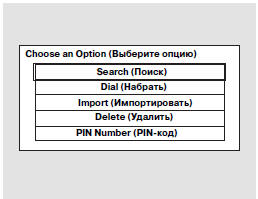
1. Press the INFO button and select "Mobile Phonebook".
2. Select the "Dial" option.
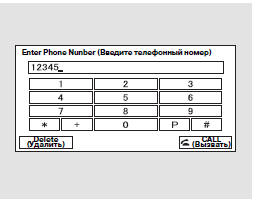
3. The navigation system display will show the screen illustrated above. Enter the phone number.
4. To start the outgoing call, select "CALL".
5. To end the call, select "Hang-up".
Making an outgoing call by saying the name of the party stored in the phone book:
Press and release the talk button before speaking a command.
1. Say "Call" or "Dial".
2. Follow the instructions of the voice-activated phone control system, then say the name (stored in the system phone book) of the party you want to call.
3. Follow the instructions of the voice-activated phone control system to confirm the name of the party you want to call.
Redialing the last number called by the voice-activated phone control system:
Press and release the call button. Then say the command "Redial".
Calling a number from the imported phone book:
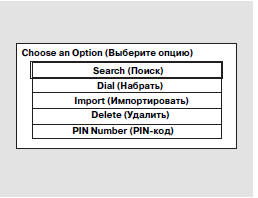
1. Press the INFO button and select "Mobile Phonebook".
2. Select "Search".
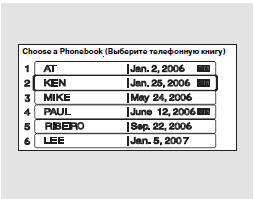
3. Select the phone book in which the required phone number is stored.
If the selected phone book is protected by a PIN code, you will need to enter the code to access it. For more information, refer to page 344.
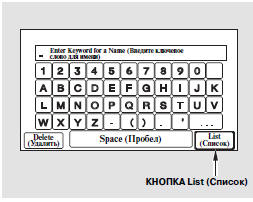
To search for a name in the phone book, enter the first letters of the first or last name.
To display all names, press the "List" soft key.

4. Select a name. The display will show all phone numbers stored for the selected name.
5. Select a phone number, and the voice-activated phone control system will dial it.
If you select "Store in HFT Unit", the phone number will be stored in the memory of the voice-activated phone control system, and you can call it by saying the name under which it was stored.
Making an outgoing call using a paired phone through the voice-activated phone control system
You can also start an outgoing call from the vehicle using a paired phone inside the vehicle. The call will automatically be transferred to the voice-activated phone control system.
NOTE: Never dial the number of the party you are calling on the phone keypad while the vehicle is moving.
Test yourself
A quick Honda CR-V quiz: every answer comes with an explanation and a link to the manual page.