Unlocking the Vehicle
Button type
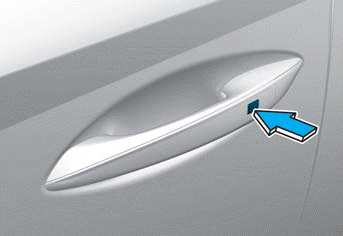
To unlock:
1. Carry the smart key with you.
2. Press the door handle button or press the lock button 2 on the Smart Key. The horn chirps and the hazard warning lights flash twice. Also, the side mirrors fold out if Unlock Door Welcome Light or Approach Driver is selected in the settings menu in the instrument cluster or infotainment system.
- If you unlock the doors using the passenger door handle, all doors are unlocked. If you unlock the doors using the driver's door handle, either only the driver's door or all doors are unlocked, depending on the setting for the Two-Press Unlock function. To change the driver's door unlock mode, refer to "Two-Press Unlock Function Setting."
Touch Type Sensor
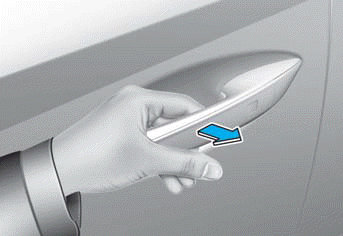
To unlock:
1. Carry the smart key with you.
2. Grasp the door handle to activate the touch sensor door unlock. The horn chirps and the hazard warning lights flash twice. Also, the side mirrors fold out if Unlock Door Welcome Light or Approach Driver is selected in the settings menu in the instrument cluster or infotainment system.
- If you unlock the doors using the passenger door handle, all doors are unlocked. If you unlock the doors using the driver's door handle, either only the driver's door or all doors are unlocked, depending on the setting for the Two-Press Unlock function. To change the driver's door unlock mode, refer to "Two-Press Unlock Function Setting."
Information
- The door handle button or touch sensor operates only when the Smart Key is within 28-40 in. (0.7-1 m) of the outside door handle.
- If you do not open the door within 30 seconds after unlocking, the doors return to the locked state.
Two-Press Unlock Function Setting
You can activate or deactivate the Two-Press Unlock function in the settings menu in the instrument cluster or infotainment system. Select:
- User Settings > Door > Two-Press Unlock (for cluster type)
- Settings > Vehicle > Door > Two-Press Unlock (for infotainment system type)
Information
- For more information on the cluster settings menu, refer to the "Cluster Display" section in Chapter 4.
- The infotainment system may change after a software update. For more information, refer to the infotainment system user's manual and quick reference guide.
Door Lock/Unlock Feature Setting
The doors may lock or unlock if the outside door handle sensor detects contact during vehicle washing or heavy rain.
To prevent the doors from locking or unlocking unintentionally:
Press and hold the lock button on the Smart Key and immediately press the unlock button together with the lock button for more than 4 seconds. The hazard warning lights flash four times. During this time, the doors will not lock or unlock even if the touch sensor on the outside door handle is touched.
To cancel the function, press the door lock or unlock button on the Smart Key.
Information
During washing or rain, the touch sensor may become insensitive to minimize unintentional operation. This is not a malfunction.
Test yourself
A quick Hyundai Tucson LM quiz: every answer comes with an explanation and a link to the manual page.